Ki Pro Rack v4.2 www.aja.com
63
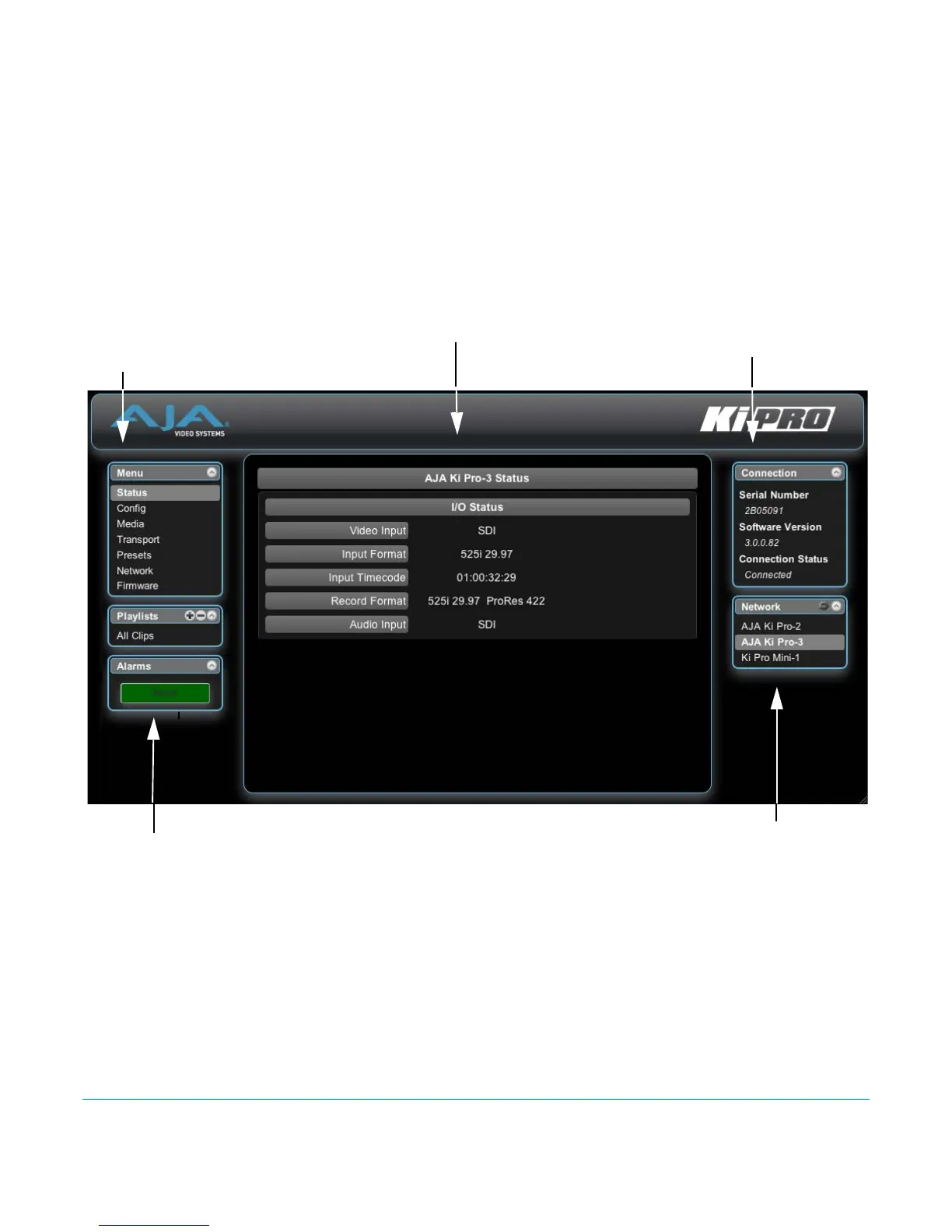
Ki Pro systems on the network and allows you to switch control between systems. See
“Controlling Multiple Ki Pros” on page 78 at the end of this chapter for additional
information on using multiple Ki Pros. In the middle of each screen are selections and
information pertaining to the subject matter of that screen (i.e., the “Media” screen has
choices about the media formats you are using).
Ki Pro Rack web screens closely mirror the parameter menus displayed on its front panel.
In each of the screens presented on the following pages, we’ll list the parameter menu
numbers that are related so you can read the full definitions. Additionally, the Status
screen lets you change parameter settings right on the screen if you right-click the
setting.
Figure 10. Ki Pro Rack Web Interface, Main Status Screen
Config Screen The Config screen is a general purpose screen used to configure Ki Pro Rack’s I/O choices,
conversion choices, and also set up Ki Pro Rack’s environment (name, clock settings,
display etc.)
S/N, software version
Menu of Ki Pro Rack Screens:
Click one to Display
that Screen
and connection status
Selections and Information
List of Ki Pros on the LAN:
Alarms appear here
Click arrow or gear icon
to show/hide.


 To Next Page