EasyManua.ls Logo

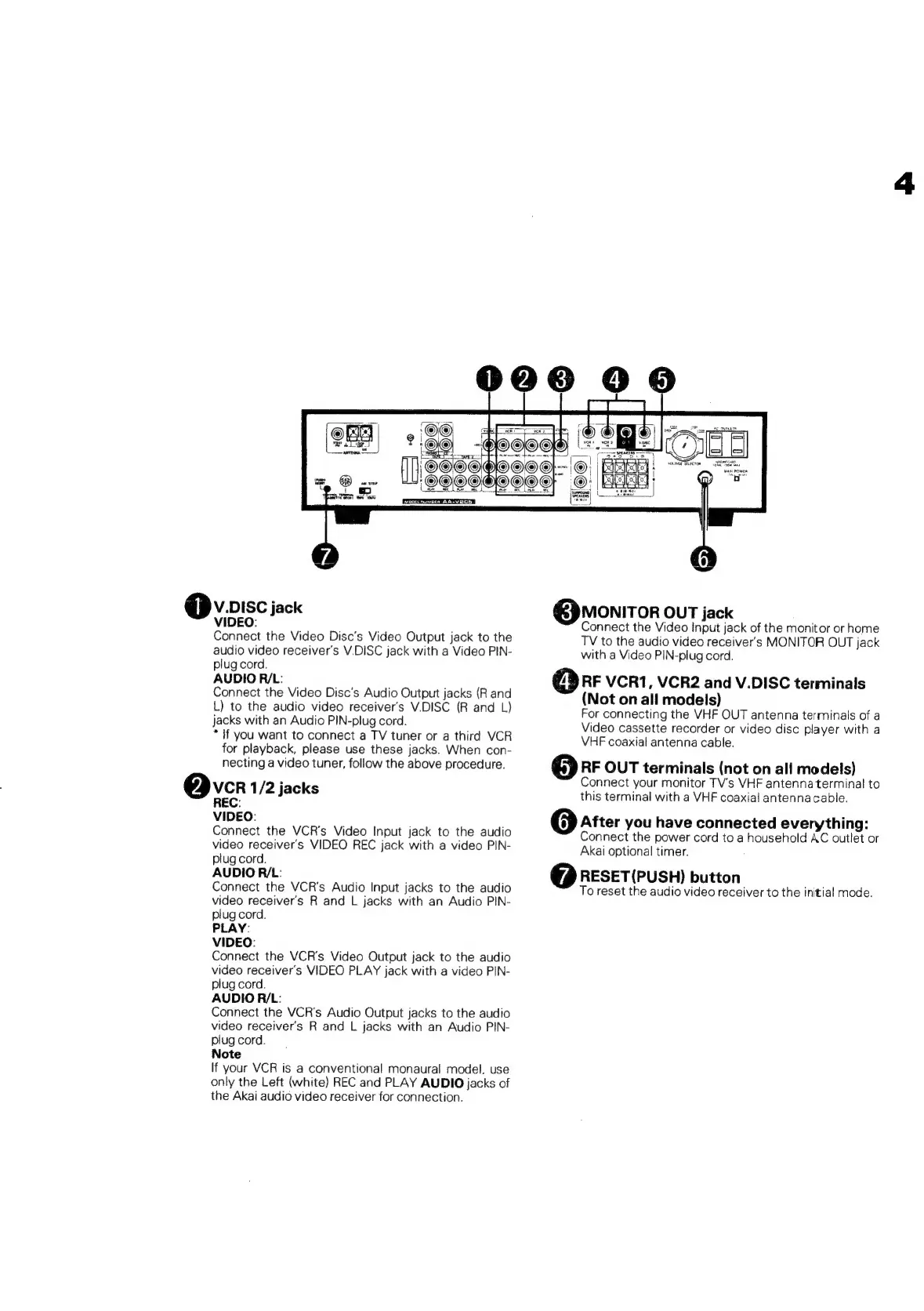
Akai AA-V205 - Rear Panel Connectivity Details; Video Disc and VCR Input;Output; Monitor and RF Signal Connections; Reset Button Functionality

Akai AA-V205
18 pages
Print Icon
To Next Page IconTo Next Page
To Previous Page IconTo Previous Page
Loading...
@v.pisc
jack
MONITOR
OUT
jack
VIDEO:
sone.
Connect
the
Video
Input
jack
of
the
monitor
or
home
Connect
the
Video
Disc’s
Video
Output
jack
to
the
TV
to
the
audio
video
receiver's
MONITOR
OUT
jack
audio
video
receiver's
V.DISC
jack
with
a
Video
PIN-
with
a
Video
PIN-plug
cord.
plug
cord.
AUDIO
RIL:
@
AF
vert,
VcR2
and
V.DISC
terminals
Connect
the
Video
Disc’s
Audio
Output
jacks
(R
and
L)
to
the
audio
video
receiver's
V.DISC
(R
and
L)
jacks
with
an
Audio
PIN-plug
cord.
*
If
you
want
to
connect
a
TV
tuner
or
a
third
VCR
for
playback,
please
use
these
jacks.
When
con-
(Not
on
all
models)
For
connecting
the
VHF
OUT
antenna
terminals
of
a
Video
cassette
recorder
or
video
disc
player
with
a
VHF
coaxial
antenna
cable.
necting
a
video
tuner,
follow
the
above
procedure.
RF
OUT
terminals
(not
on
all
models)
‘i
Connect
your
monitor
TV's
VHF
antennaterminal
to
Ovcr
1/2
jacks
this
terminal
with
a
VHF
coaxial
antenna
cable.
VIDEO:
@
After
you
have
connected
everything:
Connect
the
VCR's
Video
Input
jack
to
the
audio
Connect
the
power
cord
to
a
household
AC
outlet
or
video
receiver's
VIDEO
REC
jack
with
a
video
PIN-
Akai
optional
timer.
plug
cord.
AUDIOR/L:
.
.
@
RESET(PUSH)
button
Connect
the
VCR's
Audio
Input
jacks
to
the
audio
To
reset
the
audio
video
receiver
to
the
initial
mode.
video
receiver's
R
and
L
jacks
with
an
Audio
PIN-
plug
cord.
PLAY:
VIDEO:
Connect
the
VCR's
Video
Output
jack
to
the
audio
video
receiver's
VIDEO
PLAY
jack
with
a
video
PIN-
plug
cord.
AUDIO
R/L:
Connect
the
VCR's
Audio
Output
jacks
to
the
audio
video
receiver's
R
and
L
jacks
with
an
Audio
PIN-
plug
cord.
Note
If
your
VCR
is
a
conventional
monaural
model,
use
only
the
Left
(white)
REC
and
PLAY
AUDIO
jacks
of
the
Akai
audio
video
receiver
for
connection.

Related product manuals