E - 22
Programmable memory
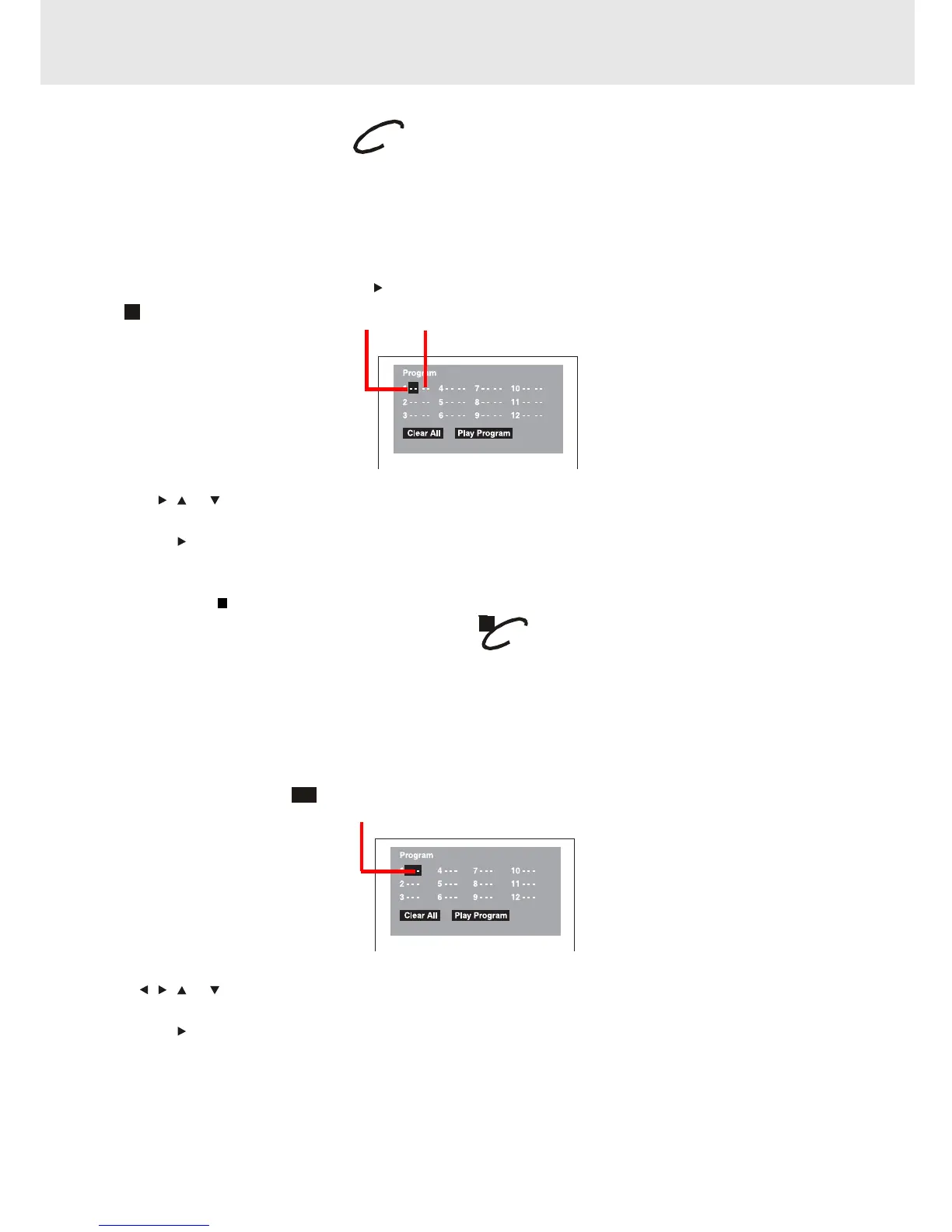
The two types of programmed playback provided by this Unit are title programmed playback and chapter
programmed playback.
Title / Chapter programmed playback
1.Press the MEMORY button while the disc is stopped.
2.Enter the title numbers in
- -
. Use or button to move the highlight to chapter and enter the chapter numbers
in
- -
.
3.Use , , or button to move to the other field.
4.Repeat steps 2 to 3.
5.Press the
PLAY button to start the programmed playback.
Notes :
• If you press the
STOP button, the programmed selections will be cleared.
• If you press the CLEAR button while you are entering a title or chapter, the currently entered numbers will be
erased and you can reset the numbers again.
3.Use , , or button to other field.
4.Repeat steps 2 to 3.
5.Press the
PLAY button to start the programmed playback.
Note :
• If you press the CLEAR button while you are entering a track, the currently entered numbers are erased and you
can reset the numbers again.
Track
CD / DVD programmable memory
Advanced
playback
Title Chapter
Programmable memory
Track programmed playback
1.Press the MEMORY button while the disc is stopped.
2.Enter the track numbers in
- - -
.
CD
DVD


 To Next Page