EasyManua.ls Logo

Akai EWI 1000 - Page 4

Akai EWI 1000
20 pages
Print Icon
To Next Page IconTo Next Page
To Previous Page IconTo Previous Page
Loading...
I.
CONTROLS
1-1.
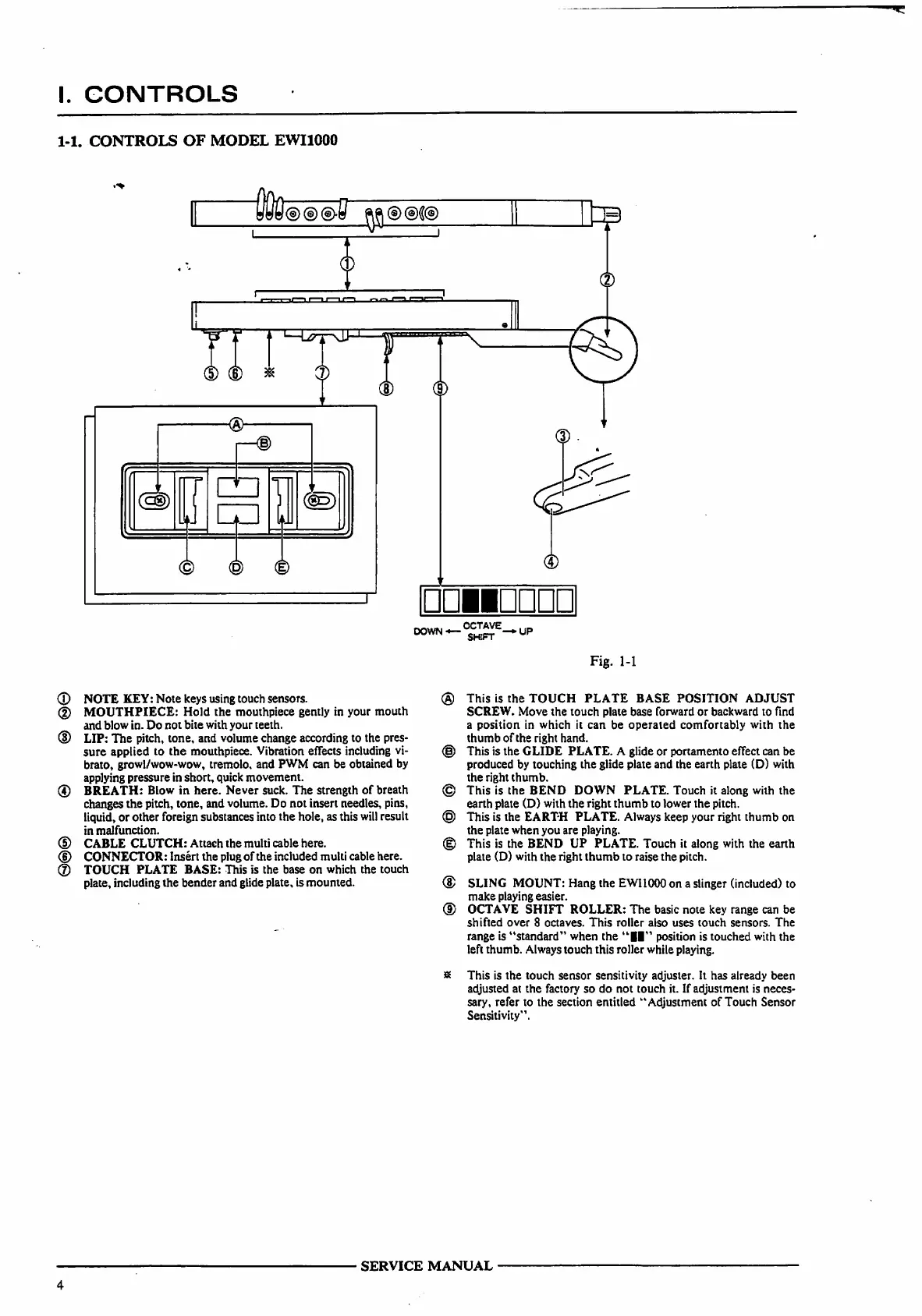
CONTROLS
OF
MODEL
EWI1000
DOWN—
<*™*-*UP
Fig.
1-1
(D
NOTE
KEY:
Note
keys
using
touch
sensors.
(2)
MOUTHPIECE:
Hold
the
mouthpiece
gently
in
your
mouth
and
blow
in.
Do
not
bite
with
your
teeth.
(D
LIP:
The
pitch,
tone,
and
volume
change
according
to
the
pres
sure
applied
to
the
mouthpiece.
Vibration
effects
including
vi
brato,
growl/wow-wow,
tremolo,
and
PWM
can
be
obtained
by
applying
pressure
in
short,
quick
movement.
(4)
BREATH:
Blow
in
here.
Never
suck.
The
strength
of
breath
changes
the
pitch,
tone,
and
volume.
Do
not
insert
needles,
pins,
liquid,
or
other
foreign
substances
into
the
hole,
as
this
will
result
in
malfunction.
(D
CABLE
CLUTCH:
Attach
the
multi cable
here.
<D
CONNECTOR:
Insert
the
plug
of
the
included
multi
cable
here.
®
TOUCH
PLATE
BASE:
This
is
the
base
on
which
the
touch
plate,
including the
bender
and
glide
plate,
is
mounted.
®
This
is
the
TOUCH
PLATE
BASE
POSITION
ADJUST
SCREW.
Move
the
touch
plate
base
forward
or
backward
to
find
a
position
in
which
it
can
be
operated
comfortably
with
the
thumb
of
the
right
hand.
(§)
This
is
the
GLIDE
PLATE.
A
glide
or
portamento
effect
can
be
produced
by
touching
the
glide
plate
and
the
earth
plate
(D)
with
the
right
thumb.
©
This
is
the
BEND
DOWN
PLATE.
Touch
it
along
with
the
earth
plate
(D)
with
the
right
thumb
to
lower
the
pitch.
©
This
is
the
EARTH
PLATE.
Always
keep
your
right
thumb
on
the
plate
when
you
are
playing.
(|)
This
is
the
BEND
UP
PLATE.
Touch
it
along
with
the
earth
plate
(D)
with
the
right
thumb
to
raise
the
pitch.
®
SLING
MOUNT:
Hang
the
EWI1000
on
a
slinger
(included)
to
make
playing
easier.
CD
OCTAVE
SHIFT
ROLLER:
The
basic
note
key
range
can
be
shifted
over
8
octaves.
This
roller
also
uses
touch
sensors.
The
range
is
"standard"
when
the
"II"
position
is
touched
with
the
left
thumb. Always
touch
this
roller
while
playing.
8
This
is
the
touch
sensor
sensitivity
adjuster.
It
has
already
been
adjusted
at
the
factory
so
do
not
touch
it.
If
adjustment
is
neces
sary,
refer
to
the
section
entitled
"Adjustment
of
Touch
Sensor
Sensitivity'1.
SERVICE
MANUAL
Scan by Manual Manor
http://www.markglinsky.com/ManualManor.html

Related product manuals