5
=G>
=G
The effected sound will play from the [STEREO OUT].
C'&#*@=*@")-4
=*@")-4@)+&
C1'1'&
C & * )
)=>&
I-F=#-F@'>,-F,!/
I%/51;
!//#$6$//#$
/#%#
#
%
%
/.
/=P#
. 0 #
# # # +
5$
/ .
+$$"//#$""6$
9# 0
.#+-F@
= 4&;564+;==6)5--5/*#4-=6
)(:/='@*
@ /-F@
G 401;&64;++6
This will display the EFFECT EDIT window.
> 0,-F@(=,#4;++6
+:&+14-6)/5I5*
This brings you back to the EFFECT EDIT window.
4->6)I&/5*.5--55;0
B /,;075,
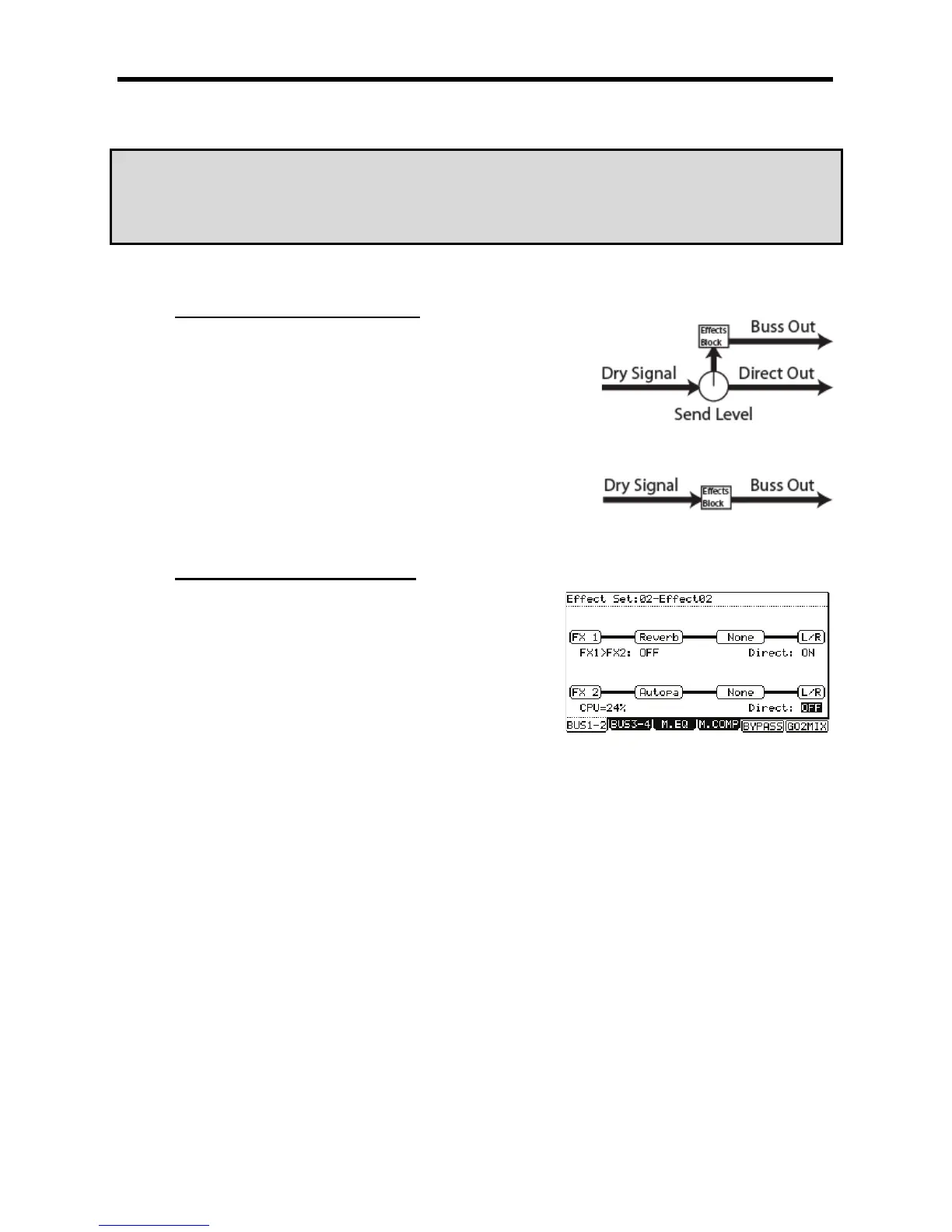
The following selections are available
The dry signal of the source is sent to the output along with the effect
The dry signal is not sent to the output. 100% of the source is sent to the effect.
For our example, set this field to OFF.
C 4-B6)8&@0F*
This is a shortcut to take you into MIXER mode. You can also get to MIXER mode by Pressing the [MODE] and [PAD 8] (MIXER).
A 4-=6).*
The PAD MIX page will be displayed.
K 9
This pad will be selected and its display will be highlighted.
= /-F-F@





 To Next Page