EasyManua.ls Logo

Akai Reference Master GX-75 - Page 11

Akai Reference Master GX-75
55 pages
Print Icon
To Next Page IconTo Next Page
To Previous Page IconTo Previous Page
Loading...
Tape
playback
Before
beginning
Set
the
TIMER
START
switch
to
OFF.
Set
the
CAL
and
CD/DAT
DIRECT
switches
to
m
.
Set
the
MPX
FILTER
switch
to
=
.
Turn
on
the
power
of
all
the
components.
After
the
power
is
turned
on,
the
operation
buttons
cannotbe
used
for
a
few
seconds
while
the
cassette
deck
stabilizes
it-
self.
©
@
Set
the
amplifier’s
input
selector
to
the
TAPE
position.
@
Check
the
cassette
tape
being
used
for
recording.
Make
sure
the
recording
defeat
tabs
are
intact
and
that
the
tape’s
recording
time
is
of
sufficient
length.
SEPARATED
BLOCKS
HIGH
RIGID
CONSTRUCTION
STEREO
CASSETTE
OCOX
GX-75
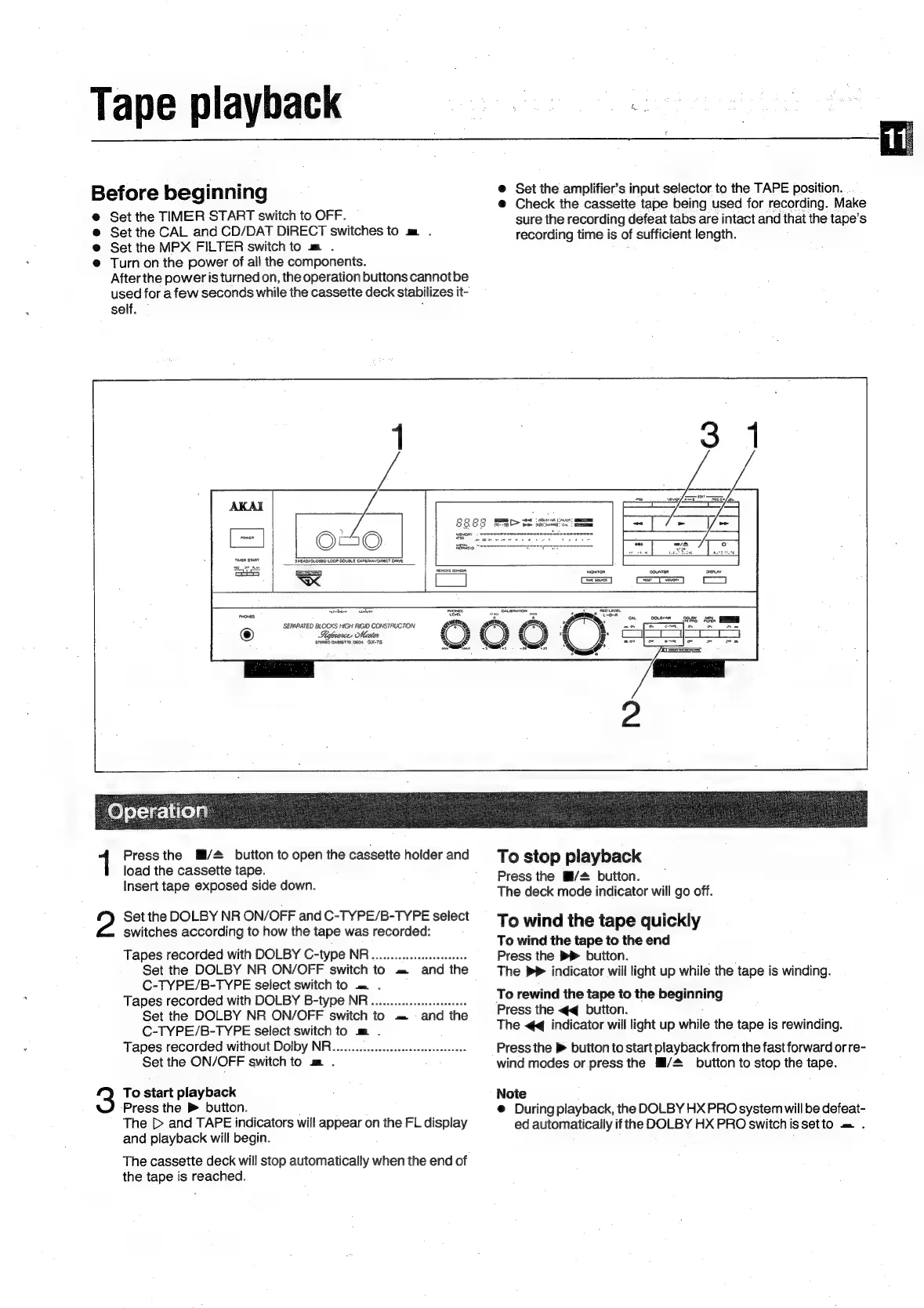
Press
the
M/2
button
to
open
the
cassette
holder
and
load
the
cassette
tape.
Insert
tape
exposed
side
down.
2?
Set
the
DOLBY
NR
ON/OFF
and
C-TYPE/B-TYPE
select
switches
according
to
how
the
tape
was
recorded:
Tapes
recorded
with
DOLBY
C-type
NR...
ee
eeeeseees
Set
the
DOLBY
NR
ON/OFF
switch
to
=
and
the
C-TYPE/B-TYPE
select
switch
to
=
.
Tapes
recorded
with
DOLBY
B-type
NR...
eee
Set
the
DOLBY
NR
ON/OFF
switch
to
.=
and
the
C-TYPE/B-TYPE
select
switch
to
m
.
Tapes
recorded
without
Dolby
NR..........eeeeeeeereeeereeees
Set
the
ON/OFF
switch
to
m
.
:
3
To
start
playback
‘Press
the
®
button.
The
[>
and
TAPE
indicators
will
appear
on
the
FL
display
and
playback
will
begin.
The
cassette
deck
will
stop
automatically
when
the
end
of
the
tape
is
reached.
To
stop
playback
Press
the
Mi/#
button.
The
deck
mode
indicator
will
go
off.
To
wind
the
tape
quickly
To
wind
the
tape
to
the
end
Press
the
>
button.
La
The
>>
indicator
will
light
up
while
the
tape
is
winding.
To
rewind
the
tape
to
the
beginning
Press
the
<q
button.
:
The
<q
indicator
will
light
up
while
the
tape
is
rewinding.
Press
the
>
button
to
start
playback
from
the
fast
forward
or
re-
wind
modes
or
press
the
Hi/#_
button
to
stop
the
tape.
Note
@
During
playback,
the
DOLBY
HX
PRO
system
will
be
defeat-
ed
automatically
if
the
DOLBY
HX
PRO
switchissetto
om
.

Related product manuals