EasyManua.ls Logo

Akai Reference Master GX-75 - Page 10

Akai Reference Master GX-75
55 pages
Print Icon
To Next Page IconTo Next Page
To Previous Page IconTo Previous Page
Loading...
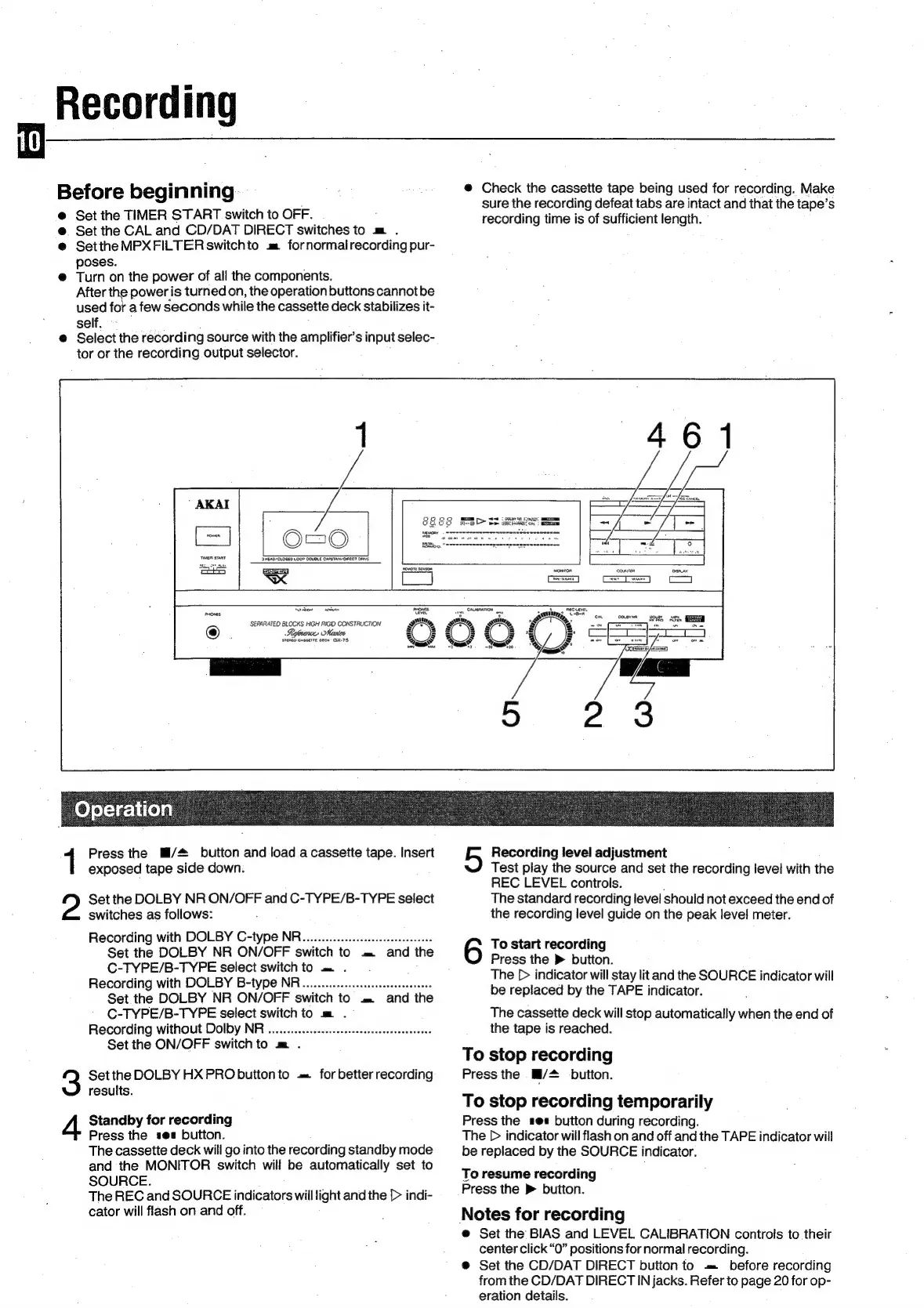
Recording
@
Check
the
cassette
tape
being
used
for
recording.
Make
sure
the
recording
defeat
tabs
are
intact
and
that
the
tape’s
recording
time
is
of
sufficient
length.
Before
beginning
@
Set
the
TIMER
START
switch
to
OFF.
@
Set
the
CAL
and
CD/DAT
DIRECT
switches
to
m
.
@
Setthe
MPXFILTER
switchto
m
fornormalrecording
pur-
poses.
@
Turn
on
the
power
of
all
the
components.
After
the
power
is
turned
on,
the
operation
buttons
cannotbe
used
for
a
few
seconds
while
the
cassette
deck
stabilizes
it-
self.
;
@
Select
the
recording
source
with
the
amplifier’s
input
selec-
tor
or
the
recording
output
selector.
Cr
MM
Pane:
GR
GEO
mam
D>
Se
imei
B
Operation
Press
the
Mi/#
button
and
load
a
cassette
tape.
Insert
exposed
tape
side
down.
Set
the
DOLBY
NR
ON/OFF
and
C-TYPE/B-TYPE
select
switches
as
follows:
Recording
with
DOLBY
C-type
NR...........
ce
ceeseeseesseeeeee
Set
the
DOLBY
NR
ON/OFF
switch
to
.=
and
the
C-TYPE/B-TYPE
select
switch
to
=.
.
Recording
with
DOLBY
B-type
NR............cessessseseseeeeees
Set
the
DOLBY
NR
ON/OFF
switch
to
=.
and
the
C-TYPE/B-TYPE
select
switch
to
m
.
Recording
without
Dolby
NR
..........:ceseceseseseeseseeseeeteres
Recording
level
adjustment
Test
play
the
source
and
set
the
recording
level
with
the
REC
LEVEL
controls.
The
standard
recording
level
should
not
exceed
the
end
of
the
recording
level
guide
on
the
peak
level
meter.
To
start
recording
Press
the
®
button.
The
[>
indicator
will
stay
lit
and
the
SOURCE
indicator
will
be
replaced
by
the
TAPE
indicator.
The
cassette
deck
will
stop
automatically
when
the
end
of
the
tape
is
reached.
Set
the
ON/OFF
switch
to
m
.
.
To
stop
recording
Press
the
a/+
button.
To
stop
recording
temporarily
Press
the
ses
button
during
recording.
The
D>
indicator
will
flash
on
and
off
and
the
TAPE
indicator
will
be
replaced
by
the
SOURCE
indicator.
To
resume
recording
Press
the
>
button.
Notes
for
recording
@
Set
the
BIAS
and
LEVEL
CALIBRATION
controls
to
their
center
click
“O”
positions
for
normal
recording.
@
Set
the
CD/DAT
DIRECT
button
to
=
before
recording
from
the
CD/DAT
DIRECT
IN
jacks.
Refer
to
page
20
for
op-
eration
details.
Set
the
DOLBY
HX
PRO
buitonto
=
for
better
recording
results.
Standby
for
recording
Press
the
see
button.
The
cassette
deck
will
go
into
the
recording
standby
mode
and
the
MONITOR
switch
will
be
automaticaily
set
to
SOURCE.
The
REC
and
SOURCE
indicators
will
light
and
the
[>
indi-
cator
will
flash
on
and
off.

Related product manuals