EasyManua.ls Logo

Akai Reference Master GX-75 - Page 13

Akai Reference Master GX-75
55 pages
Print Icon
To Next Page IconTo Next Page
To Previous Page IconTo Previous Page
Loading...
Recording
level
adjustment
Basic
recording
level
adjustment
Basically,
adjust
the
REC
LEVEL
controls
so
that
the
recording
level
does
not
exceed
the
recording
level
guide
indicators
on
the
peak
level
meter
when
the
cassette
deck
is
in
the
tape
moni-
tor
mode
(the
TAPE
indicator
will
be
on
the
FL
display).
The
recording
level
guide
indicators
will
vary
according
to
the
tape
position
of
the
loaded
tape.
Recording
Level
Balance
For
normal
stereo
recording,
make
sure
the
red
lines
on
the
Left
and
Right
REC
LEVEL
controls
are
aligned
and
then
adjust
both
controls
to
the
desired
level
at
the
same-time.
If
necessary
the
Left
and
Right
REC
LEVEL
controls
can
also
be
adjusted
separately.
To
decrease
the
right
channel
level:
Turn
down
the
R
REC
LEVEL
control.
To
decrease
the
left
channel
level:
Turn
down
the
L
REC
LEVEL
control.
Monitoring
:
Comparing
the
source
sound
with
the
just-recorded
sound
during
recording
Monitoring
the
source
sound
Press
the
MONITOR
button
during
recording.
The
TAPE
indicator
will
be
replaced
by
the
SOURCE
indicator
and
the
cassette
deck
will
be
set
to
the
source
monitor
mode.
Monitoring
the
just-recorded
sound
Press
the
MONITOR
button
again.
The
SOURCE
indicator
will
be
replaced
by
the
TAPE
indicator
and
the
cassette
deck
will
be
set
to
the
tape
monitor
mode.
What
is
the
auto
monitor
system?
The
independentrecording
and
playback
heads
in
combination
with
two
independent
amplifiers
(one
for
recording
and
another
for
playback)
let
you
listen
to
a
recording
as
it
is
being
made.
This
is
called
tape
monitoring.
By
switching
the
auto
monitor
system
during
recording,
you
can
compare
the
just-recorded
music
(TAPE
position)
with
the
source
music
(SOURCE
posi-
tion).
In
this
way
you
can
make
sure
that
you
have
set
the
re-
cording
input
levels
correctly.
The
tape
monitor
system
of
this
cassette
deck
is
an
“Auto
Monitor
System”.
Besides
letting
you
manually
set
the
tape
monitor
system,
it
also
does
it
automati-
cally.
When
the
cassette
deck
is
recording,
the
auto
monitor
system
is
set
automatically
to
TAPE.
During
recording
standby,
it
is
automatically
set
to
SOURCE.
Therefore,
under
normal
circumstances
there
is
no
need
for
you
to
set
the
MONITOR
switch
yourself.
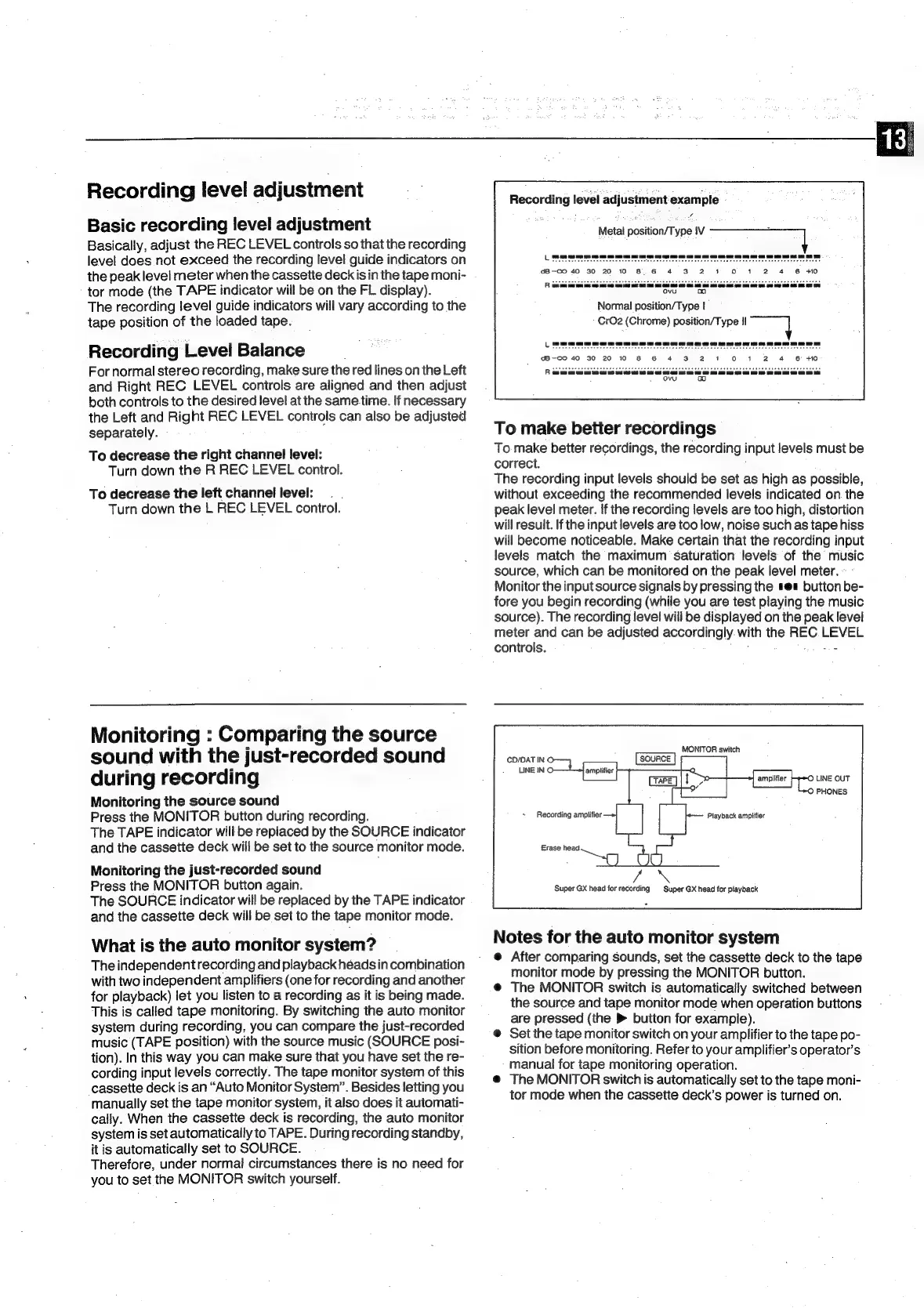
Recording
level
adjustment
example
-
Metal
position/Type
IV
Normal
position/Type
|
-
CrO2
(Chrome)
position/Type
II
To
make
better
recordings
To
make
better
recordings,
the
recording
input
levels
must
be
correct.
The
recording
input
levels
should
be
set
as
high
as
possible,
without
exceeding
the
recommended
levels
indicated
on
the
peak
level
meter.
If
the
recording
levels
are
too
high,
distortion
will
result.
If
the
input
levels
are
too
low,
noise
such
as
tape
hiss
will
become
noticeable.
Make
certain
that
the
recording
input
levels
match
the
maximum
saturation
levels
of
the
music
source,
which
can
be
monitored
on
the
peak
level
meter.
Monitor
the
input
source
signals
by
pressing
the
sea
button
be-
fore
you
begin
recording
(while
you
are
test
playing
the
music
source).
The
recording
level
will
be
displayed
on
the
peak
level
meter
and
can
be
adjusted
accordingly.
with
the
REC
LEVEL
controls.
fetes
CD/DAT
IN
©
LINE
IN
©
©
LINE
OUT
Recording
amplifier
Super
GX
head
for
recording
Super
GX
head
for
playback
Notes
for
the
auto
monitor
system
@
After
comparing
sounds,
set
the
cassette
deck
to
the
tape
monitor
mode
by
pressing
the
MONITOR
button.
@
The
MONITOR
switch
is
automatically
switched
between
the
source
and
tape
monitor
mode
when
operation
buttons
are
pressed
(the
>
button
for
example).
@
Set
the
tape
monitor
switch
on
your
amplifier
to
the
tape
po-
sition
before
monitoring.
Refer
to
your
amplifier’s
operator’s
manual
for
tape
monitoring
operation.
@
The
MONITOR
switch
is
automatically
set
to
the
tape
moni-
tor
mode
when
the
cassette
deck’s
power
is
turned
on.

Related product manuals