EasyManua.ls Logo

Akai Reference Master GX-75 - Page 14

Akai Reference Master GX-75
55 pages
Print Icon
To Next Page IconTo Next Page
To Previous Page IconTo Previous Page
Loading...
Conveninent
recording
features
Recording
cancel:
Cancelinga
_
section
that
has
just
been
recorded.
Press
the
REC
CANCEL
button
while
the
tape
deck
is
in
the
re-
cording
mode.
The
cassette
deck
will
rewind
the
tape
to
the
beginning
of
the
section
that
has
just
been
recorded,
create
a
blank
space
and
then
standby
for
recording.
The
REC
indicator
stays
lit,
the
[>
indicator
flashes
on
and
off
and
the
TAPE
indicator
is
replaced
by
the
SOURCE
indicator.
To
resume
recording
Press
the
®
button.
Notes
®
Inorder
for
recording
cancel
to
function
properly,
there
must
be
4
seconds
or
more
of
blank
space
at
the
beginning
of
the
recorded
section.
To
create
blank
spaces
between
selec-
tions,
use
the
©
button
during
the
recording
standby
mode.
@
After
recording
cancel!
has
been
performed,
always
make
certain
that
you
are
at
the
beginning
of
the
selection
before
re-recording.
Spot
erase
:
Erasing
part
of
a
recorded
program
Use
the
REC
CANCEL
and
MEMORY
A-—-B
button
if
you
wish
to
erase
part
of
a
recorded
program.
Check
before
erasing
the
program
Make
sure
the
recording
defeat
tabs
of
the
cassette
tape
are
not
removed.
The
cassette
deck
will
not
go
into
the
recording
can-
cel
mode
if
they
are.
Refer
to
page
5,
“cassette
tapes”
for
more
details.
Operation
1
Press
the
>
button
to
start
tape
playback.
Memorizing
the
starting
point
of
the
section
to
be
er-
ased
Press
the
MEMORY
A-~B
button
once
at
the
point
you
wish
to
begin
the
spot
erase
function.
The
A—
indicator
will
flash
on
and
off.
3
Memorizing
the
end
point
of
the
section
to
be
erased
Press
the
MEMORY
A-—
8B
button
again
when
you
reach
the
point
at
which
you
wish
to
end
the
spot
erase
function.
The
A-—B
indicator
will
appear
and
the
cassette
deck
will
stop.
To
start
erasure
4
Press
the
REC
CANCEL
button
to
start
the
spot
erase
function.
The
cassette
deck
will
rewind
the
tape
and
begin
erasing
the
recorded
section
between
the
two
points
you
have
pro-
grammed.
When
erasure
is
finished
the
cassette
deck
will
stop
automatically.
"
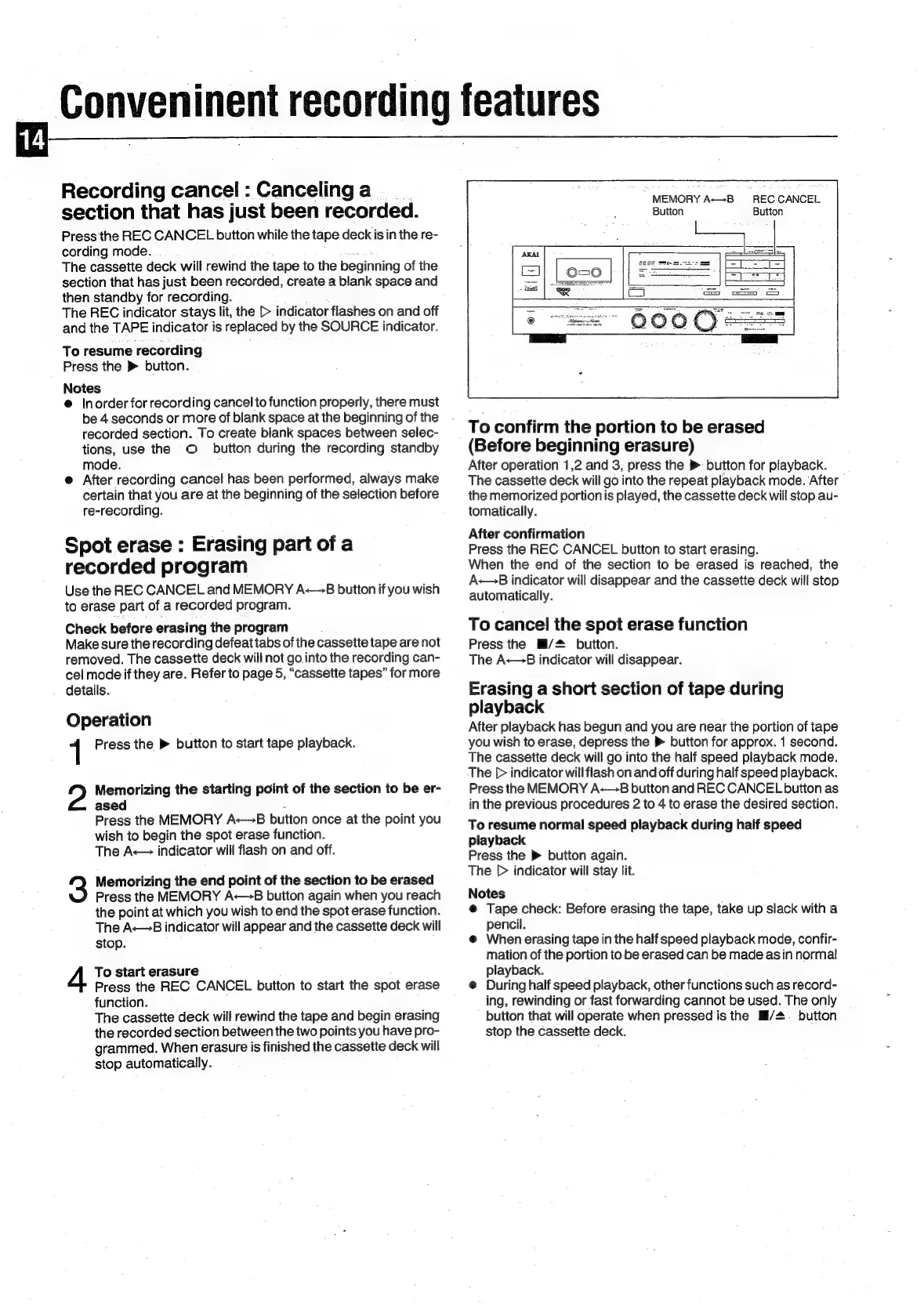
MEMORY
A—B
Button
REC
CANCEL
Button
To
confirm
the
portion
to
be
erased
(Before
beginning
erasure)
After
operation
1,2
and
3,
press
the
>
button
for
playback.
The
cassette
deck
will
go
into
the
repeat
playback
mode.
After
the
memorized
portion
is
played,
the
cassette
deck
will
stop
au-
tomatically.
After
confirmation
Press
the
REC
CANCEL
button
to
start
erasing.
When
the
end
of
the
section
to
be
erased
is
reached,
the
A
indicator
will
disappear
and
the
cassette
deck
will
stop
automatically.
To
cancel
the
spot
erase
function
Press
the
Hi/#
button.
The
A-—B
indicator
will
disappear.
Erasing
a
short
section
of
tape
during
playback
After
playback
has
begun
and
you
are
near
the
portion
of
tape
you
wish
to
erase,
depress
the
®
button
for
approx.
1
second.
The
cassette
deck
will
go
into
the
half
speed
playback
mode.
The
[>
indicator
will
flash
on
and
off
during
half
speed
playback.
Press
the
MEMORY
A-—8
button
and
REC
CANCEL
button
as
in
the
previous
procedures
2
to
4
to
erase
the
desired
section.
To
resume
normal
speed
playback
during
half
speed
playback
Press
the
»
button
again.
The
[>
indicator
will
stay
lit.
Notes
@
Tape
check: Before
erasing
the
tape,
take
up
slack
with
a
pencil.
@
When
erasing
tape
in
the
half
speed
playback
mode,
confir-
mation
of
the
portion
to
be
erased
can
be
made
asin
normal
playback.
@
During
half
speed
playback,
other
functions
such
as
record-
ing,
rewinding
or
fast
forwarding
cannot
be
used.
The
only
button
that
will
operate
when
pressed
is
the
Mi/#.
button
stop
the
cassette
deck.

Related product manuals