EasyManua.ls Logo

Akai Reference Master GX-75 - Page 18

Akai Reference Master GX-75
55 pages
Print Icon
To Next Page IconTo Next Page
To Previous Page IconTo Previous Page
Loading...
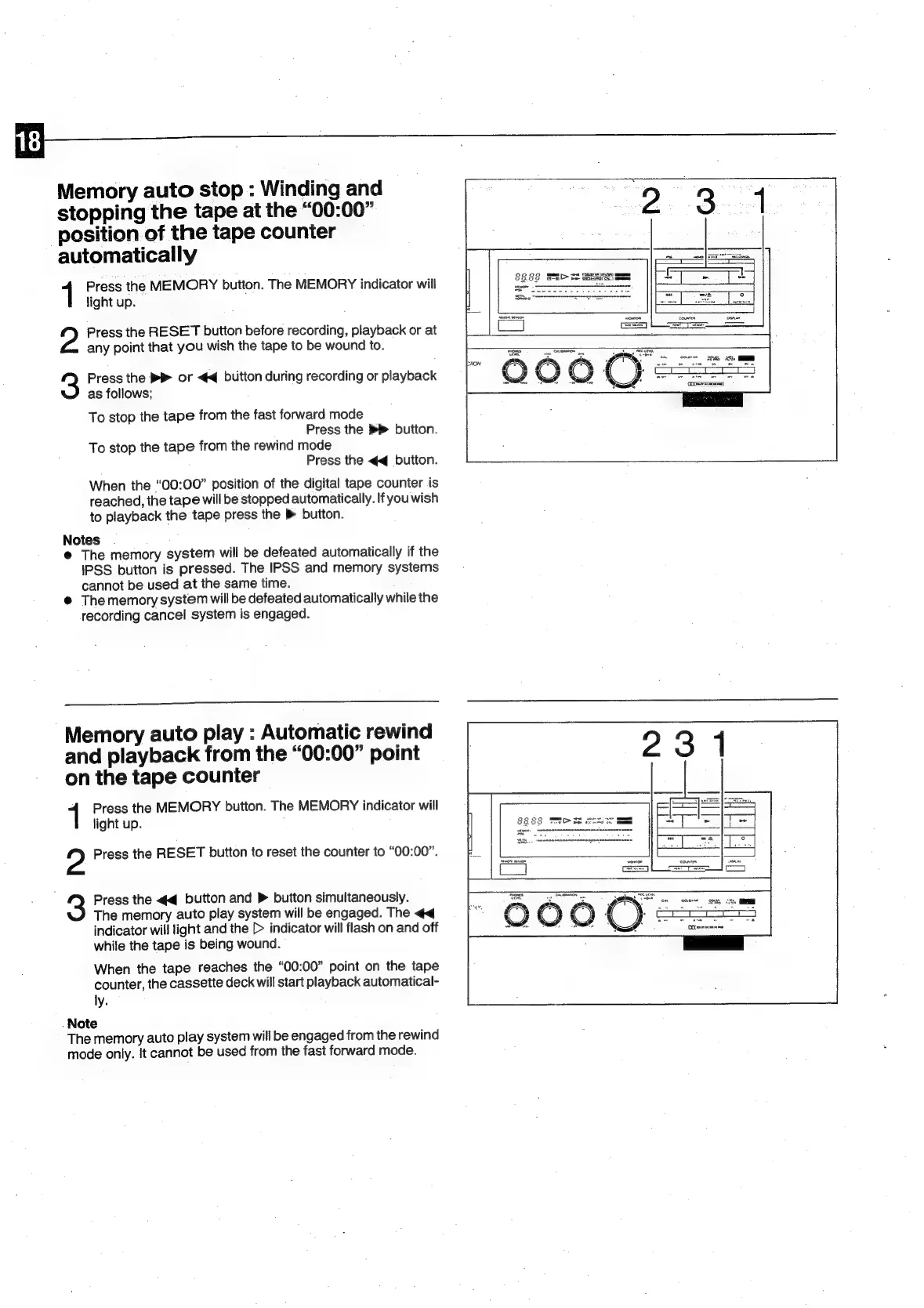
Memory
auto
stop
:
Winding
and
stopping
the
tape
at
the
“00:00”
position
of
the
tape
counter
automatically
1
Press
the
MEMORY
button.
The
MEMORY
indicator
will
light
up.
2
Press
the
RESET
button
before
recording,
playback
or
at
any
point
that
you
wish
the
tape
to
be
wound
to.
3
Press
the
®}
or
<4
button
during
recording
or
playback
as
follows;
To
stop
the
tape
from
the
fast
forward
mode
Press
the
>
button.
To
stop
the
tape
from
the
rewind
mode
Press
the
<q
button.
When
the
“00:00”
position
of
the
digital
tape
counter
is
reached,
the
tape
will
be
stopped
automatically.
If
youwish
to
playback
the
tape
press
the
®
button.
Notes
®
The
memory
system
will
be
defeated
automatically
if
the
IPSS
button
is
pressed.
The
IPSS
and
memory
systems
cannot
be
used
at
the
same
time.
@
Thememory
system
will
be
defeated
automatically
while
the
recording
cancel
system
is
engaged.
Memory
auto
play
:
Automatic
rewind
and
playback
from
the
“00:00”
point
on
the
tape
counter
Press
the
MEMORY
button.
The
MEMORY
indicator
will
light
up.
2
Press
the
RESET
button
to
reset
the
counter
to
“00:00”.
3
Press
the
<q
button
and
>
button
simultaneously.
The
memory
auto
play
system
will
be
engaged.
The
<q
indicator
will
light
and
the
[>
indicator
will
flash
on
and
off
while
the
tape
is
being
wound.
When
the
tape
reaches
the
“00:00”
point
on
the
tape
counter,
the
cassette
deck
will
start
playback
automatical-
ly.
_Note
The
memory
auto
play
system
will
be
engaged
from
the
rewind
mode
only.
It
cannot
be
used
from
the
fast
forward
mode.

Related product manuals