EasyManua.ls Logo

Akai Reference Master GX-75 - Page 17

Akai Reference Master GX-75
55 pages
Print Icon
To Next Page IconTo Next Page
To Previous Page IconTo Previous Page
Loading...
Repeat
playback
:
Repeated
playback
of
a
memorized
section
By
memorizing
two
points
on
the
tape
(beginning
and
end),
you
can
repeat
playback
of
any
section
that
you
wish.
This
is
ideal
for
times
that
you
wish
to.listen
to
one
particular
section
of
a
song
repeatedly.
One
complete
song
or
the
whole
tape
can
also
be
memorized
for
repeated
playback.
Use
the
MEMORY
A-:—B
button
as
follows.
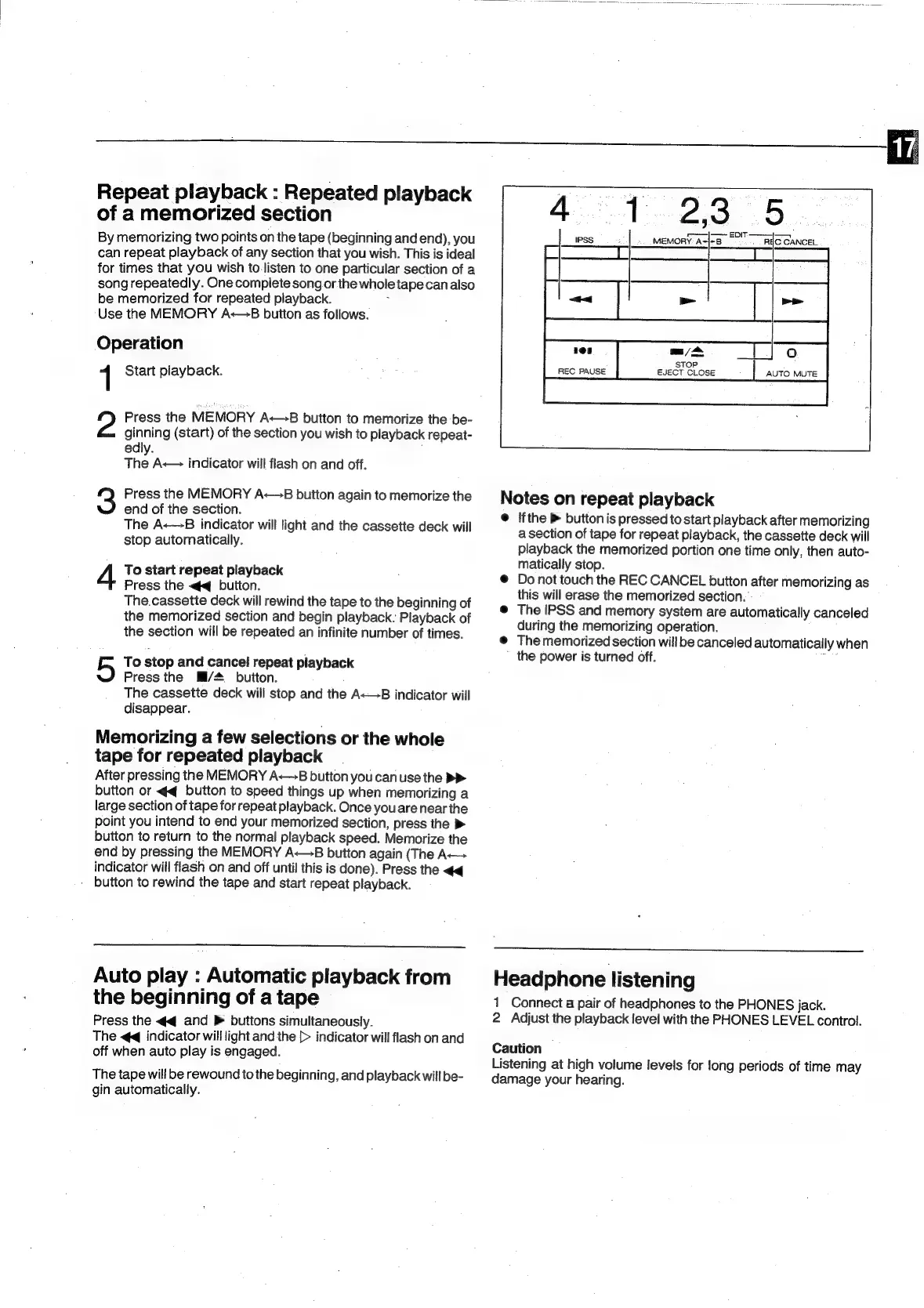
Operation
1
Start
playback.
Press
the
MEMORY
A—
B
button
to
memorize
the
be-
ginning
(start)
of
the
section
you
wish
to
playback
repeat-
edly.
The
A-—
indicator
will
flash
on
and
off.
Press
the
MEMORY
A
8
button
again
to
memorize
the
end
of
the
section.
The
A<—B
indicator
will
light
and
the
cassette
deck
will
stop
automatically.
To
start
repeat
playback
Press
the
<4
button.
The.cassette
deck
will
rewind
the
tape
to
the
beginning
of
the
memorized
section
and
begin
playback.
Playback
of
the
section
will
be
repeated
an
infinite
number
of
times.
To
stop
and
cancel
repeat
playback
Press
the
Mi/#
button.
The
cassette
deck
will
stop
and
the
A<—B
indicator
will
disappear.
5
Memorizing
a
few
selections
or
the
whole
tape
for
repeated
playback
After
pressing
the
MEMORY
A:—B
button
you
canuse
the
>>
button
or
<q
button
to
speed
things
up
when
memorizing
a
large
section
of
tape
for
repeat
playback.
Once
you
are
near
the
point
you
intend
to
end
your
memorized
section,
press
the
>
button
to
return
to
the
normal
playback
speed.
Memorize
the
end
by
pressing
the
MEMORY
A-—8
button
again
(The
A
indicator
will
flash
on
and
off
until
this
is
done).
Press
the
<q
-
button
to
rewind
the
tape
and
start
repeat
playback.
Auto
play
:
Automatic
playback
from
the
beginning
of
a
tape
Press
the
<q
and
>
buttons
simultaneously.
The
<4
indicator
will
light
and
the
[>
indicator
will
flash
on
and
off
when
auto
play
is
engaged.
The
tape
will
be
rewound
to
the
beginning,
and
playback
will
be-
gin
automatically.
108
on
/
o
AUTO
MUTE
STOP
EJECT
CLOSE
REC
PAUSE
Notes
on
repeat
playback
@
Ifthe
>
button
is
pressed
to
start
playback
after
memorizing
a
section
of
tape
for
repeat
playback,
the
cassette
deck
will
playback
the
memorized
portion
one
time
only,
then
auto-
matically
stop.
Do
not
touch
the
REC
CANCEL
button
after
memorizing
as
this
will
erase
the
memorized
section.
The
IPSS
and
memory
system
are
automatically
canceled
during
the
memorizing
operation.
The
memorized
section
will
be
canceled
automatically
when
the
power
is
turned
off.
:
Headphone
listening
1
Connect
a
pair
of
headphones
to
the
PHONES
jack.
2
Adjust
the
playback
level
with
the
PHONES
LEVEL
control.
Caution
|
Listening
at
high
volume
levels
for
long
periods
of
time
may
damage
your
hearing.

Related product manuals