EasyManua.ls Logo

Akai Reference Master GX-75 - Page 16

Akai Reference Master GX-75
55 pages
Print Icon
To Next Page IconTo Next Page
To Previous Page IconTo Previous Page
Loading...
Convenient
playback
features
IPSS:
Instant
Program
Searching
System
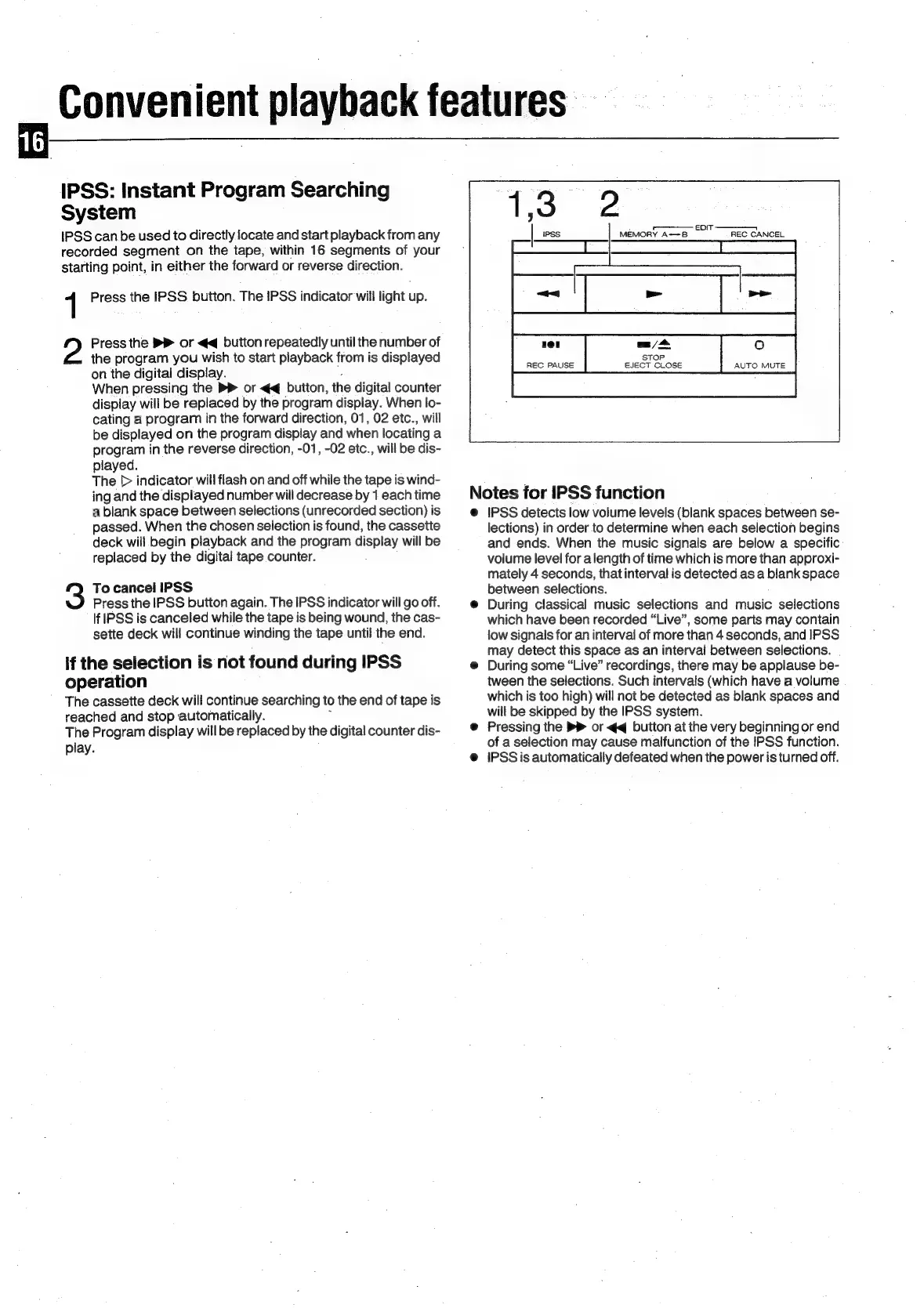
IPSS
canbe
used
to
directly
locate
and
start
playback
from
any
recorded
segment
on
the
tape,
within
16
segments
of
your
starting
point,
in
either
the
forward
or
reverse
direction.
1
Press
the
IPSS.
button.
The
IPSS
indicator
will
light
up.
Press
the
PR
or
<¢q
button
repeatedly
until
the
number
of
the
program
you
wish
to
start
playback
from
is
displayed
on
the
digital
display.
When
pressing
the
>
or
<<
button,
the
digital
counter
display
will
be
replaced
by
the
program
display.
When
lo-
cating
a
program
in
the
forward
direction,
01,
02
etc.,
will
be
displayed
on
the
program
display
and
when
locating
a
program
in
the
reverse
direction,
-01,
-02
etc.,
will
be
dis-
played.
The
[>
indicator
will
flash
on
and
off
while
the
tape
is
wind-
ing
and
the
displayed
number
will
decrease
by
1
each
time
a
blank
space
between
selections
(unrecorded
section)
is
passed.
When
the
chosen
selection
is
found,
the
cassette
deck
will
begin
playback
and
the
program
display
will
be
replaced
by
the
digital
tape
counter.
3
To
cancel
IPSS
Press
the
IPSS
button
again.
The
IPSS
indicator
will
go
off.
If
IPSS
is
canceled
while
the
tape
is
being
wound,
the
cas-
sette
deck
will
continue
winding
the
tape
until
the
end.
If
the
selection
is
not
found
during
IPSS
operation
The
cassette
deck
will
continue
searching
to
the
end
of
tape
is
reached
and
stop automatically.
The
Program
display
will
be
replaced
by
the
digital
counter
dis-
play.
+
eDit
-—_-——
MEMORY
A--B
REC
CANCEL
Y]
dies
REC
PAUSE
EJECT.
CLOSE
AUTO
MUTE
Notes
for
IPSS
function
@
IPSS
detects
low
volume
levels
(blank
spaces
between
se-
lections)
in
order
to
determine
when
each
selection
begins
and
ends.
When
the
music
signals
are
below
a
specific
volume
level
for
a
length
of
time
which
is
more
than
approxi-
mately
4
seconds,
that
interval
is
detected.as
a
blank
space
between
selections.
@
During
classical
music
selections
and
music
selections
which
have been
recorded
“Live”,
some
parts
may
contain
low
signals
for
an
interval
of
more
than
4
seconds,
and
IPSS
may
detect
this
space
as
an
interval
between
selections.
|
@
During
some
“Live”
recordings,
there
may
be
applause
be-
tween
the
selections.
Such
intervals
(which
have
a
volume
which
is
too
high)
will
not
be
detected
as
blank
spaces
and
will
be
skipped
by
the
IPSS
system.
@
Pressing
the
>>
or
<q
button
at
the
very
beginning
or
end
of
a
selection
may
cause
malfunction
of
the
IPSS
function.
@
IPSS
is
automatically
defeated
when
the
power
is
turned
off.

Related product manuals