EasyManua.ls Logo

Akai Reference Master GX-75 - Page 20

Akai Reference Master GX-75
55 pages
Print Icon
To Next Page IconTo Next Page
To Previous Page IconTo Previous Page
Loading...
_
Operation
details
_
tS
>
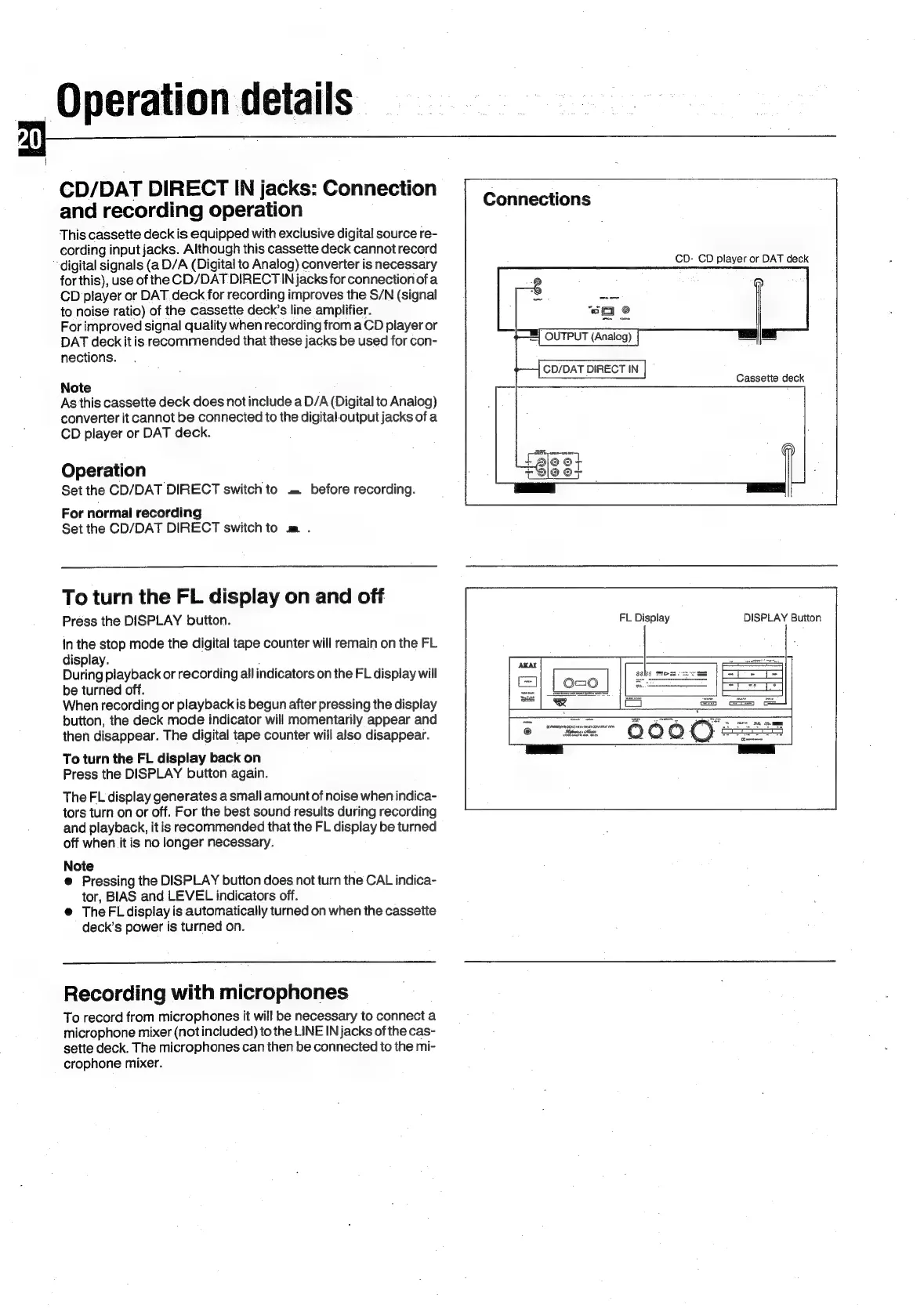
CD/DAT
DIRECT
IN
jacks:
Connection
and
recording
operation
This
cassette
deck
is
equipped
with
exclusive
digital
source
re-
cording
input
jacks.
Although
this
cassette
deck
cannot
record
‘digital
signals
(a
D/A
(Digital
to
Analog)
converter
is
necessary
for
this),
use
of
the
CD/DAT
DIRECT
IN
jacks
for
connection
ofa
CD
player
or
DAT.
deck
for
recording
improves
the
S/N
(signal
to
noise
ratio)
of
the
cassette
deck’s
line
amplifier.
For
improved
signal
quality
when
recording
from
a
CD
player
or
DAT
deck
it
is
recommended
that
these
jacks
be
used
for
con-
nections.
Connections
CD-
CD
player
or
DAT
deck
Cassette
deck
Note
As
this
cassette
deck
does
not
include
a
D/A
(Digital
to
Analog)
converter
it
cannot
be
connected
to
the
digital-output
jacks
of
a
CD
player
or
DAT
deck.
Operation
Set
the
CD/DAT
DIRECT
switch
to
.=
before
recording.
For
normal
recording
Set
the
CD/DAT
DIRECT
switch
to
m
.
To
turn
the
FL
display
on
and
off
Press
the
DISPLAY
button.
FL
Display
DISPLAY
Button
In
the
stop
mode
the
digital
tape
counter
will
remain
on
the
FL
display.
During
playback
or
recording
all
indicators
on
the
FL
display
will
be
turned
off.
When
recording
or
playbackis
begun
after
pressing
the
display
button,
the
deck
mode
indicator
will
momentarily
appear
and
then
disappear.
The
digital
tape
counter
will
also
disappear.
To
turn
the
FL
display
back
on
Press
the
DISPLAY
button
again.
The
FL
display
generates
a
small
amount
of
noise
when
indica-
tors
turn
on
or
off.
For
the
best
sound
results
during
recording
and
playback,
it
is
recommended
that
the
FL
display
be
turned
off
when
it
is
no
longer
necessary.
Note
@
Pressing
the
DISPLAY
button
does
not
turn
the
CAL
indica-
tor,
BIAS
and
LEVEL
indicators
off.
@
TheFLdisplay
is
automatically
turned
on
when
the
cassette
deck’s
power
is
turned
on.
Recording
with
microphones
To
record
from
microphones
it
will
be
necessary
to
connect
a
microphone
mixer
(not
included)
to
the
LINE
IN
jacks
of
the
cas-
sette
deck.
The
microphones
can
then
be
connected
to
the
mi-
crophone
mixer.

Related product manuals