EasyManua.ls Logo

Akai Reference Master GX-75 - Page 21

Akai Reference Master GX-75
55 pages
Print Icon
To Next Page IconTo Next Page
To Previous Page IconTo Previous Page
Loading...
The
MPX
(Multiplex)
filter
When
high
frequency
signals
are
over-emphasized
during
FM
stereo
recording;
use
of
a
noise
reduction
system
alone
is
not
enough.
In
this
case,
it
is
necessary
to
use
the
MPX
filter.
Set
the
MPX.
FILTER
switch
to
=
What
is
the
MPxX
filter?
FM
stereo
signals
contain
19
kHz
pilot
signals
and
38
kHz
sub-
carrier
signals
which
convey
the
left
and
right
channel
informa-
tion.
These
signals
are
necessary,
but
they
must
be
removed
from
the
output
signals
of
the
tuner.
If
these
signals
are
not
re-
moved,
they
can
affect
the
DOLBY
NR
system.
The
MPX
filter
is
designed
to
remove
these
pilot
tone
signals
from
the
recording.
When
to
use
the
MPX
FILTER
switch
Use
this
switch
only
when
recording
with
the
DOLBY
NR
system.
Most
high
quality
tuners
have
filters
to
suppress
FM
pi-
lot
tone
signals.
With
these
tuners,
you
can
leave
the
MPX
FIL-
TER
switch
at
sm
.
With
other
tuners,
the
MPX
FILTER
switch
should
be
set
to
.=
.
The
MPX
FILTER
switch
should
also
be
turned
on
when
you
have
monitored
the
just
recorded
music
and
feel
that
the
sound
quality
is
not
right.
When
the
CD/DAT
DIRECT
switch
is
setto
=
,
the
MPX
FIL-
TER
switch
is
automatically
defeated.
Tape
Dubbing
:
Making
a
copy
from
an
original
tape
For
tape
dubbing,
normally
connect
both
cassette
decks
to
the.
amplifier.
Refer
to
the
amplifier’s
operator's
manual
for
opera-
tion
details.
Itis
also
possible
to
connect
directly,
deck
to
deck.
Set
the
re-
cording
controls
(noise
reduction,
recording
level,
etc.)
exactly
as
you
would
for
standard
recording.
The
Auto
stop
and
tape
transport
mechanism
Auto
stop
mechanism
This
cassette
deck
is
equipped
with
an
auto
stop
mechanism
that
automatically
stops
the
tape
when
it
has
been
fully
fast
for-
warded,
fast
rewound
or
at
the
end
of
playback
or
recording.
Tape
transport
mechanism
When
the
power
of
the
cassette
deck
is
turned
on,
the
capstans
rotate
in
order
to
stabilize
tape
transportation
during’
the
record-
ing
and
playback
modes.
The
auto
tape
selector
.
How
the
tape
positions
are
detected
Cassette
tapes
can
be
separated
widely
into
three
types:
Normal
position,
chrome
(CrO2)
position
and
metal
position.
Tape
performances
differ
according
to
tape
position
and
to
fully
utilize
the
performance
of
each
tape, the
cassette
deck’s
re-
cording/playback
characteristics
such
as
bias
and
equaliza-
tion
must
be
set
to
suit
each
tape
position.
This
cassette
deck
is
equipped
with
an
auto
tape
selector
which
functions
automatically
after
you
have
loaded
a
cassette
tape.
Once
loaded,
the
metal,
CrO2
or
normal
tape
position
is
indicat-
ed
on
the
FL
display.
How
the
Auto
Tape
Selector
operates
When
a
cassette
tape
is
loaded,
the
cassette
deck
detects
the
tape
position
by
sensing
the
tape
position
notches
located
on
top
of
the
cassette
case,
as
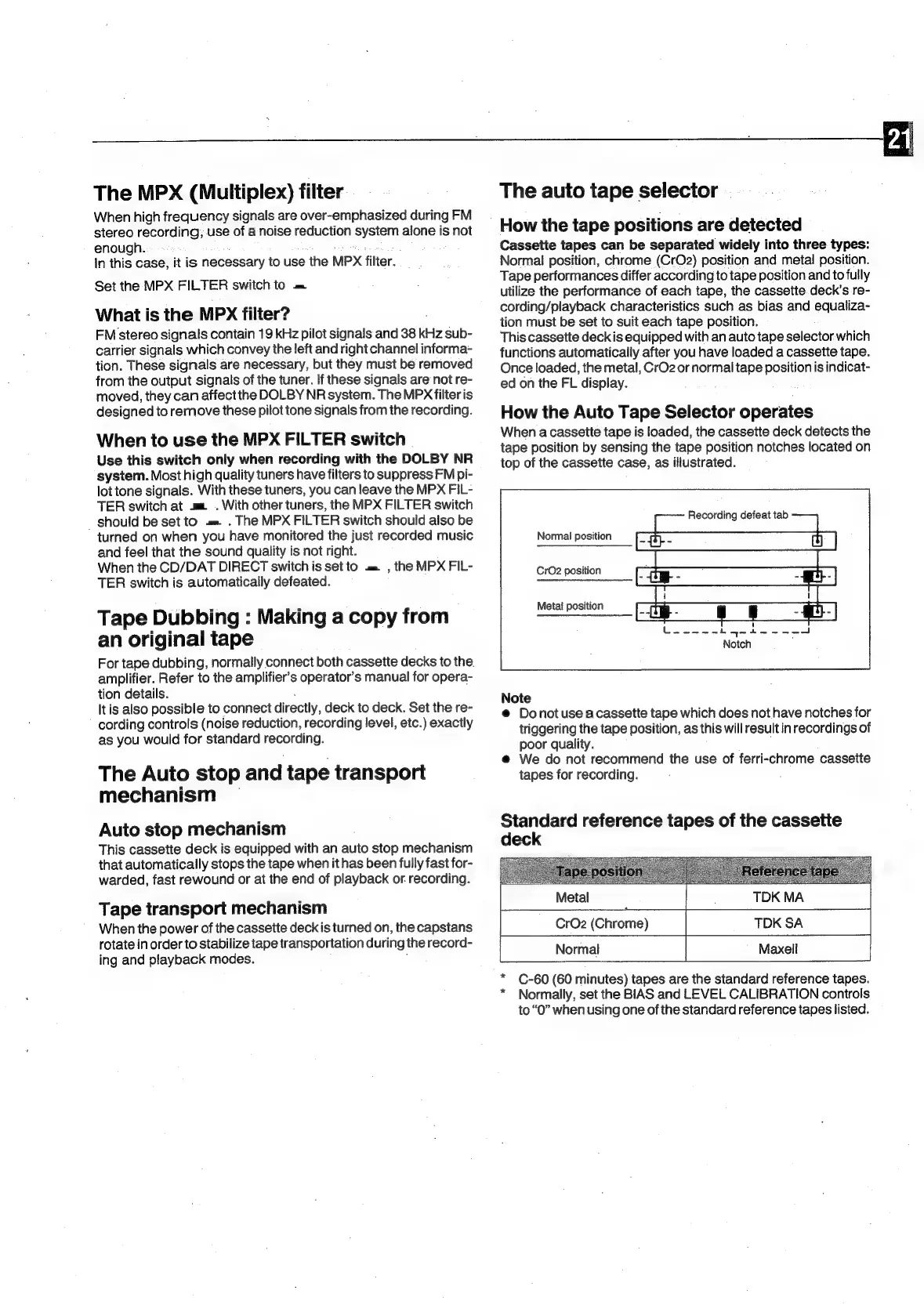
illustrated.
Recording
defeat
tab
Normal
position
CrO2
position
Meta!
position
Mikes
dai
ed
Notch
Note
@
Donotuse
a
cassette
tape
which
does
not
have
notches
for
triggering
the
tape
position,
as
this
will
result
in
recordings
of
poor
quality.
:
@
We
do
not
recommend
the
use
of
ferri-chrome
cassette
tapes
for
recording.
Standard
reference
tapes
of
the
cassette
deck
C-60
(60
minutes)
tapes
are
the
standard
reference
tapes.
Normally,
set
the
BIAS
and
LEVEL
CALIBRATION
controls
to
“0”
when
using
one
of
the
standard
reference
tapes
listed.
Metal
TDK
MA
|
CrO2
(Chrome)
TDK
SA
Normal
Maxell

Related product manuals