EasyManua.ls Logo

Akai Reference Master GX-75 - Page 26

Akai Reference Master GX-75
55 pages
Print Icon
To Next Page IconTo Next Page
To Previous Page IconTo Previous Page
Loading...
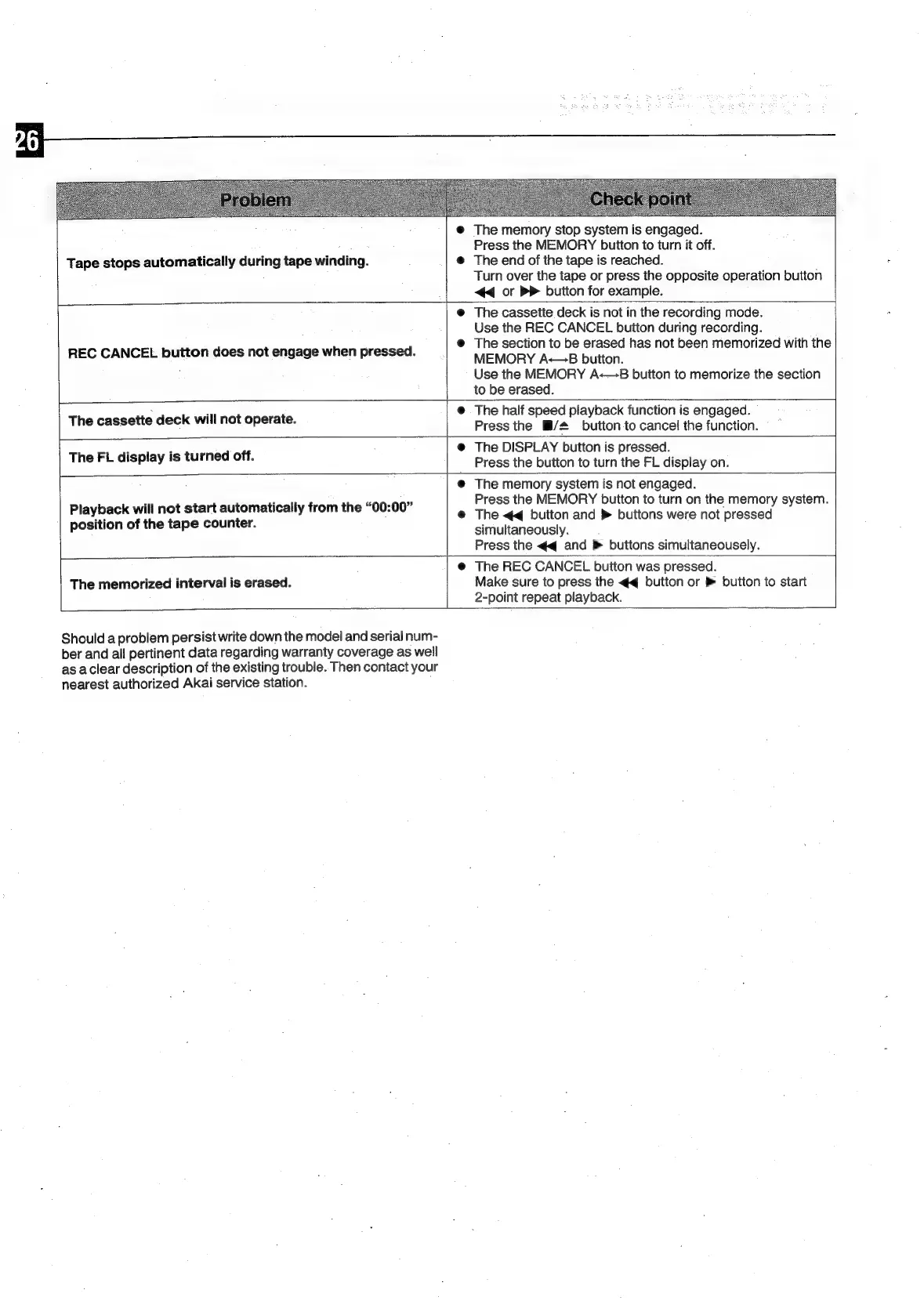
Tape
stops
automatically
during
tape
winding.
The
memory
stop
system
is
engaged.
Press
the
MEMORY
buiton
to
turn
it
off.
The
end
of
the
tape
is
reached.
Turn
over
the
tape
or
press
the
opposite
operation
button
<<
or
BP
button
for
example.
REC
CANCEL
button
does
not
engage
when
pressed.
The
cassette
deck
is
not
in
the
recording
mode.
Use
the
REC
CANCEL
button
during
recording.
The
section
to
be
erased
has
not
been
memorized
with
the
MEMORY
A-<—B
button.
Use
the
MEMORY
A-—8B
button
to
memorize
the
section
to
be
erased.
The
cassette
deck
will
not
operate.
The
half
speed
playback
function
is
engaged.
Press
the
M/#
button
to
cancel
the
function.
©
The
FL
display
is
turned
off.
The
DISPLAY
button
is
pressed.
Press
the
button
to
turn
the
FL
display
on.
Playback
will
not
start
automatically
from
the
“00:00”
position
of
the
tape
counter.
The
memorized
interval
is
erased.
Should
a
problem
persist
write
down
the
model
and
serial
num-
ber
and
all
pertinent
data
regarding
warranty
coverage
as
well
as
aclear
description
of
the
existing
trouble.
Then
contact
your
nearest
authorized
Akai
service
station.
The
memory
system
is
not
engaged.
Press
the
MEMORY
button
to
turn
on
the
memory
system.
The
<<
button
and
»
buttons
were
not
pressed
simultaneously.
Press
the
<q
and
»
buttons
simultaneousely.
The
REC
CANCEL
button
was
pressed.
Make
sure
to
press
the
<q
button
or
®
button
to
start
2-point
repeat
playback.

Related product manuals