EasyManua.ls Logo

Akai VS-G240EA - Page 4

Akai VS-G240EA
82 pages
Print Icon
To Next Page IconTo Next Page
To Previous Page IconTo Previous Page
Loading...
*
INFORMATION
TRACKING/STABILITY
ADJUSTMENT
To
correct
tracking
during
the
normal
playback,
slow
or
still
mode,
only
the
remote
control
buttons
can
be
used
for
the
following
adjustment.
e
To
correct
tracking
during
playback
If
the
tracking
is
not
corrected
satisfactorily
by
the
automatic
tracking
function,
press
the
remote
control's
"<<"
or
“>”
button
until
the
picture
is
clear.
e
To
correct
tracking
during
the
still
mode
Press
the
remote
control's
“<"
or
“>"
button
repeatedly
until
the
picture
is
clear.
®
To
correct
picture
shake
during
the
slow
motion
or
still
mode
Press
the
remote
control’s
““"
or
"\~"
button
repeatedly
until
the
picture
shake
is
corrected.
ERROR
ANNOUNCEMENT
When
a
malfunction
occurs,
the
following
error
indicators
appear
on
the
FL
display
to
indicate
the
problem
when
the
power
is
turned
off.
Err
1
:
AL
power
supply
has
short
circuited.
Err
2
:
The
loading
motor
has
stopped.
(When
the
mechanism
position
detect
switch
is
not
able
to
read
the
specified
code,
that
is
to
say
not
able
to
reach
the
specified
position
within
the
specified
time.)
Err
3:
The
drum
motor
has
stopped.
(When
the
drum
motor
does
not
rotate
due
to
condensation,
etc.)
PRESETS
IN
THE
TEST
MODE
1)
Engaging
the
“TEST
MODE”
To
set
the
VCR
to
the
TEST
MODE,
press
the
“reset”
button
on
the
front
panel
first
then
plug
in
the
AC
power
cord
while
pressing
and
holding
both
the
"POWER"
and
“STOP/EJECT"
buttons
(on
the
front
panel)
at
the
same
time.
Press
the
“reset”
button
to
disengage
the
“TEST
MODE”.
(The
test
mode
is
not
disengaged,
even
if
the
AC
cord
is
disconnected,
without
pressing
the
“reset”
button.)
NOTE:
Once
the
“reset”
button
has
been
pressed,
clock
and
program
data
will
be
cancelled.
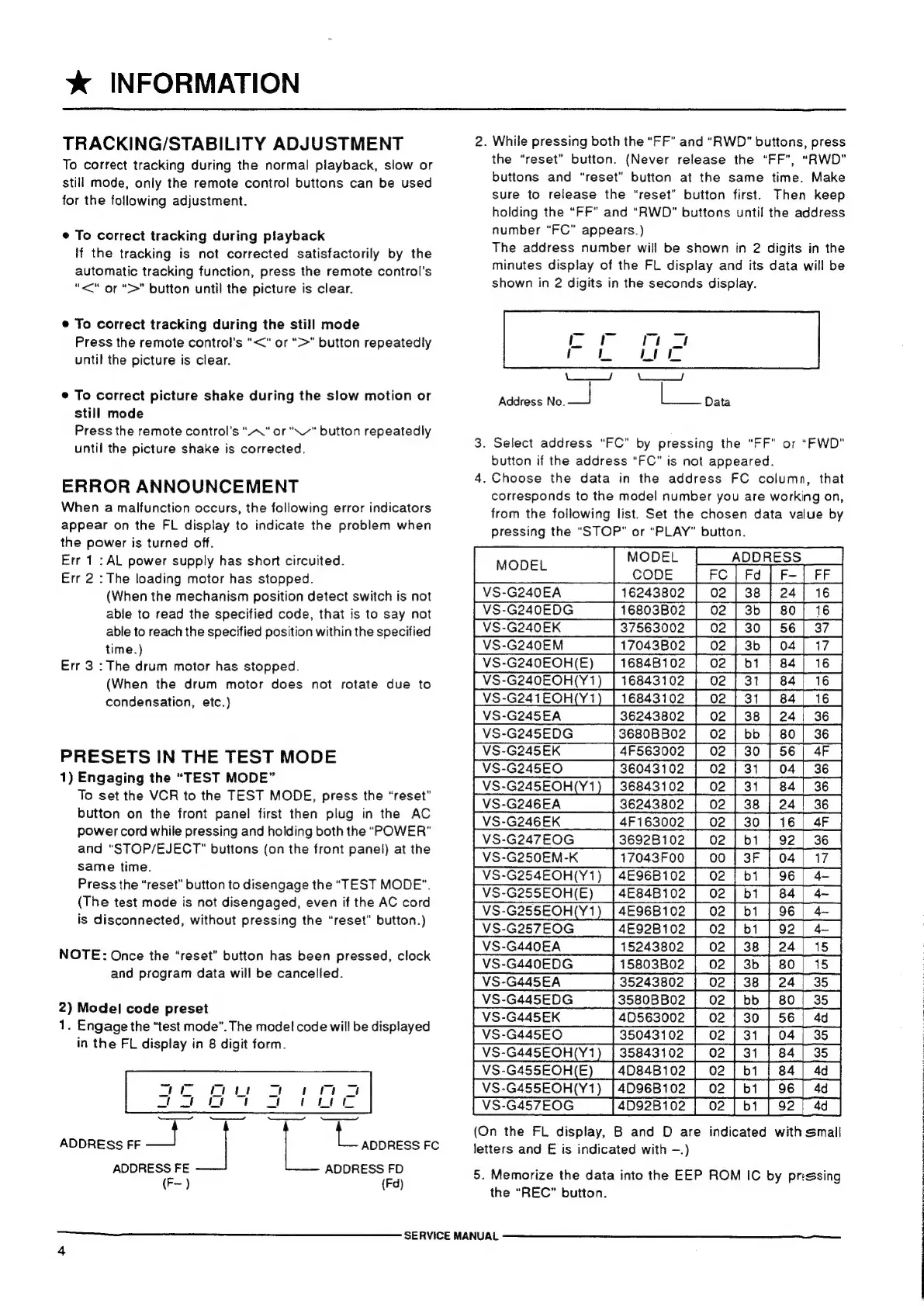
2)
Model
code
preset
1.
Engage
the
“test
mode”.
The
model
code
will
be
displayed
in
the
FL
display
in
8
digit
form.
Necemne—ecen?
ADDRESS
FF
as
|
L
ADDRESS
FC
ADDRESS
FE
ADDRESS
FD
(F-)
(Fd)
SERVICE
MANUAL
2.
While
pressing
both
the
“FF”
and
“RWD”
buttons,
press
the
“reset”
button.
(Never
release
the
“FF”,
“RWD”
buttons
and
“reset”
button
at
the
same
time.
Make
sure
to
release
the
“reset”
button
first.
Then
keep
holding
the
“FF”
and
“RWD”
buttons
until
the
address
number
“FC”
appears.)
The
address
number
will
be
shown
in
2
digits
in
the
minutes
display
of
the
FL
display
and
its
data
will
be
shown
in
2
digits
in
the
seconds
display.
|
ey
|
YL
),
Address
No.
_|
L
Data
3.
Select
address
“FC”
by
pressing
the
“FF”
or
“FWD”
button
if
the
address
“FC”
is
not
appeared.
4.
Choose
the
data
in
the
address
FC
column,
that
corresponds
to
the
model
number
you
are
working
on,
from
the
following
list.
Set
the
chosen
data
value
by
pressing
the
“STOP”
or
“PLAY”
button.
MODEL
CODE
|
VS-G245EDG
«|
3680BB02
|
02
|
bb
|
80
|
36
|
|
VS-G246EK_
sd.
4F
163002
|
02
|
30
|
16]
4F
|
|
VS-G247EOG
_—[
36928102
|
02
|
b1
|
92
|
36
|
|
VS-G250EM-K
|
17043F00
|
00
|
3F
[
04
|
17
|
(Y1)
|
VS-G25SEOH(Y1)
[46968102
|
02
|
bi
|
96
|
4~
|
|
VS-G257EOG___—|.
4E92B102
|
02
|
bi
|
92
|
4
|
3b
|VS-G445EDG
135808802
|
02
|
bb
|
80
|
35
|
[VS-G457EOG
_[4D92B102
|
02
|
b1
|
92
|
4d
|
(On
the
FL
display,
B
and
D
are
indicated
with
small
letters
and
E
is
indicated
with
—.)
5.
Memorize
the
data
into
the
EEP
ROM
IC
by
prising
the
“REC”
button.
fa
aS
LPO
RE
NE
AT:
REISE
TE
REA
TER
A
IW
ee
td
RT
a
RIN
STRIPE
SOE
Se
RT,