Need help?
Do you have a question about the Akko 3068 and is the answer not in the manual?
Press Fn and left Win key to lock the Windows key.
Hold down Fn and press the ~ key to restore factory settings.
Cycles through lighting effects using Fn+Del: Steady, Breathe, One-key light up/off, Wave, Ripple, Raindrop.
Adjusts brightness, dimming, animation direction, and speed using Fn+= combinations.
Instructions for entering and exiting macro mode using Fn+Win and Fn+Esc keys.
Flowchart for starting, recording, and ending macro setup via Fn+Esc and custom keys.
Step-by-step guide on how to record a macro for a specific key, defining 'A' as 'AKKOGEAR'.
Details on Akko's 1-year warranty policy, repair costs, and disassembling voiding warranty.
Lists types of man-made damage not covered by warranty, including immersion and physical force.
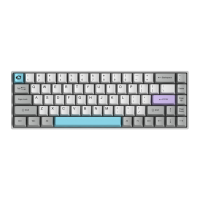
The Akko 3068 is a mechanical keyboard designed for users seeking a compact yet highly functional input device. It is a hardware-based keyboard, meaning its core functionalities, including macro programming, operate without the need for additional software drivers, offering a plug-and-play experience.
The Akko 3068 serves as a versatile mechanical keyboard suitable for various computing tasks, from daily typing to gaming. Its design emphasizes a balance between portability and comprehensive control, incorporating a range of hotkeys and system commands to enhance user efficiency. The keyboard features PBT keycaps, known for their durability and resistance to shine over time, contributing to a premium typing feel and longevity. Connectivity is facilitated via a Type-C to USB interface, ensuring a stable and widely compatible connection.
For users who require advanced customization, the Akko 3068 supports custom keys through Akko Macro V1.0. This macro system allows users to program specific key sequences or functions directly onto the keyboard's hardware, eliminating reliance on software. This is particularly beneficial for gamers or professionals who need quick access to complex commands without interruption. The keyboard also boasts N-Key Rollover, a crucial feature for fast typists and gamers, ensuring that every key press is registered accurately, even when multiple keys are pressed simultaneously.
The 3068S version of the keyboard includes a single-color backlight, adding both aesthetic appeal and practical utility for typing in low-light conditions. The backlight offers various lighting effects and adjustable settings, allowing users to personalize their typing experience further.
The Akko 3068 is designed for ease of use with a comprehensive set of hotkeys and system commands.
The keyboard integrates function keys (F1-F12) with multimedia and utility controls. For instance, F1-F10 can be accessed via Fn+1-0. Dedicated hotkeys for calculator (Fn+C), insert (Fn+|), mute (Fn+M), decrease volume (Fn+<), and increase volume (Fn+>) are readily available. Navigation keys like Home, PgUp, End, and PgDn are also accessible through Fn combinations. A unique feature is the ability to swap WASD keys with arrow keys (Fn+W), which is particularly useful for left-handed gamers or those who prefer alternative control schemes. The keyboard also allows users to revert the right Ctrl key into a Menu (APP) key by holding down Fn and pressing right Ctrl, offering flexibility in key assignments.
To prevent accidental interruptions during critical tasks, the Akko 3068 includes a Windows Key Lock feature, activated by pressing Fn and the left Win key. This prevents the Start Menu from popping up during intense gaming sessions. For troubleshooting or resetting preferences, the keyboard offers a factory reset option, accessible by holding down Fn and pressing the ~ key.
The backlight functionality on the 3068S model provides both visual enhancement and practical utility. Users can cycle through various lighting effects such as Steady, Breathe, One-key light up/off, Wave, Ripple, and Raindrop by pressing Fn+Del. The backlight's brightness can be adjusted using Fn+ and Fn+-. Animation direction can be set to left (Fn+←) or right (Fn+→), and animation speed can be controlled with Fn+< (slower) and Fn+> (faster). It's important to note that some lighting effects, like constant light, only allow brightness adjustments as they lack animation speed and direction.
The Akko Macro V1.0 system is a powerful hardware-based macro programming tool.
Fn + Win for 3 seconds. The keyboard will exit Macro mode if re-connected or the system is restarted, requiring re-entry to use programmed keys.Fn + Left Win for 3 seconds).Fn + Esc).Fn + Custom Key).Fn + Custom Key again).Fn + Esc).Fn + Left Win for 3 seconds).Fn + Custom Key.Fn + Left Win for 3 seconds.The Akko 3068 is designed with durability in mind, featuring PBT keycaps that are resistant to wear and tear. While the manual does not explicitly detail user-level maintenance beyond general care, the hardware-based nature of its macro system means there is no software to update or troubleshoot, simplifying long-term use.
Akko provides a 1-year warranty for customers in mainland China. For other regions, warranty policies are handled by the local Akko distributor. If the warranty expires, users may opt for paid repairs or attempt self-repair with Akko's guidance, though full responsibility for any loss during self-repair lies with the user. Disassembling the keyboard without manufacturer/seller instruction will void the warranty. Warranty policies may vary across different platforms and distributors.
The warranty does not cover man-made damage, which includes but is not limited to immersion, falling, or excessive force applied to wires. This emphasizes the importance of careful handling to ensure the longevity of the device.
 General
| Layout | 65% |
|---|---|
| Number of keys | 68 |
| Keycap Material | PBT |
| Hot-swappable | Yes |
| Compatibility | Windows, MacOS |
| Switch Type | Akko Switch |
| Connectivity | Wired |
| Backlight | RGB |
| Dimensions | 316mm x 120mm x 40mm |
| Weight | 0.7 kg |

 To Next Page