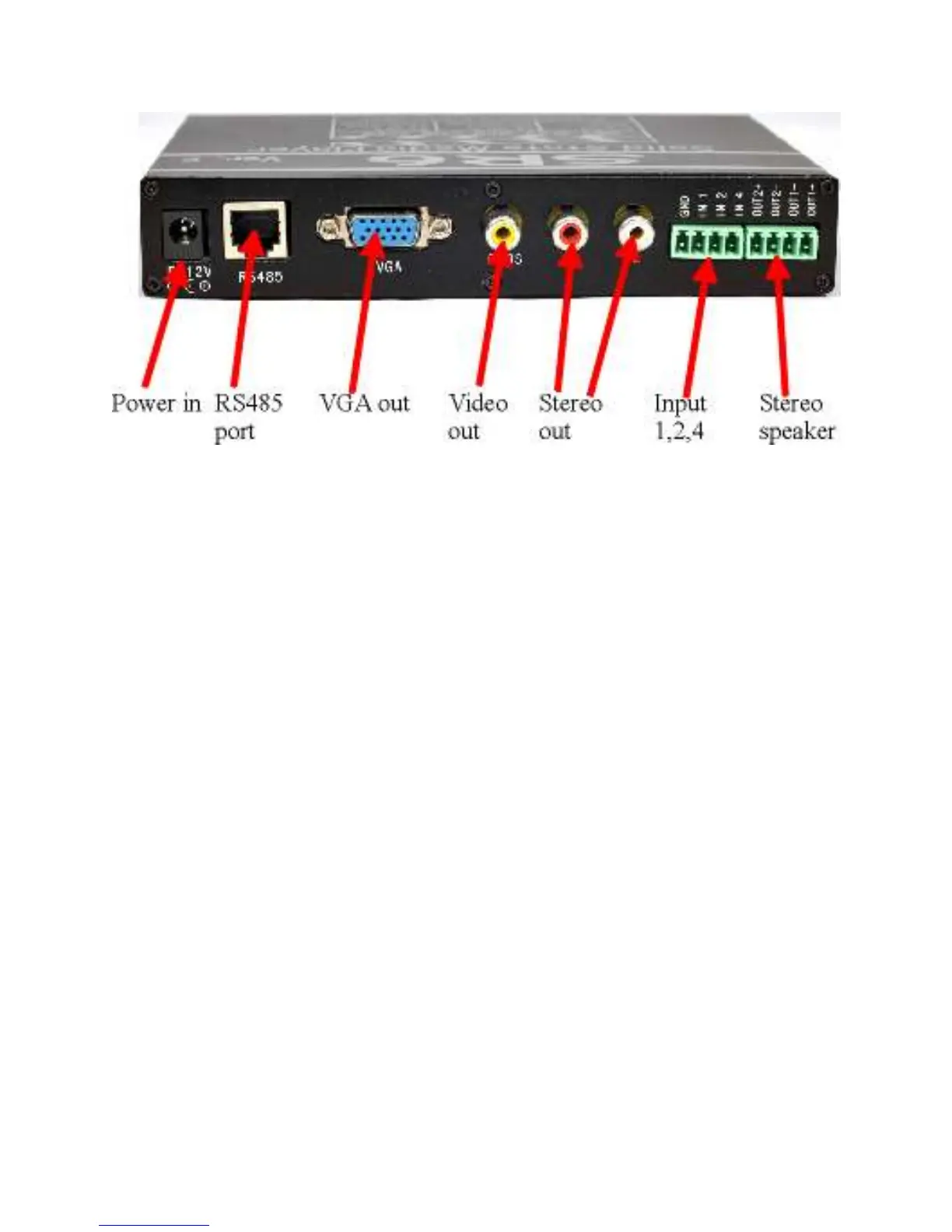
REAR VIEW:
Composite Video:
Connect into composite video out of your monitor. Output is always ON.
Output is automatically adjusted to NTSC or PAL.
VGA out:
Connect into the VGA input of a PC monitor. Output is always ON.
Output is 640 X 480.
STEREO out:
Stereo audio line out. Connect this into the audio in of the video monitor or
external audio amplifier.
Digital Input:
SR6 digital input, to trigger short momentarily to ground.
IN1 … triggers statement 01xxxx in the playlist.txt.
Example: 010000=bird.mp3
If IN1 is triggered, bird.mp3 will play.
IN2 … is statement 02xxxx in the playlist.txt
IN4 … is statement 04xxxx in the playlist.txt
IN3 … (IN1+IN2) is statement 03xxxx in the playlist.txt
IN5 … (IN1+IN4) is statement 05xxxx in the playlist.txt
IN6 … (IN2+IN4) is statement 06xxxx in the playlist.txt
To expand output to 48, use IN6 input board.
Special IR function for SR6 digital input:
The SR6 digital input can be converted into special function such as Pause/Play,
Next, Previous etc.
Please refer to page 8 of this manual for more info.



 To Next Page