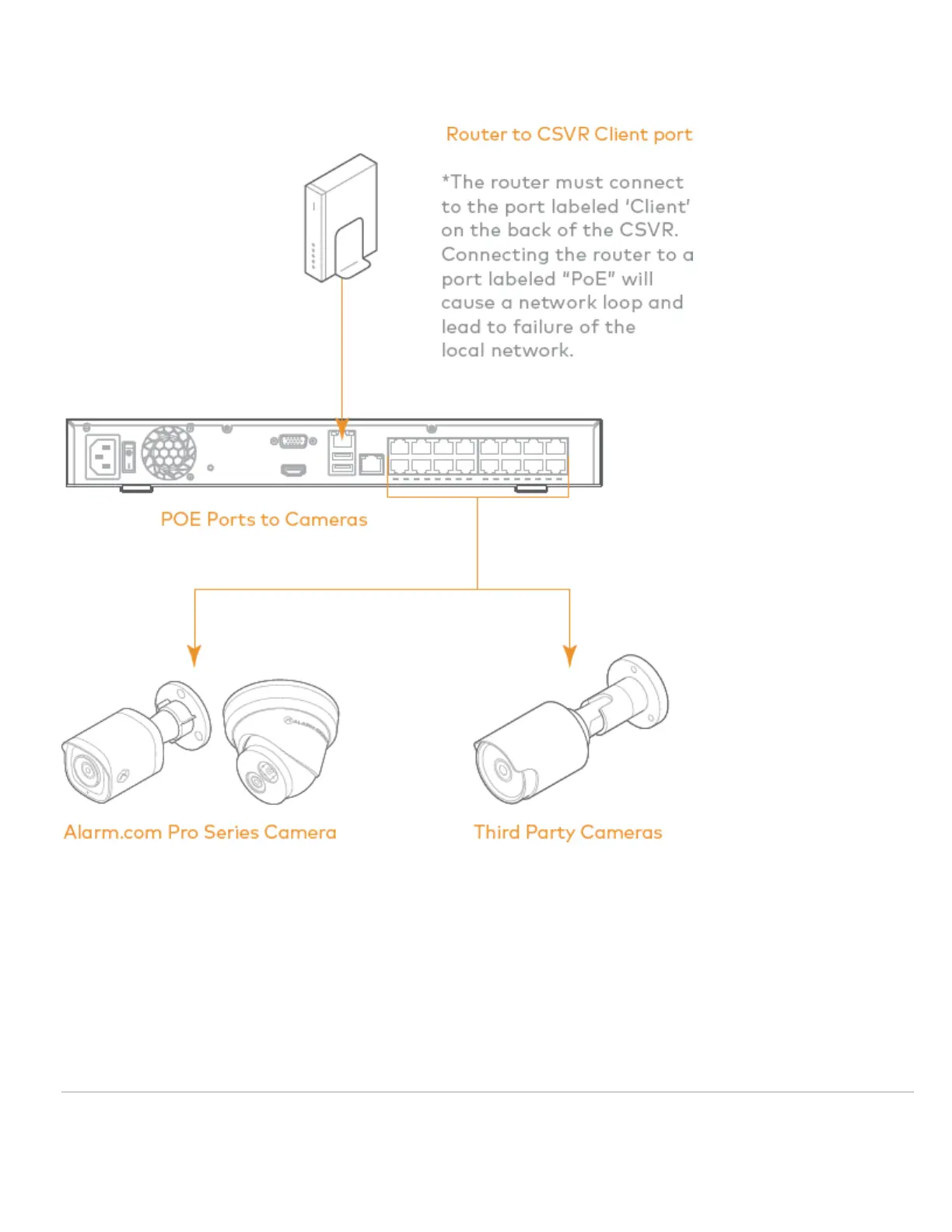
Recommended networking diagram for CSVR2108P/CSVR2116P
Note: To optimize performance, Alarm.com recommends using our Pro Series PoE Cameras with the Pro Series CSVR.
Adding the device to the Alarm.com account
1. Using an Ethernet cable, connect the device to the network.
2. If you wish to use a display with your Pro Series CSVR, please connect it to one of the HD Out ports using an
HDMI cable or the VGA port using a VGA cable.
3. Connect the device to a non-switched, grounded power outlet.
4. For the CSVR2108P/CSVR2116P: Use the switch on the back of the device to turn on your Pro Series CSVR.
5. Wait for the device to boot up. A solid green status LED indicates that the device is ready to be added to the
https://answers.alarm.com/Partner/Installation_and_Troubleshooting/Video_Devices/Commercial_Stream_Video_Recorder_(…
Updated: Fri, 06 Sep 2024 22:06:09 GMT
4



 To Next Page