3
be opened up to 15 seconds without activating an alarm. If no
code is entered or if the door remains open longer than 15
seconds, a non-latching alarm will sound; that is, when the
door is closed, the alarm will shut down and the unit will reset.
Applications include unattended doors as may be found at fire
stairwells, airport high-security areas, etc. that must remain
closed after passage. To enable Level-2 security, first enter
the Master Code or Management Code, then press [AL] [4] [4]
[AL].
Level 3. Entering the Passage Code allows the door to
remain open indefinitely without activating an alarm. When the
door is closed, the unit will rearm automatically. A typical ap-
plication might be a delivery entrance where the door is
propped open for long periods of time. To enable Level-3 se-
curity, first enter the Master Code or Management Code, then
press [AL] [5] [5] [AL].
ALARM TYPES
Sweep Siren. This is the default alarm. To re-program a
Sweep Siren alarm (if changed), enter the Master Code or
Management Code, then press [AL] [1] [1] [AL].
Steady Siren. To program a Steady Siren alarm, enter the
Master Code or Management Code, then press [AL] [1] [2] [AL].
Pulsing Siren. To program a Pulsing Siren alarm, enter the
Master Code or Management Code, then press [AL] [1] [3] [AL].
ANNUNCIATOR VOLUME
Low. This is the default setting. Low volume is adjusta-
ble by means of the potentiometer at the upper-left corner of
the circuit board; clockwise rotation increases loudness. To
reprogram Low-volume annunciator (if changed), press the
Master Code or Management Code, then press [AL] [1] [4]
[AL].
High. This setting provides maximum loudness. To pro-
gram High volume, press the Master Code or Management
Code, then press [AL] [1] [5] [AL].
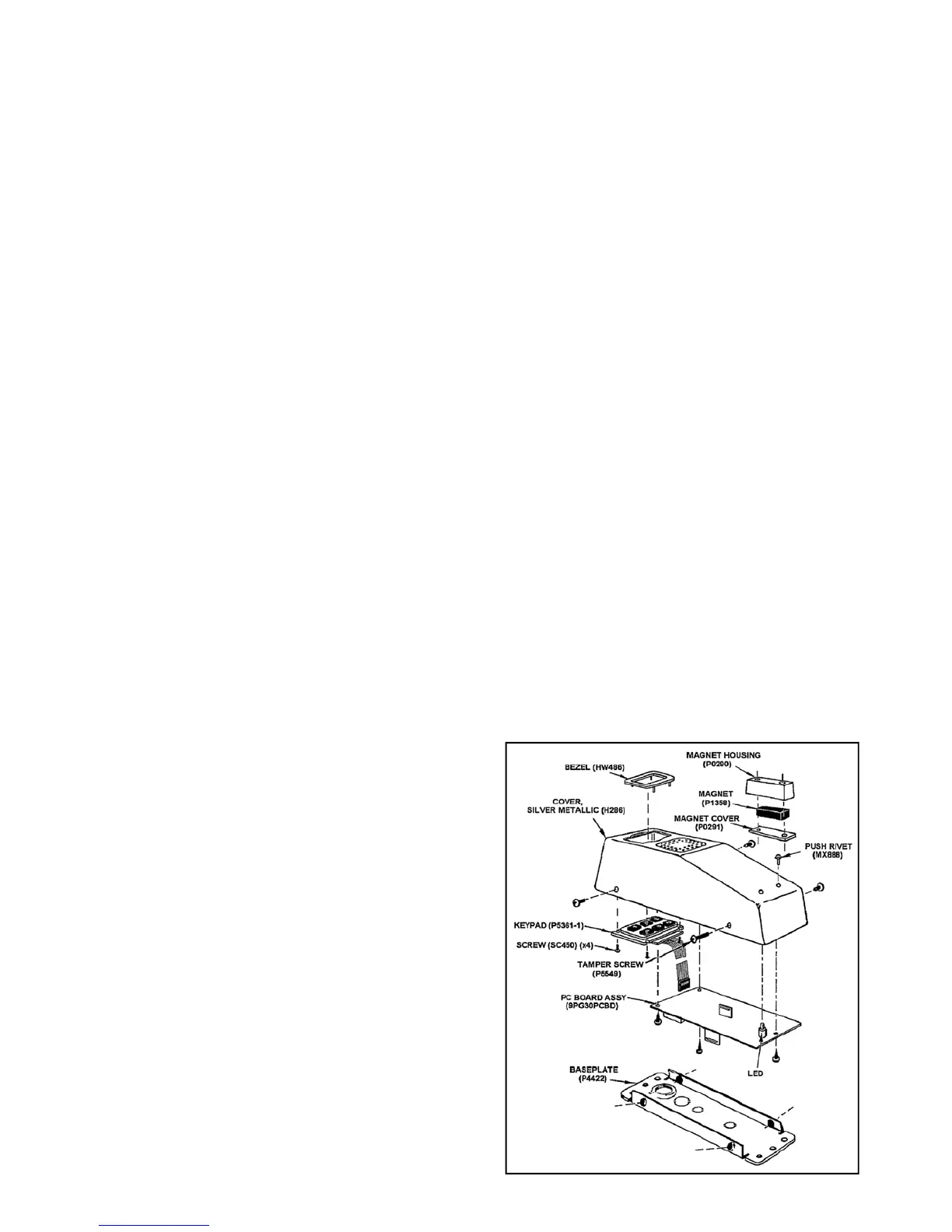
EXPLODED VIEW
Codes: Master, Management, and Passage Codes;
Security Level (Level 1, 2 or 3);
Alarm Type: Sweep, Steady, or Pulsing Siren; and
Annunciator Volume: Low or High.
We recommend the unit be programmed after it has been
mounted and the door closed, as the tamper switch must be
installed and the magnet properly positioned with respect to
the active reed switch. If it is desired to pre-program the unit
before mounting, keep the tamper switch closed (install tamper
screw) and the reed switch closed (place magnet near switch)
until programming is completed.
Note: (1) When entering codes or programming, each but-
ton must be pressed within 5 seconds of the last or the unit will
time out. (2) Press the [AL] button to cancel a wrong code
entry (prior to completion). (3) Seven beeps indicate that the
programmed code has been accepted. (4) Five beeps indi-
cate either a wrong code entry or a programming error. (5)
Three unsuccessful attempts to enter a code will sound a loud
2-second alert.
CODES
Each code may be 3 to 5 digits in length.
Master Code. The Master Code can be used to program
any code or feature or to arm or disarm. The default Master
Code is 1 2 3 4 5. This default Master Code must be changed
before any other code or function can be programmed. To
program a new Master Code, press [1] [2] [3] [4] [5] [AL] [1]
[AL] [new Master Code] [AL].
Note: Be sure to enter the new Master Code carefully. If
the wrong Code is entered and is unknown, press the CLEAR
button on the circuit board to reset the unit and erase all
codes, then start over. (Whenever the CLEAR button is
pressed, all programmed Codes are erased and the Master
Code defaults to 1 2 3 4 5).
To program the Management Code (see below), press the
Master Code, then press [AL] [2] [AL] [new Management
Code] [AL].
Management Code. The Management Code may be used
to program the Passage Code, any feature, or to silence the
alarm.
Passage Code. This code allows passage through the
protected door without altering the arm/disarm status of the
unit. If the unit is armed, the door must be closed within 15
seconds or the alarm will sound. The Passage Code may be
used with any programmed security level.
To program the Passage Code, enter the Master Code or
Management Code, then press [AL] [3] [AL] [new Passage
Code] [AL].
SECURITY LEVELS
There are three levels of security to accommodate different
applications. Note: The tamper switch and keypad are disa-
bled until the door is closed. Security levels are programmable
using the Master Code or Management Code:
Level 1. Provides the highest level of security and is the
default mode of operation. Opening the door while armed will
cause the alarm to latch on (after the entry delay, if enabled).
The alarm may only be reset using the Master Code or the
Management Code. To re-program Level-1 security (if
changed), enter the Master Code or Management Code, then
press [AL] [3] [3] [AL].
Level 2. Entering the Passage Code will allow the door to
Fig. 4. Exploded view with part numbers


 To Next Page
 Loading...