
 Need help?
Do you have a question about the Alba B-3319 and is the answer not in the manual?
Covers essential safety guidelines, including reading instructions, avoiding water, cleaning, ventilation, heat sources, and servicing.
Details FCC regulations for Class B digital devices, potential radio frequency interference, and measures to correct interference.
Provides warnings on electric shock, radiation exposure, modifications, furniture staining, fluorescent lighting interference, and battery hazards.
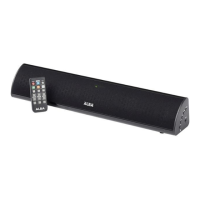
Lists product details like length, Bluetooth version, EDR, A2DP profile, wireless range, volume control, remote, inputs, indicators, and mountability.
Details the items included in the box: remote control, RCA cables, power adapter, and wall-mount hardware.
Instructions for plugging the soundbar into a power outlet using the provided DC input cable and adapter.
Guide on how to insert or replace the CR2025 coin/button cell battery in the remote control.
Identifies the Stereo RCA Audio Inputs (AUX IN) and Optical Input located on the back of the soundbar.
Locates the DC power input connection on the soundbar.
Explains the function of the Power, Source, Volume, and Pair buttons located on the side of the soundbar.
Details the purpose of each button on the remote, including power, source selection, volume, EQ, and playback controls.
Explains the status indicated by different LED lights: power, audio modes (Optical, Aux, Line In), and Bluetooth pairing/connection.
Step-by-step guide to connect a computer via RCA cables to the AUX IN for audio output.
Instructions for connecting a television or other device using RCA cables to the AUX IN.
Procedure for connecting audio sources using a digital optical cable to the Optical Input.
Advice on using toslink cables, ensuring secure connections, and configuring source audio settings (PCM, SPDIF).
Steps to connect an MP3 player or other audio source using a 3.5mm cable to the unit's Line In port.
Detailed instructions for first-time pairing, including powering on, selecting Bluetooth mode, and using the Pair button.
Guide on selecting tracks and controlling playback (play, pause, skip) using the connected Bluetooth device or remote.
 General
| Brand | Alba |
|---|---|
| Model | B-3319 |
| Category | Speaker System |
| Language | English |

 To Next Page