EasyManua.ls Logo

Alba B-3319 - Remote Control and Indicators; Remote Layout Functions; Indicator Light Meanings

Alba B-3319
11 pages
Print Icon
To Next Page IconTo Next Page
To Previous Page IconTo Previous Page
Loading...
6
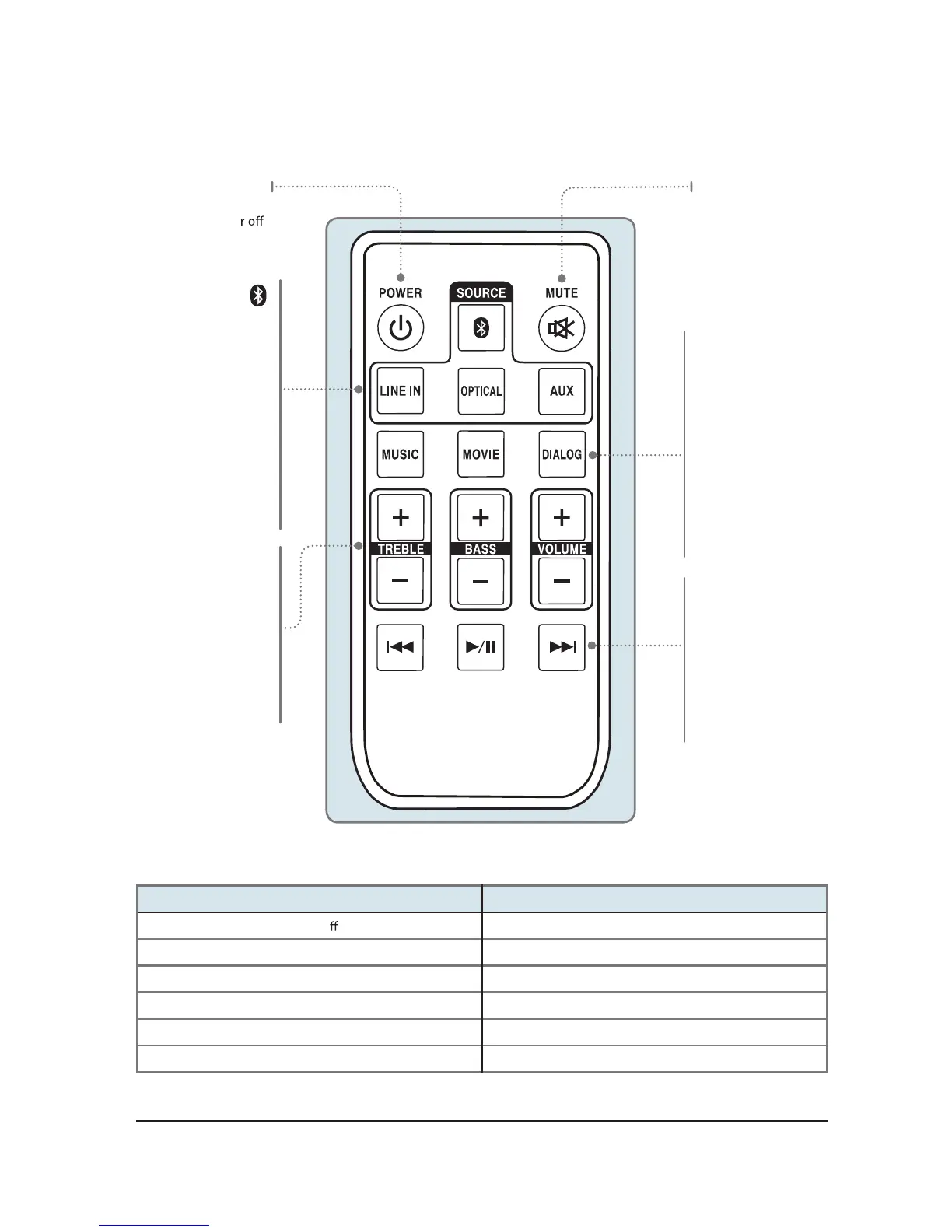
Remote Layout
Power
Press to turn
the unit on o .
Mute
Press to mute
the volume.
Press to switch
to Bluetooth Mode.
Line In
Press to switch
to Line In mode.
Optical
Press to switch
to Optical mode.
AUX
Press to switch
to Aux In mode.
Music
Press to switch to
the EQ optimized
for music.
Movie
Press to switch to
the EQ optimized
for movie sound.
Dialog
Press to switch to
the EQ optimized
for dialog.
Treble
Press to adjust the
treble up or down.
Bass
Press to adjust the
bass up or down
Volume
Press to adjust
the volume.
Skip Back/Fwd
In bluetooth mode,
press to skip the
selected track.
Play/Pause
In bluetooth mode,
press to play or
pause the selected
track.
Indicator Lights
STATUS INDICATOR
Power O
Red Light
Optical Mode Amber Light
Aux In Mode White Light
Line In Mode Green Light
Bluetooth Pairing Flashing Blue Light
Bluetooth Connected Blue Light