29 30
Power key
• Press: Lock the screen/Light up the screen.
• Press and hold: Show the popup menu to
select from Restart/Power off/Aeroplane
mode.
• Press and hold the Power key and Volume
down key to take a screenshot.
• Press and hold the Power key for at least 10
seconds to force reboot.
The Google Assistant Button
• Press: Launch Google Assistant.
Volume keys
• Adjust the call volume during a phone call.
• Adjust the media volume while listening to
music or a video, or streaming content.
• Adjust the media volume.
• Mute the ringtone of an incoming call.
• While using the Camera app, press the Volume
up or down key to take a photo or touch and
hold to shoot continuously.
• Double-press the Volume up key to open the
camera.
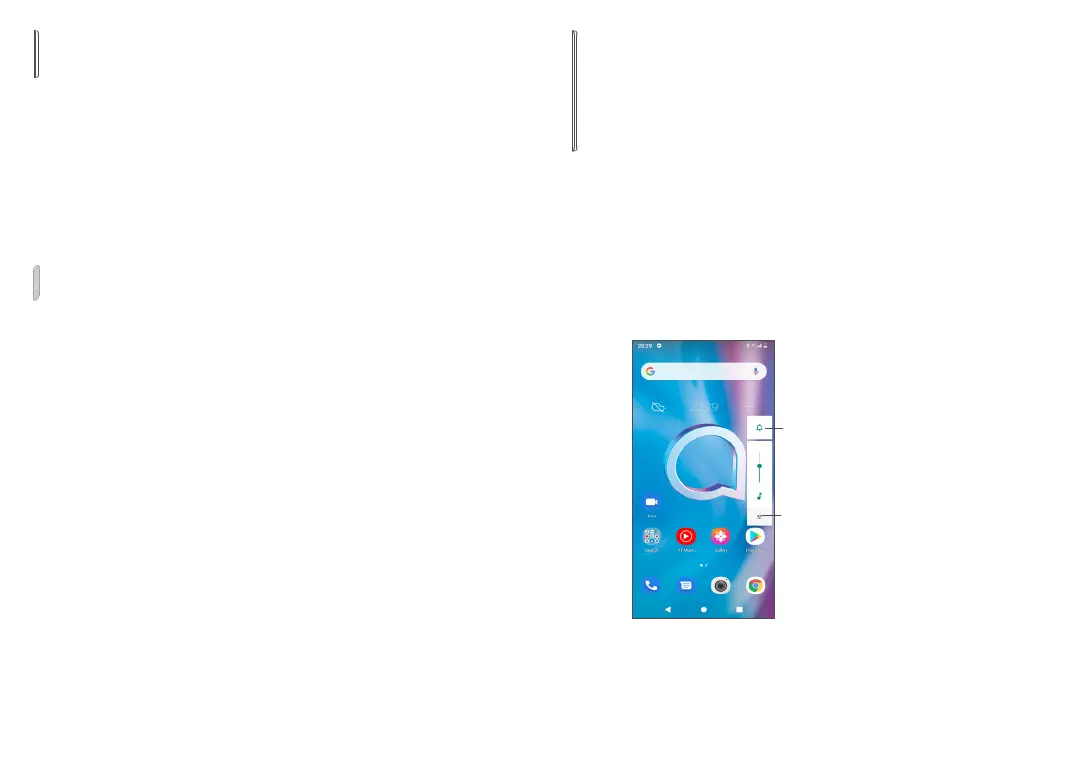
• Convenient operations
Touch to switch
between Sound,
vibrate and Mute
Touch to adjust the
volume of media,
calls, ringtones,
alarms or notifications



 To Next Page