7 8
1.2 Setup
Setup your phone for the first time
The first time you power on the phone, you should set the following options:
• Touch to select the phone's language, then touch .
• Select an enabled Wi-Fi, then touch Next, otherwise touch Skip.
• Set up date and time if needed, then touch Next.
• Enter the name to allow the phone to personalize some applications, then touch Next.
• Set up Fingerprint to unlock the screen by touching Next, otherwise touch Skip.
• Set up Face recognition to unlock screen by touching Add face data, otherwise touch Skip.
• Set up Google Services by marking the corresponding checkboxes, touch MORE to learn more about Google
Services, then touch NEXT.
Note: Even if no SIM card is installed, your phone will still power on and you will be able to connect to a Wi-Fi network
and use some of the phone's features.
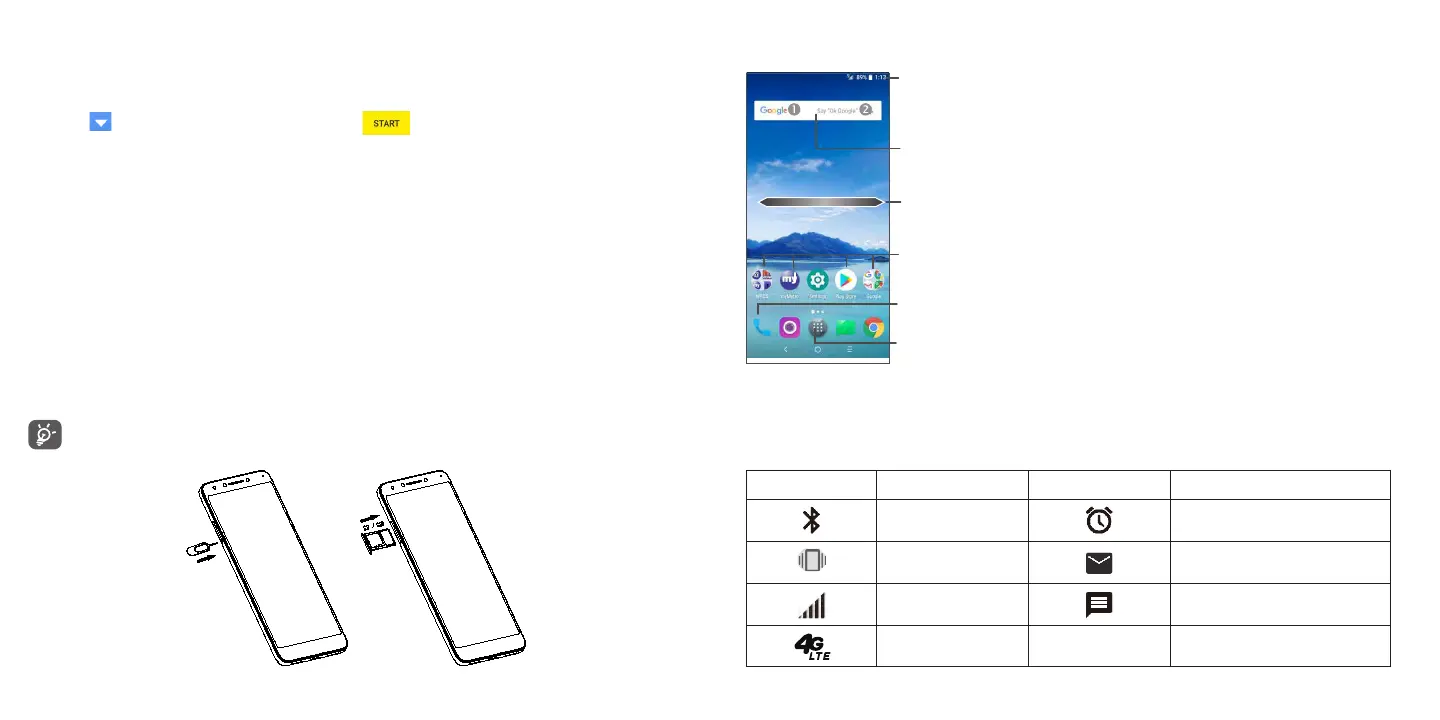
Inserting Nano SIM card
You must insert your Nano SIM card to make phone calls using your network.
Your phone only supports Nano SIM card. Do not attempt to insert other SIM types like Mini or Micro cards,
otherwise you may damage your phone.
1.3 Home Screen
Enter the applications list.
Status bar
•Status/Notification indicators
•Touch and drag down to open the Notification panel.
Swipe left or right to view more screens
Touch an icon to open an
application, folder, etc.
Favorite tray applications
•Enter the application.
•Long press to move or remove applications.
Search bar
Enter text search screen.
Enter voice search screen.
1.4 Status Bar
From the status bar, you can view both phone status (to the right side) and notification information (to the left side).
Here is a list of the icons you might see and their meanings:
Icon Status Icon Status
Bluetooth® active Alarm set
Vibrate New E-Mail
Network (full signal) New message
4G LTE data service











 To Next Page