EasyManua.ls Logo

Alcatel 7071A - User Manual

Alcatel 7071A
10 pages
Print Icon
To Next Page IconTo Next Page
Loading...
1
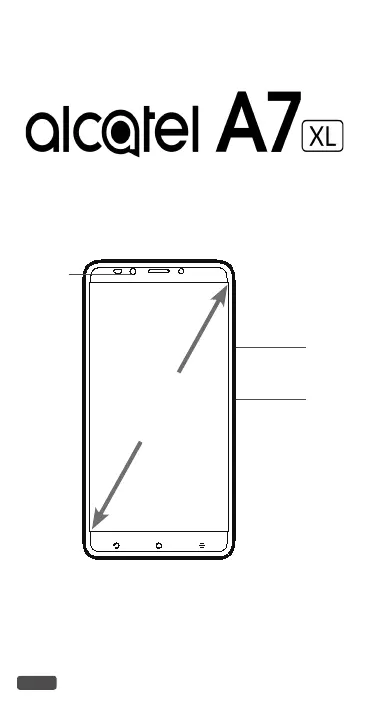
QUICK START GUIDE
Power key
Volume up/down
Front
camera
6"
CJB1K61ALAAA
7071A

Questions and Answers

  • C
    Craig LarsenSep 23, 2025
    What to do if the phone doesn't ring when a call or message arrives on Alcatel 7071A Cell Phone?
    • L
      Luis DudleySep 23, 2025
      If your Alcatel Cell Phone doesn't ring for calls or messages, make sure that Do Not Disturb mode (Settings > Sound & notification > Do Not Disturb) is not activated. Adjust the volume using the Volume up/down key.
  • A
    Alan SweeneyAug 25, 2025
    Why does my Alcatel 7071A battery drain so fast?
    • M
      Miss Holly RamirezAug 25, 2025
      Several factors can cause your Alcatel Cell Phone battery to drain quickly. To optimize battery life: * Ensure the phone charges for at least 135 minutes. * After a partial charge, wait 20 minutes after removing the charger for an accurate battery level. * Adjust screen brightness. * Increase the email auto-check interval. * Manually update news/weather or increase their check interval. * Close unused background apps. * Turn off Bluetooth, Wi-Fi, or GPS when not in use.
  • V
    vperezAug 25, 2025
    What to do if my Alcatel Cell Phone can't charge properly?
    • E
      Erin RogersAug 26, 2025
      If your Alcatel Cell Phone isn't charging correctly, ensure you're using the charger that came with the phone. If your phone has a removable battery, check that it's properly inserted and making good contact. If the battery is completely discharged, it may take about 20 minutes for the charging indicator to appear. Charging should be carried out under normal conditions (0°C (32°F) to 40°C (104°F)). When abroad, verify voltage input compatibility. Also, inspect the charging port for damage.
  • A
    Adam LeonardAug 27, 2025
    Why is there an invalid SIM card error on my Alcatel Cell Phone?
    • R
      Richard GonzalezAug 27, 2025
      If your Alcatel Cell Phone displays an invalid SIM card error, ensure that the SIM card has been correctly inserted. Also, check that the chip on your SIM card is not damaged and that the service of your SIM card matches the network you’re on.
  • J
    Jamie JensenAug 27, 2025
    What to do if my Alcatel Cell Phone can't connect to the internet?
    • D
      donnaromanAug 27, 2025
      If your Alcatel Cell Phone can't connect to the internet, first ensure that your wireless service plan includes Cellular Data. Check your phone's settings to verify that Cellular Data is enabled or that you're connected to Wi-Fi. Also, make sure you're in an area with network coverage for cellular data or Wi-Fi. If problems persist, try connecting at a later time or from a different location.
  • T
    Thomas BrownSep 14, 2025
    What to do if SIM card PIN locked on Alcatel 7071A?
    • J
      Jeanette SmithSep 14, 2025
      If your SIM card is PIN locked on your Alcatel Cell Phone, contact your network carrier to obtain the PUK (Personal Unblocking Key) code.
  • M
    Molly RobertsSep 12, 2025
    What to do if I can't add a contact on my Alcatel 7071A?
    • L
      Larry WrightSep 12, 2025
      If you can't add a contact to your Alcatel Cell Phone, ensure that your SIM card contact list is not full. If it is, delete some files or save the files to the phone.
  • T
    Terry SpencerSep 12, 2025
    What to do if the phone becomes warm following prolonged calls, game playing, internet surfing or running other complex applications on Alcatel Cell Phone?
    • W
      wrighttoniSep 13, 2025
      The heating you experience on your Alcatel Cell Phone during prolonged use with calls, games, or internet is a normal consequence of the CPU handling excessive data. Ending these activities will allow your phone to return to its normal temperature.
  • L
    laceyphelpsSep 4, 2025
    What to do if I forget some passwords/codes/keys on my Alcatel Cell Phone?
    • S
      stephanie31Sep 4, 2025
      If you forget passwords, codes, or keys on your Alcatel Cell Phone, perform a Factory data reset.
  • A
    Alexis FordSep 2, 2025
    What to do if I can't send and receive MMS on my Alcatel 7071A Cell Phone?
    • S
      smithmckenzieSep 2, 2025
      If you're having trouble sending and receiving MMS messages on your Alcatel Cell Phone, first check if your phone memory is full. Contact your network carrier to verify service availability and MMS parameters. Also, confirm the server center number or your MMS profile with your carrier. If the server center is busy, try again later. Starting a new messaging string may also help, as your current string may have reached its limit.

Alcatel 7071A Specifications

General IconGeneral
BrandAlcatel
Model7071A
CategoryCell Phone
LanguageEnglish

Related product manuals