EasyManua.ls Logo

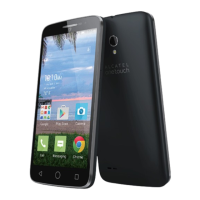
Alcatel 7071A - User Manual

Alcatel 7071A
10 pages
Print Icon
To Next Page IconTo Next Page
Loading...
1
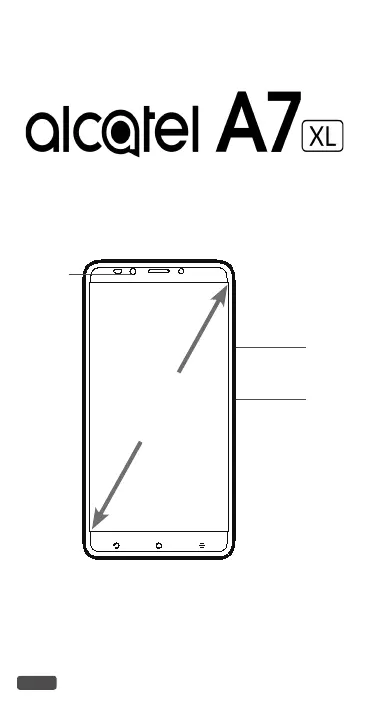
QUICK START GUIDE
Power key
Volume up/down
Front
camera
6"
CJB1K61ALAAA
7071A

Questions and Answers

  • B
    Brenda DavidsonSep 10, 2025
    What to do if I can't find my contacts on my Alcatel 7071A Cell Phone?
    • B
      Brian BrooksSep 12, 2025
      If you can't find your contacts on your Alcatel Cell Phone, make sure that your SIM card is not broken and is inserted properly. You may also need to import all contacts stored on the SIM card to your phone.
  • E
    Erin DelgadoSep 9, 2025
    What to do if I can't use the features described in the manual for Alcatel 7071A?
    • S
      Susan WallsSep 9, 2025
      If you can't use certain features described in the manual for your Alcatel Cell Phone, check with your carrier to ensure your subscription includes the service. Also, verify that the feature doesn't require any additional accessories.
  • C
    charrisSep 8, 2025
    What to do if I can't access my voicemail on my Alcatel 7071A Cell Phone?
    • J
      Joshua HarrisSep 8, 2025
      If you can't access your voicemail on your Alcatel Cell Phone, make sure that your carrier’s voicemail number is correctly entered in "Voicemail number". If the network is busy, try again later.
  • A
    Austin SmithAug 23, 2025
    What to do if my Alcatel 7071A can't be switched on?
    • W
      Walter StuartAug 23, 2025
      If your Alcatel Cell Phone doesn't switch on, charge it for at least 20 minutes to ensure it has sufficient battery power. Then, try switching it on again.
  • K
    kevinsmithSep 5, 2025
    What to do if the caller’s name/number doesn't appear when a call is received on my Alcatel 7071A Cell Phone?
    • T
      Tina DelgadoSep 5, 2025
      If the caller's name or number doesn't appear when you receive a call on your Alcatel Cell Phone, verify that you have subscribed to Caller ID service with your carrier. The caller may also have concealed their name or number.
  • L
    laceyphelpsSep 4, 2025
    What to do if I forget some passwords/codes/keys on my Alcatel Cell Phone?
    • S
      stephanie31Sep 4, 2025
      If you forget passwords, codes, or keys on your Alcatel Cell Phone, perform a Factory data reset.
  • K
    kimberlycollinsSep 3, 2025
    What to do if the sound quality of the calls is poor on my Alcatel 7071A?
    • H
      hooverrichardSep 3, 2025
      If the sound quality during calls on your Alcatel Cell Phone is poor, adjust the volume using the Volume up/down key. Check the network strength and move to a location with a stronger signal. Also, ensure that the receiver, connector, or speaker on your phone is clean.
  • A
    Alexis FordSep 2, 2025
    What to do if I can't send and receive MMS on my Alcatel 7071A Cell Phone?
    • S
      smithmckenzieSep 2, 2025
      If you're having trouble sending and receiving MMS messages on your Alcatel Cell Phone, first check if your phone memory is full. Contact your network carrier to verify service availability and MMS parameters. Also, confirm the server center number or your MMS profile with your carrier. If the server center is busy, try again later. Starting a new messaging string may also help, as your current string may have reached its limit.
  • N
    Nicholas LynchSep 1, 2025
    What to do if my Alcatel 7071A can't connect to a network or "No service" is displayed?
    • H
      hwagnerSep 1, 2025
      If your Alcatel Cell Phone displays "No service" or can't connect to a network, try moving to another location. Verify network coverage with your carrier in your current area and confirm that your SIM card is valid with your carrier. Ensure your phone isn’t in airplane mode. If you're outside your carrier's network, enable roaming in your phone’s settings, but be aware that roaming charges may apply.
  • D
    Dustin BurtonAug 31, 2025
    What to do if my Alcatel 7071A Cell Phone turns off by itself?
    • A
      Alan CurryAug 31, 2025
      If your Alcatel Cell Phone is turning off unexpectedly, first ensure that you are not accidentally pressing the Power key. Check the battery charge level to make sure it's sufficient. Also, verify your phone’s settings to see if there is a scheduled power off time set. As a last resort, you can factory reset the phone via Backup & reset in the phone’s Settings, but be sure to back up your data first.

Alcatel 7071A Specifications

General IconGeneral
BrandAlcatel
Model7071A
CategoryCell Phone
LanguageEnglish

Related product manuals