Ph: 07 4047 7007 Fax: 07 4047 7090 Ph: 07 4047 7007 Fax: 07 4047 7090
www.telequip.net Email service@telequip.net www.telequip.net Email service@telequip.net
ABN 63 155 081 897 137 Sheridan St, CAIRNS QLD 4870 ABN 63 155 081 897 137 Sheridan St, CAIRNS QLD 4870
Permanent features keys: located just above the loudspeaker
Mute and intercom key.
During a call, press this key to stop your contact from hearing you.
When idle, press this key to switch the phone to intercom mode. When
you receive a call, the phone hooks off automatically and you go
straight into hands free mode. When activated, this is key blue
Turn down the volume
Lower the contrast
Turn up the volume
Increase the contrast
Pressing this key answers an incoming call in hands free mode (the
key is blue). When a call is in progress, pressing this key switches from
hands free mode to headset or handset mode.
Programmable keys (F1 and F2 keys).Lit when the function
associated with the key is activated. A service or a direct call can be
associated to these keys.
Redial key: to access the ’Redial’ feature.
Last number redial (short press)
Call back on the last 10 number dialled (long press)
Guide key: Used to obtain information on functions of the .menu. page
and to program key of the “person” page
Messaging key: to access various mail services
This key is lit when you have received a new voicemail, text message
or callback request.
Quick Reference Guide
for
Alcatel 8xxx Phones

 Need help?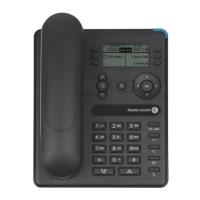












 To Next Page
 General