2 3
Using Message Options ........................23
Deleting Messages ................................24
Message Settings ..................................24
7. Browser ..............................25
Launching Browser ............................... 25
Accessing a WAP Site ........................... 26
Navigating with the Browser ................. 26
Settings .................................................27
8. Settings ..............................27
Accessing the Settings Menu ................27
Sound ...................................................27
Phone Settings ......................................29
Call Settings ..........................................31
Airplane mode .......................................32
Security .................................................32
Connectivity...........................................32
Restore default ......................................32
9. Alarm
.................................33
10. Tools .................................34
11. My folder
............................37
Buy Ringtones and Graphics .................37
My images ............................................37
Others ................................................... 37
Memory Status .....................................37
12. Safety and Use ......................38
13. General Information ................46
1. Basics
Activating Your Phone
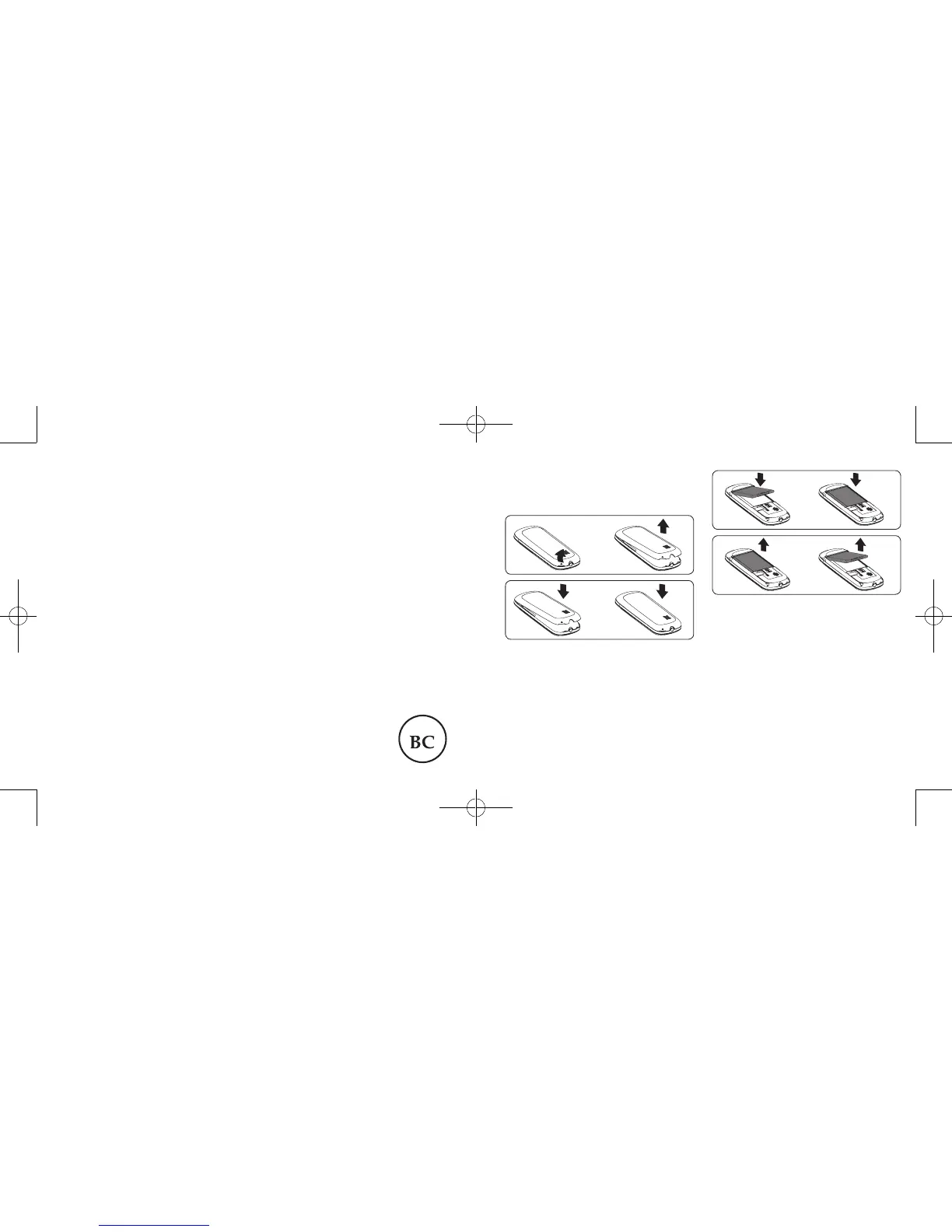
Removing or Installing the Back Cover
Installing or Removing the Battery
1. Place the battery on the back of the phone
so the metal contacts match up on the
battery and in the battery cavity.
2. Slide the battery down into the battery
cavity until it locks into place.
3. To remove, lift the battery out of the cavity
from the upper right corner.
Zodiac Refresh_Unlockable_Alcatel A207BG_UM_Eng_USA_20151008.indd 2-3 10/13/2015 10:59:08 AM



 To Next Page