41 42
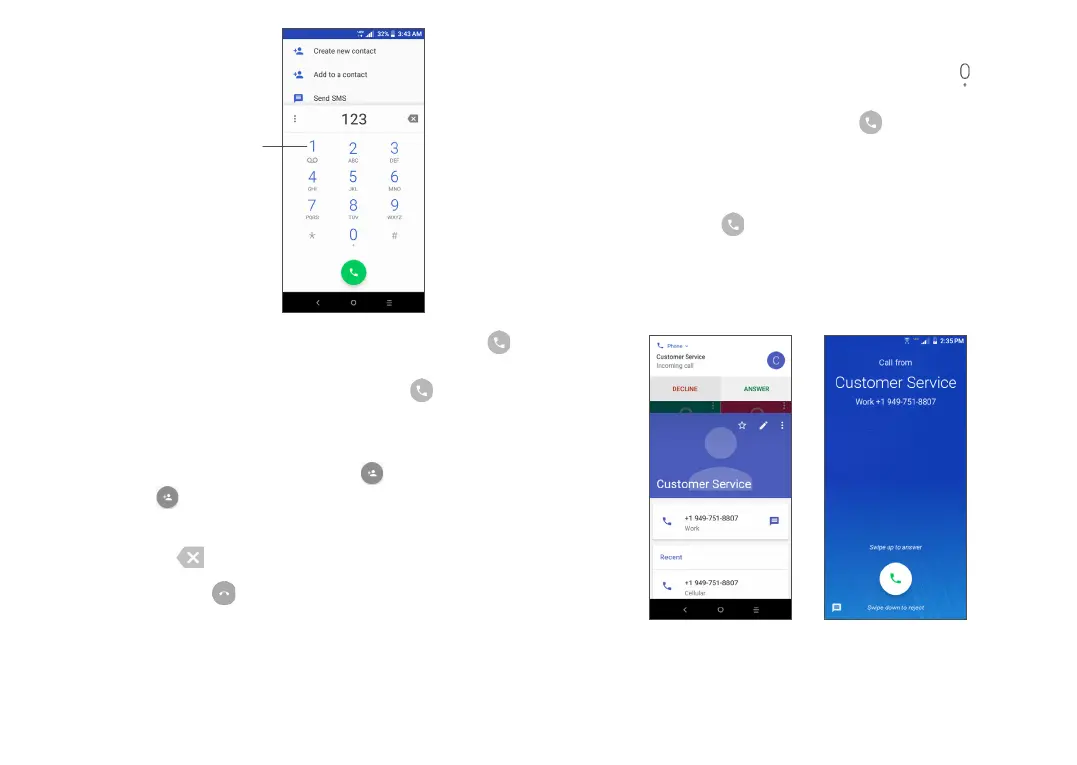
Touch and
hold to access
voicemail
Enter the desired number from the keypad and tap
to place the call or select a contact from Contacts or
Call Log by sliding or taping tabs, then tap to make
the call.
The number you entered can be saved to Contacts by
tapping the Create new contact icon or the Add to
a contact icon .
If you make a mistake, you can delete the incorrect
digits by tapping .
To hang up a call, tap .
International call
To dial an international call, touch and hold to enter
“+”, then enter the international country prefix followed
by the full phone number and tap .
Emergency call
If your phone has network coverage, dial the emergency
number and tap to make an emergency call. This
works even without a SIM card and without typing the
PIN code.
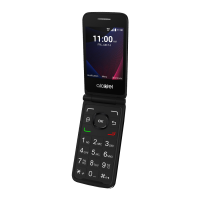
3.1.2 Answering or rejecting a call
If phone is unlocked If phone is locked



 To Next Page