5 6
1. Choose Settings > Device settings > Account Management.
2. Enter the current password.
3. Enter a new password and confirm it and apply.
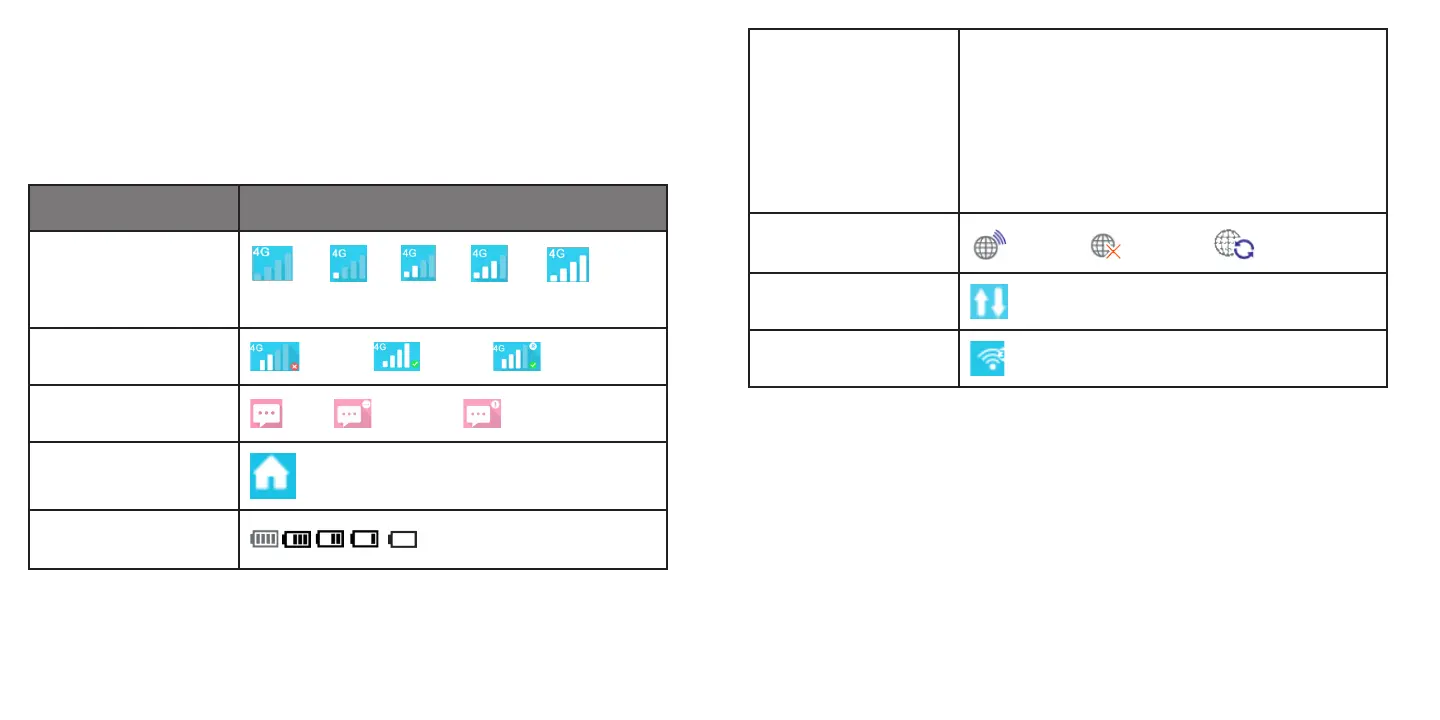
Icon description
Category Icon Display
Signal strength
From no signal to excellent
Network status Disconnect, Connected, Roaming
SMS Normal,
New message, SMS box full
Home click to go back to Home page
Battery Battery level
Network type
2G: EDGE, GPRS
3G: HSPA, HSUPA, UMTS
3G+: HSPA+, DC-HSPA+
4G: LTE
5G:
Connection status Connected, Disconnected Connecting
Usage
Usage data
Wi-Fi status Wi-Fi active with connected devices
2.2 Home
Click the “Home” area to open the menu. This includes Current Data, Duration, Upload/Download Speed, Discon-
nect/Connect, Connected Devices, Blocked Devices.
• Connect/Disconnect: Click Connect/Disconnect to connect/disconnect Internet.
• Connected Devices: The table shows the information of connected wireless device(s).
• Blocked Devices: The table shows the information of blocked wireless device(s).
2.3 Information






 To Next Page