10
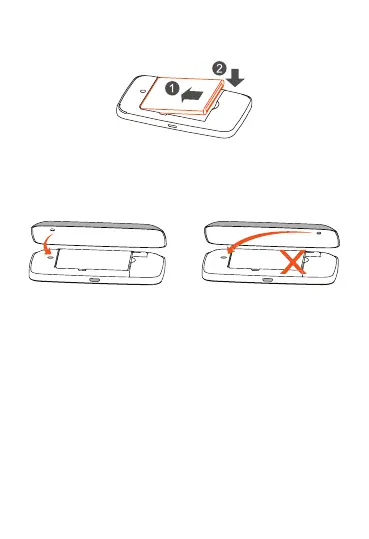
Step 3: Install baery:
Step 4: Close back cover:
Posion the back cover so that locang nub is inserted
into corresponding indentaon (please refer to illustraon
below)
Step 5: Power device on:
Long Press the “Power” key unl all LED indicators
illuminate in blue.
Connecng in Wi-Fi mode
SSID: locate the SSID informaon on the scker on the Back
Cover.
Step 1: Use the Wi-Fi manager on the Wi-Fi embedded
device to select network name (SSID).
• From a Windows PC: Right-click Wireless network
connecon on the task bar, and select: View Available
Networks.








 To Next Page