EasyManua.ls Logo

Alcatel MOVETRACK - User Manual

Alcatel MOVETRACK
12 pages
Print Icon
To Next Page IconTo Next Page
Loading...
CJB1GS0ALAAA
Quick Start Guide
Question and Answer IconNeed help?

Do you have a question about the Alcatel MOVETRACK and is the answer not in the manual?

Summary

Whats In The Box

Inserting Your Nano-SIM

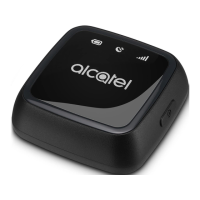
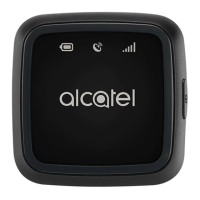
Device Overview

Battery Indicator

Shows battery status: blinking red during charging, blue when full, red when low.

GPS Indicator

Indicates GPS signal: blinking red when searching, blue when found, red when unable to find.

Network Indicator

Displays cellular network status: blue for connected, red for no coverage.

Power Button

Button to turn the device on/off by pressing and holding.

Micro-USB Port

Port for charging the device and data transfer.

Nano-SIM Card Cover

Cover to access the Nano-SIM card slot.

Charging and Powering On

Pairing with Your Smartphone

Using Your MOVETRACK

FAQ

Summary

Whats In The Box

Inserting Your Nano-SIM

Device Overview

Battery Indicator

Shows battery status: blinking red during charging, blue when full, red when low.

GPS Indicator

Indicates GPS signal: blinking red when searching, blue when found, red when unable to find.

Network Indicator

Displays cellular network status: blue for connected, red for no coverage.

Power Button

Button to turn the device on/off by pressing and holding.

Micro-USB Port

Port for charging the device and data transfer.

Nano-SIM Card Cover

Cover to access the Nano-SIM card slot.

Charging and Powering On

Pairing with Your Smartphone

Using Your MOVETRACK

FAQ

Alcatel MOVETRACK Specifications

General IconGeneral
Device TypeGPS Tracker
SOS ButtonYes
Geo-fencingYes
Real-time TrackingYes
GPSYes
Connectivity2G
Battery TypeLi-Ion
CompatibilityiOS and Android apps
SIM CardMicro-SIM

Related product manuals