
 Need help?
Do you have a question about the Alcatel MW40V and is the answer not in the manual?
Product meets applicable national SAR limits. Specific values are in the Radio Waves section.
Warnings regarding device operation, prohibited use, and use in sensitive environments.
Step-by-step guide for removing the cover, installing SIM/SD card, and powering on.
Instructions for selecting the network name (SSID) and entering the Wi-Fi key.
Guide to setting up the device via website login and configuring Wi-Fi settings.
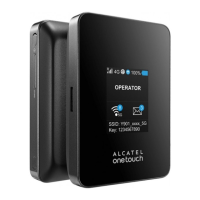
This document outlines the Quick Start Guide for the Alcatel Link Zone, a portable wireless router designed to provide a simple way to share 4G connectivity with any Wi-Fi embedded device.
The Link Zone device is designed for ease of use and portability, allowing users to establish a personal Wi-Fi hotspot on the go. Its primary function is to act as a bridge between a 4G cellular network and Wi-Fi-enabled devices such as PCs, tablets, and smartphones. This enables multiple devices to access the internet simultaneously through a single 4G connection.
The manual emphasizes the importance of safety and proper usage. Users are advised to read the safety chapter carefully to avoid damage or improper use. Key safety guidelines include:
The device is recommended for use in environments with temperatures between 0°C and 45°C and humidity between 10% and 90%. Chargers are designed to operate within a temperature range of 0°C to 40°C and meet safety standards for information technology equipment.
The Link Zone package typically includes:
The device features several key components:
The LED indicators provide crucial information about the device's status:
The device incorporates power-saving features:
When the hotspot is powered on, specific icons illuminate:
To connect devices to the Link Zone:
The device can be configured via a web interface or a dedicated app.
http://192.168.1.1 to access the login page.The Link Zone can be charged in two ways:
The device complies with government requirements for exposure to radio waves. It is designed and manufactured not to exceed emission limits for radio-frequency (RF) energy. The Specific Absorption Rate (SAR) limit set by public authorities (e.g., FCC, Industry Canada) is 1.6 W/kg averaged over 1 gram of body tissue. The highest SAR value for this model is 1.26 W/Kg for use close to the body.
For body-worn operation, the device meets FCC RF exposure guidelines when used with a non-metallic accessory, maintaining a distance of at least 10 mm from the body. The World Health Organization (WHO) states that current scientific information does not indicate a need for special precautions for routers. Users concerned about RF exposure can limit it by reducing usage time or keeping routers away from the head and body.
The equipment has been tested and found to comply with Class B digital device limits under Part 15 of the FCC Rules. These limits are designed to provide reasonable protection against harmful interference in a residential installation. If interference occurs, users are encouraged to try corrective measures such as reorienting the receiving antenna, increasing separation between equipment and receiver, or connecting the equipment to a different circuit.
Changes or modifications not expressly approved by the party responsible for compliance could void the user's authority to operate the equipment. The device complies with Part 15 of the FCC Rules, meaning its operation is subject to not causing harmful interference and accepting any interference received.
The router is equipped with a built-in antenna. For optimal operation, avoid touching or damaging it. When using the device with a headset or USB data cable, it will comply with guidelines. If using other accessories, ensure they are non-metallic and position the router at least 10 mm from the body.
By using the device, some personal data may be shared with the main device. Users are responsible for protecting their personal data and not sharing it with unauthorized devices. TCL Communication Ltd. stores data in accordance with data protection legislation, implementing technical and organizational measures to protect personal data against unauthorized processing, accidental loss, destruction, or damage. These measures consider available technical possibilities, implementation costs, processing risks, and data sensitivity. Users can access, review, and edit their personal information through their user account or by contacting TCL Communication Ltd. directly.
The Wi-Fi Logo indicates that the device is Wi-Fi CERTIFIED by the Wi-Fi Alliance. FCC ID: 2ACCJB132.
The device is warranted against technical deviations for twelve (12) months from the original invoice date. Users must inform the vendor immediately of any conformity defects and provide proof of purchase. The vendor or repair center will decide whether to replace or repair the device. Repaired or replaced devices are warranted for one (1) month unless statutory provisions state otherwise.
The warranty does not cover damage or defects due to:
The warranty is also excluded if markings or serial numbers have been removed or altered. The device is warranted against hidden defects inherent in design or manufacture. There are no other express or implied warranties. The manufacturer is not liable for incidental or consequential damages, including trading loss or commercial loss, to the full extent disclaimable by law. Some regions may not allow the exclusion or limitation of incidental or consequential damages or limitations on implied warranties, so these exclusions may not apply to all users.
 General
| Device Type | Mobile Wi-Fi |
|---|---|
| Supported Network | 4G LTE |
| Wi-Fi Standard | 802.11 b/g/n |
| Maximum Wi-Fi Speed | 150 Mbps |
| Battery Capacity | 1800 mAh |
| SIM Card Slot | Yes |
| Maximum Connected Devices | 10 |
| Weight | 100 g |
| Display | LED indicators |
| LTE Category | Cat 4 |










 To Next Page