43 44
11
My files ..........................
You will have access to all audio and visual files stored in phone or
Memory card in My files.
11.1 Phone
An entry to access all files in all folders stored in phone.
11.1.1 My audios
Choose ringtone for an incoming call, a message alert beep, power on/
off ringtone, etc.
DRM: Digital Rights Management feature allows sounds and
images to be played while protecting the associated copyright.
DRM counter-based files and files with expired rights will not be
automatically played when scrolling the list.
11.1.2 My images
You can select an image or a photo as wallpaper, power on/off screen, or
assign it as incoming call image.
The images will be displayed in alphabetical order.
11.1.3 Received
This feature stores all received files by Bluetooth.
11.1.4 My videos
"My videos" album contains video clips recorded, received or downloaded.
11.2 Memory card
You can access all files stored in the Memory card here.
When a Memory card is inserted for the first time, it will be
scanned and the default folders will be created.
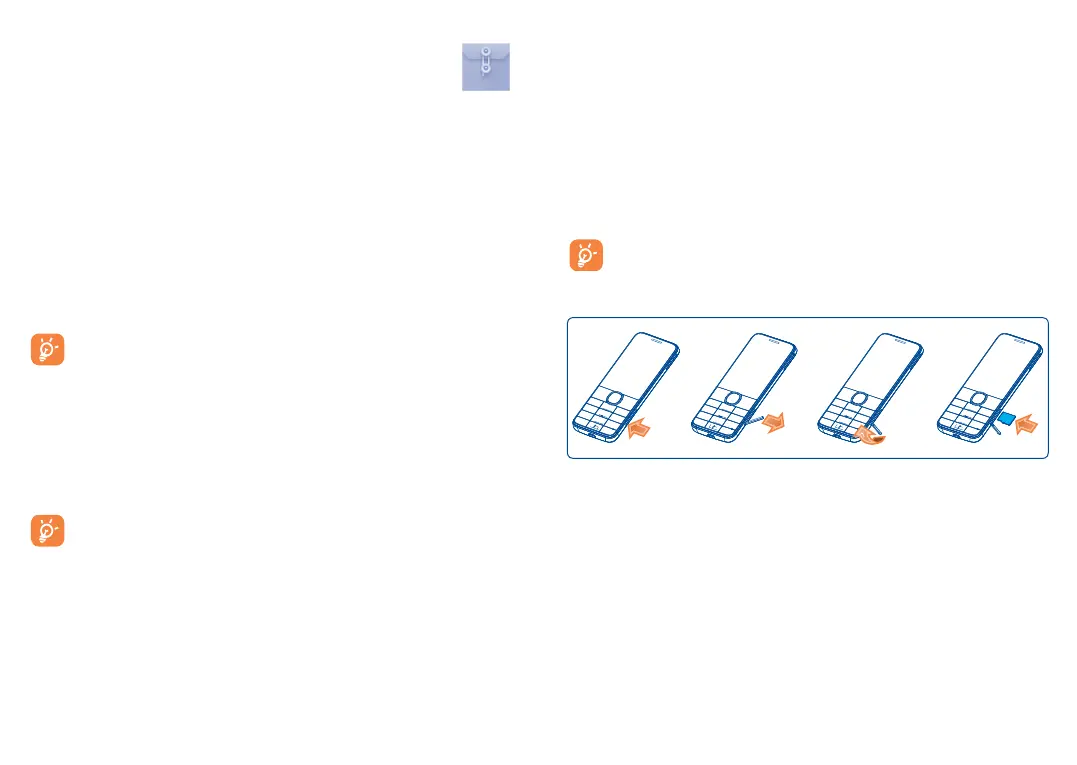
Inserting the SD card:
Insert the microSD card with the golden contact upward. To remove the
card, press and slide it out.











 To Next Page