84
Access the settings from the MENU: From the photo shot screen, press the right softkey to access the
following options:
Image size
Select “Image size” in the list of options or press the key until you reach the size you require: VGA
(640x480), and Panoramic (640x360) optimised to be sent to a PC, XL (160x128), L (128x128) for local use
or MMS, M (64x64) to assign it to a directory file for instance, S (32x32) to create your very own stamps
(see page 87).
Capture mode
Select “Capture mode” in the options list or keep pressing the key to choose from one of the
following modes:
Single: a single photo; this is the default mode.
Animation x 4: in this mode, you can take 4 consecutive photos like a small slide show. The number
at the top right of the screen shows you which photo your are on: 1/4, 2/4, ....4/4. When you have
taken the 4th photo, the animation will start automatically.
Mosaic: in this mode, you will get an image made up of 4 thumbnails. To do this, proceed as for the
animation, once the “Mosaic” has been selected (see above).
The burst shoot mode is only available by a long keypress on or by a long press on the
upperside key.
Frame
Choose a frame from the list offered and press . The frame will be placed in your photo shot screen; if
the image is to your liking, press to take the photo. You will also find this option in the “Modify”
function (see page 87).
83
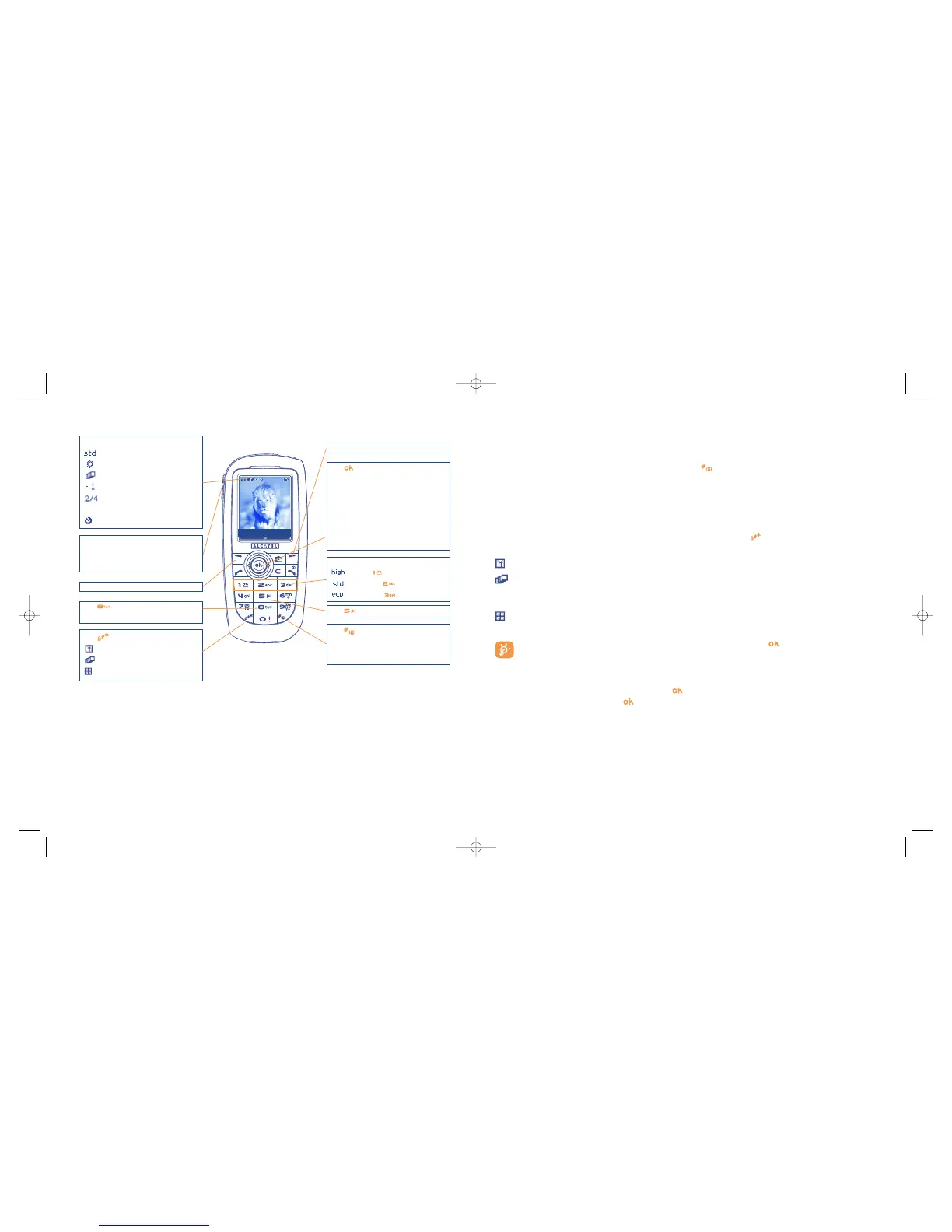
Selected options bar:
Quality
white balance
Capture mode
Exposure (over/under)
number of photos taken (for
animation and mosaic)
Timer
Left softkey: Shoot
Quality:
: High - key
: Standard - key
: Economy - key
Key Capture mode
: Single
: Animation x 4
: Mosaic
Key : White balance
Right softkey: Options
Key :
- Short keypress: Take a picture
- Long keypress: burst shoot
- Exposure:
Left: underexposure
Right: overexposure
- Zoom:
Up: zoom in
Down: zoom out
Key Image size:
- Panoramic
- VGA
- XL/L/M/S
Key Colour mode: colour or
black&white
IFA BILDERTEAM/Agenceimages.com
OT 557
Side keys :
- short press up or down : take a photo
- long press up : burst shot
- long press down : take a photo + sound
Shoot Options









 To Next Page