17 18
2
Your Mobile ...........................
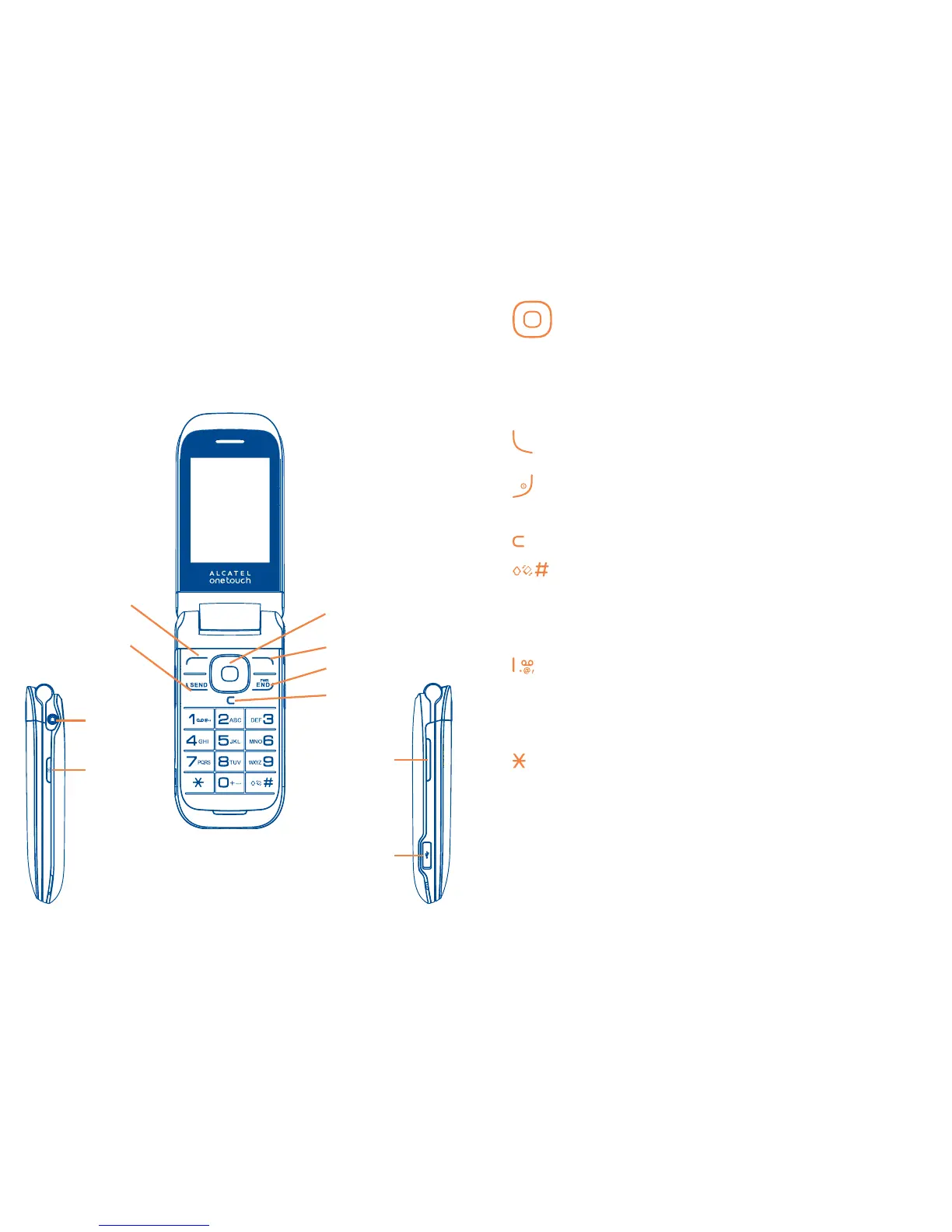
2.1 Keys and Connectors
•Navigation key
(1)
Press to go left/right/up/down
Press to access function
UP: Call log
DOWN: Contacts
LEFT
(2)
: Tools
RIGHT
(2)
: Media
•OK key Press to confirm an option
•Answer/Send a call
•Enter Call log
•Press: End a call
Return to the Home Screen
•Press and hold: Power on/off
•Press: Delete characters in Edit mode
•Press: "#" key
Press and hold: Switch to General profile
•In Edit mode
Press: Switch between ABC/Abc/abc
Press and hold: Switch between Multi-Tap/Smart
•Press: "1" Key
Press and hold: Access your voicemail
•In Edit mode
Press: Input "1"
Input frequently-used symbols
•Press: " " Key
•In Edit mode
Press: change input method
Press and hold: Access the Symbols table
*
Left key
Right key
Navigation key/ OK
key
End key
Delete key
Send key
Headset
connector
Camera key
Volume key
micro-USB
connector
(1)
You can personalize navigation key in Settings.
(2)
The shortcut to access function for LEFT/RIGHT only be available when
shortcut bar is off.









 To Next Page