Need help?
Do you have a question about the Alcatel U5 and is the answer not in the manual?
Identifies and explains the function of physical buttons and ports on the device.
Instructions for installing/removing back cover, battery, SIM, SD card, and headset, plus battery charging.
Guide for connecting USB devices to the phone.
How to add applications, shortcuts, folders, and widgets to the Home screen for quick access.
Guidance on using the Home key, notification panel, and quick settings panel.
Instructions for initiating phone calls and responding to incoming calls.
Steps for viewing, creating, and synchronizing contacts on the phone.
Guidance on creating, editing, and receiving SMS and MMS messages.
Instructions for setting up and managing email accounts on the device.
Information on viewing manuals, updating software, and accessing user care.
Instructions for backing up personal data and performing a factory data reset.
This document is a Quick Start Guide for the Alcatel U5 3G (model 4047A) mobile phone. It provides essential information to help users get started with their new device, covering basic functions, usage, and maintenance tips.
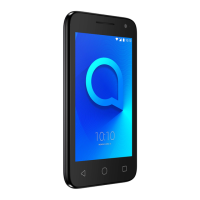
The Alcatel U5 3G is a smartphone designed for everyday use. Its front panel features a headset speaker, a front camera, and a front camera flash. The main display is a touchscreen interface. Below the screen, there are three navigation buttons: a back button, a home button, and a recent apps button. On the right side of the device, you'll find the volume up/down keys and the power key. The bottom of the device includes a USB connector for charging and data transfer. The back of the phone features a camera, a camera flash/flashlight, and a fingerprint sensor for secure unlocking and authentication.
To begin using the Alcatel U5 3G, follow these steps:
The Home screen is the central hub of your Alcatel U5 3G, allowing quick access to applications, shortcuts, folders, and widgets. You can customize the Home screen by arranging items according to your preferences. Touching the Home key at any time will bring you back to the main Home screen.
Key features of the Home screen include:
Making and answering calls is a fundamental function of the Alcatel U5 3G.
The device allows you to manage your contacts efficiently.
The Alcatel U5 3G supports sending and receiving SMS (Short Message Service) and MMS (Multimedia Messaging Service).
The device allows you to set up and manage email accounts.
To ensure optimal performance and address any issues, the Alcatel U5 3G offers several maintenance and support features:
This guide provides a foundational understanding of the Alcatel U5 3G, covering its basic operations and essential features for a smooth user experience.
 General
| Screen shape | Flat |
|---|---|
| Display diagonal | 5 \ |
| External display | No |
| Touch technology | Multi-touch |
| Touchscreen type | Capacitive |
| Display resolution | 854 x 480 pixels |
| Compatible memory cards | - |
| Flash type | LED |
| Rear camera type | Single camera |
| Video recording modes | 720p |
| Rear camera resolution (numeric) | 5 MP |
| Front camera resolution (numeric) | 2 MP |
| RAM capacity | 1 GB |
| Maximum memory card size | 32 GB |
| Internal storage capacity | 8 GB |
| Processor cores | 4 |
| Processor family | MediaTek |
| Processor frequency | 1.1 GHz |
| Themes | Wallpapers |
| Personalization | Icons, Menu, Shortcuts |
| Personal info management (PIM) | Alarm clock, Calculator, Calendar, Events reminder, Notes, To-do list |
| Google applications | Google Maps, Google Play, YouTube |
| App distribution platform | Google Play |
| Talk time (2G) | 12 h |
| Talk time (3G) | 11 h |
| Battery capacity | 2050 mAh |
| Standby time (2G) | 473 h |
| Standby time (3G) | 441 h |
| Standby time (4G) | 196 h |
| Battery technology | Lithium |
| Battery recharge time | 4 h |
| 4G standard | LTE |
| 2G standards | EDGE, GPRS, GSM |
| 3G standards | WCDMA |
| SIM card type | MicroSIM |
| Bluetooth version | 4.2 |
| 2G bands (primary SIM) | 850, 900, 1800, 1900 MHz |
| Mobile network generation | 4G |
| USB version | 2.0 |
| USB connector type | Micro-USB B |
| HDMI ports quantity | 0 |
| Headphone connectivity | 3.5 mm |
| Multimedia Messaging Service (MMS) | Multimedia Messaging Service (MMS) is a standard way to send messages that include multimedia content to and from a mobile phone over a cellular network |
| Form factor | Bar |
| Product color | Black |
| Certification | CE |
 Weight and Dimensions
| Depth | 9.95 mm |
|---|---|
| Width | 71.8 mm |
| Height | 140.7 mm |
| Weight | 148 g |

 To Next Page