EasyManua.ls Logo

Alcatel Y900 - User Manual

Alcatel Y900
13 pages
Print Icon
To Next Page IconTo Next Page
Loading...
Y900
User Manual
Question and Answer IconNeed help?

Do you have a question about the Alcatel Y900 and is the answer not in the manual?

Summary

Safety Precautions

I. Web UI Configuration

1.1 Login the Configuration Page

Access the device's web interface using a browser and the default login credentials.

1.2 Icon Description

Explains the meaning of icons related to signal strength, network status, and messages.

2. Connection

2.1 Connection Information

Details how to connect to the internet and view network operator information.

2.5 Connected Devices Information

Manages connected devices, allowing editing and blocking of listed devices.

3. Usage

3.1 Usage Information

Presents home and roaming usage data, including volume and duration.

5. Settings

Wi-Fi Settings

Configure Wi-Fi parameters like mode, SSID, security, and channel selection.

Login Settings

Set and manage the login password, defining character requirements.

6. More

WPS

Guides through Wi-Fi Protected Setup using PBC or WPS PIN methods.

8. Charging the Device

10. Warranty

11. Q&A

12. Warning and Precautions

Electronic Device

Precautions for using the device near sensitive electronic and medical equipment.

Hospital

Guidelines for operating the device safely in healthcare environments.

Storage Environment

Safety advice for device storage concerning temperature, magnetic fields, and shock.

Children Safety

Measures to ensure children's safety when interacting with the device.

Summary

Safety Precautions

I. Web UI Configuration

1.1 Login the Configuration Page

Access the device's web interface using a browser and the default login credentials.

1.2 Icon Description

Explains the meaning of icons related to signal strength, network status, and messages.

2. Connection

2.1 Connection Information

Details how to connect to the internet and view network operator information.

2.5 Connected Devices Information

Manages connected devices, allowing editing and blocking of listed devices.

3. Usage

3.1 Usage Information

Presents home and roaming usage data, including volume and duration.

5. Settings

Wi-Fi Settings

Configure Wi-Fi parameters like mode, SSID, security, and channel selection.

Login Settings

Set and manage the login password, defining character requirements.

6. More

WPS

Guides through Wi-Fi Protected Setup using PBC or WPS PIN methods.

8. Charging the Device

10. Warranty

11. Q&A

12. Warning and Precautions

Electronic Device

Precautions for using the device near sensitive electronic and medical equipment.

Hospital

Guidelines for operating the device safely in healthcare environments.

Storage Environment

Safety advice for device storage concerning temperature, magnetic fields, and shock.

Children Safety

Measures to ensure children's safety when interacting with the device.

Overview

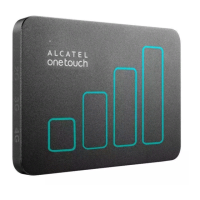
This document is the user manual for the ALCATEL one touch Link Y900, a 4G+ wireless device.

Function Description:

The ALCATEL one touch Link Y900 is a portable wireless device designed to provide internet connectivity. It functions as a mobile hotspot, allowing multiple Wi-Fi enabled devices to connect to the internet via 2G, 3G, 3G+, or 4G LTE networks. The device can also be used to charge other devices like tablets and smartphones via an OTG cable (for the 3600mAh battery version).

Important Technical Specifications:

  • SAR Limit: 2.0W/kg (national limit). Body-worn SAR is 0.203 W/kg for LTE BAND VII, with a recommended separation distance of 15mm from the body.
  • Operating Temperature: 0°C to 45°C (for equipment use), -10°C to 70°C (for storage).
  • Humidity: 10% to 90% (for both use and storage).
  • Charger Operating Temperature: 0°C to 40°C.
  • Wi-Fi Standards: 802.11 ac / 802.11 a / 802.11 b / 802.11 g / 802.11 n.
  • SSID Length: 1-32 characters.
  • Max Number of Wi-Fi Users: 32 (default and maximum).
  • Security Protocols: WPA, WPA2, WEP (lower security, for older devices).
  • DHCP Default IP Address: 192.168.1.1.
  • Subnet Mask: 255.255.255.0.
  • Battery: Rechargeable Li-polymer (unibody, not removable). 3600mAh battery version supports OTG charging.
  • USB Cable: 3.0 USB cable for charging.
  • Charging Time: Maximum 3 hours when powered off.
  • Wi-Fi Frequency Band: 5.15-5.25GHz band restricted to indoor usage only.
  • Compliance: Meets national SAR limits, ecodesign directive 2009/125/EC, WEEE Directive 2012/19/EU, RoHs Directive 2011/65/EU, ICNIRP, and European Directive 1999/5/EC (R&TTE).

Usage Features:

  • Web UI Configuration: Access device settings and information via a web browser at http://192.168.1.1 with the default password "admin".
  • Connection Management:
    • Connect/disconnect from the internet.
    • View connection information: operator name, roaming status, signal strength (from no signal to excellent), network technology (2G, 3G, 3G+, 4G LTE), battery level, and connected devices.
    • Monitor usage: current usage time (HH:MM) and data (MB or GB) for the current connection, home and roaming data usage, and total duration for a specified connection period.
    • Clear usage history and set usage limits.
    • Manage connected devices: view, edit device names, and block/unblock devices (USB devices cannot be blocked).
  • Messaging (SMS):
    • Create new SMS messages.
    • Save unsent SMS to Drafts.
    • Delete SMS messages.
    • View messages (Normal, New message, SMS box full).
    • Reply/Forward SMS.
  • Wi-Fi Settings:
    • Select 802.11 mode.
    • Configure SSID (network name) and SSID Broadcast (Enable/Disable).
    • Set Wi-Fi Channel (different domains have different channels, e.g., FCC (US)/IC (Canada) 1-11, ETSI (Europe) 1-13, MKK (Japan) 1-13).
    • Set maximum number of Wi-Fi users.
    • Configure security (Disable, WEP, WPA, WPA2) and password.
  • Login Settings: Define and modify login password (4-16 ASCII characters, letters, numbers, symbols, excluding "; \ & % + ' < > ?").
  • Profile Management: Edit user profiles.
  • PIN Code Settings: Enable/Disable/Modify PIN code (4-8 digits). PUK code is required after 3 incorrect PIN attempts; device locks after 10 incorrect PUK attempts.
  • Connection Mode: Automatic or Manual network connection.
  • Network Mode: Auto, 2G only, 3G only, 4G only.
  • Advanced Settings (DHCP):
    • View/configure Home Address (router's IP), Subnet Mask.
    • Enable/Disable DHCP Server.
    • Set DHCP IP Pool range.
    • Configure DHCP Lease Time.
    • MAC Filter: Control specific MAC addresses (Disable, Allow, Deny). Maximum 10 MAC addresses allowed.
  • WPS (Wi-Fi Protected Setup): PBC (Push Button Connect) or WPS PIN mode.
  • Online Update: Device automatically checks for new software versions and displays update reminders.
  • Help: Access the User Manual.
  • Charging Other Devices: Use an OTG cable to power up other devices (3600mAh battery version only).

Maintenance Features:

  • Reboot: Restart the device.
  • Reset: Reset the device to original factory settings.
  • Backup and Restore: Backup and restore configuration settings via Settings->About.
  • Troubleshooting (Q&A):
    • Browser and OS support information.
    • Connection issues (SSID not appearing, failed to connect, no service): check signal, device position, hardware, refresh network list, reset device.
    • Forgot Wi-Fi Key: Reset device to factory defaults by pressing Power key and WPS key together.
    • PIN/PUK lock: Login to web page and enter PIN/PUK from operator.
    • Connecting/disconnecting to 4G/3G network: Use "Connect/Disconnect" button in Connection menu.
    • Setting new SIM PIN: Settings->Pin Code Settings.
    • Internet connectivity and Wi-Fi setup info: Connection menu.
    • Checking volume and time used: Usage menu.
    • Manual network search: Settings->Network mode.
    • Checking model number and firmware versions: Settings->About.
  • General Safety Precautions:
    • Do not switch on where prohibited or dangerous (hospitals, aircraft, near high-precision electronic devices).
    • Do not disassemble.
    • Avoid strong electromagnetic fields, magnetic storage media, high temperatures, flammable gas.
    • Keep away from children.
    • Use approved batteries and chargers only.
    • Observe laws and privacy.
  • Operating Environment:
    • Keep dry, not water-resistant.
    • Avoid dusty, damp, dirty places, and strong magnetic fields.
    • Do not use outdoors during thunder storms.
    • May interfere with nearby TV, radio, PCs.
    • Use manufacturer-approved accessories only.
  • Traffic Safety: Do not use while driving. Avoid placing near vehicle electronic systems (ABS, airbags).
  • Conditions of Use:
    • Switch off in aircraft, health care facilities (unless designated), near gas/flammable liquids.
    • Maintain 15 cm distance from medical devices (pacemakers, hearing aids, insulin pumps).
    • Supervise children.
    • Handle with care, keep clean, do not open/dismantle/repair, drop, throw, bend, or paint.
  • Battery Maintenance:
    • Do not attempt to open back cover or replace battery. Contact dealer for replacement.
    • Do not burn or dispose in household rubbish.
    • Dispose of used batteries according to instructions.
    • Risk of explosion if replaced by incorrect type.

Alcatel Y900 Specifications

General IconGeneral
BrandAlcatel
ModelY900
CategoryMobile router
LanguageEnglish