EasyManua.ls Logo

Alcofind AF-50 AD - User Manual

Alcofind AF-50 AD
25 pages
Print Icon
To Next Page IconTo Next Page
Loading...
Instruction Manual
Digital Breathalyzer AF-50 AD
· KEY FEATURES
- OLED DISPLAY
Helps to read various information including total test number, date, unit and other options
- 100 TEST MEMORIES
Saves the test result including test date and time
- USER-FRIENDLY INTERFACE
Enables to change device setting easily
- GRAPH MODE
Allows to track all test results efficiently
- CALIBRATION REMINDER
Helps get on-time calibration by letting users know about the remaining days to the next
calibration
* Please read the users manual carefully before use.
Question and Answer IconNeed help?

Do you have a question about the Alcofind AF-50 AD and is the answer not in the manual?

Summary

Key Features

OLED Display

Helps to read various information including total test number, date, unit and other options.

100 Test Memories

Saves the test result including test date and time.

User-Friendly Interface

Enables to change device setting easily.

Graph Mode

Allows to track all test results efficiently.

Calibration Reminder

Helps get on-time calibration by letting users know about the remaining days to the next calibration.

Important Safety Information

Introduction

Contents

Name of Each Part

Basic Operation

Preparation

Steps for preparing the device, including inserting batteries and mouthpiece.

Operation with App

Detailed steps for operating the breathalyzer using a connected smartphone application.

Operation Without App

Symbols and Troubleshooting

Basic Menu Options

Test Result

View the results of previous breathalyzer tests.

Test Result-G

View previous test results in a graphical format.

Alarm Limit

Set the threshold for audible and visual alarms based on BAC levels.

Unit

Select the desired measurement unit for Blood Alcohol Content (BAC).

Brightness

Adjust the brightness level of the device's display screen.

Sound

Configure the sound settings for alerts and feedback.

Information

Display device firmware version, calibration date, and test count.

PIN Code

Set or manage a PIN code to access advanced menu options.

Advanced Menu Options

Test Limit

Set the maximum number of measurements the device allows.

Set Time

Adjust the device's internal clock for date and time settings.

Date Limit

Set the date for the next required calibration.

Change PIN

Change the existing PIN code for device security.

Specification

Contact Information

FCC Statements

Overview

This document describes the ALCOFIND Digital Breathalyzer AF-50 AD, a professional-use alcohol tester designed for high-reliability in various fields including law enforcement, hospitals, and schools. It measures estimated Blood Alcohol Content (BAC) in human breath using a premium fuel cell sensor, ensuring durability and accurate results.

Function Description

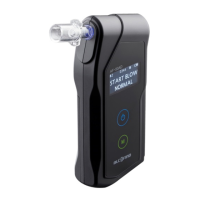
The AF-50 AD is a digital breathalyzer that measures BAC from breath samples. It can be operated both with and without a smartphone app, offering flexibility in usage. The device features an OLED display for clear readability of various information such as total test numbers, date, unit, and other options.

Operation with App:

  1. Preparation: Install two AA alkaline batteries, insert a mouthpiece securely, and ensure Bluetooth is enabled on your smartphone.
  2. App Connection: Open the dedicated app, then press and hold the device's Power button for 2 seconds to turn it on. If pairing is successful, the app will display "START TEST." For the first pairing, a PIN Code request will appear; input "000000." The app remembers and searches for the last paired device for 30 seconds. If not found, it offers options to find another device or continue searching.
  3. User Selection: Choose a user ("Me" or "Friend") within the app. Test results are saved separately for each user and can be viewed graphically.
  4. Warm-up: The app displays a circular bar indicating warm-up progress. When it reaches 95%, prepare to blow.
  5. Blowing: When "Start blowing" is displayed, blow into the mouthpiece for 5 seconds until the gage reaches 100 or an air pump click is heard. If the camera feature is enabled, it will automatically capture an image upon completion.
  6. Analysis & Result: The app will show "Analyzing data" if a sufficient breath sample is taken. The estimated BAC level will then be displayed. Users can add memos to test results, view them graphically, and share them via text message, Facebook, or Twitter.
  7. Retest/Home: Tap "Retest" or "BAC level" on the app (or press the Power button on the device) to retest without selecting a user. To start a new test from the beginning, tap the Home icon.
  8. Power Off: Press and hold the Power button for 2 seconds to turn off the device. It automatically turns off after 2 minutes of inactivity. If the app is exited while connected, all LEDs on the device will flicker; press the Power button to restart.

Operation without App:

  1. Power On: Press the Power button for 2 seconds. The alarm limit, date, and time will be displayed.
  2. Warm-up: The device automatically starts warming up. "START BLOW" will be displayed with a double beep when ready. During warm-up, the menu button can be pressed to check the 10 previous test results with a bar graph.
  3. Measurement: Blow through the mouthpiece until the device beeps twice. Blowing time varies based on the set value.
  4. Analyzing: The analyzing process starts automatically upon successful sampling.
  5. Test Result: After a few seconds, the estimated BAC will be displayed for 4 seconds. The Power and Menu buttons are deactivated during this time. The status LED flashes red if the result is higher than the alarm limit, or green if it's equal to or lower than the alarm limit.
  6. After Test Options: After 4 seconds, the display changes to offer "RETEST" (press Power button) or "GRAPH" (press Menu button) to view previous results. Press and hold the Power button for 2 seconds to power off manually. The device automatically turns off after 3 minutes of inactivity.

Important Technical Specifications

  • Indication of B.A.C: 0.000 ~ 0.500 %BAC, 0.00 ~ 5.00 ‰, 0.00 ~ 2.50 mg/L
  • Accuracy:
    • ±0.005 %BAC (at 0.100 %BAC, at 25 °C)
    • ±0.05 ‰ (at 1.00 ‰, at 25 °C)
    • ±0.025 mg/L (at 0.50 mg/L, at 25 °C)
  • Warm-up time: Within 10 seconds at 0.050 %BAC (may vary depending on BAC measured).
  • Sensor type: Premium Fuel Cell
  • Power supply: Two AA size alkaline batteries
  • Connectivity: Bluetooth 4.0 LE (1Mbps / 2Mbps)
  • Memory capacity: 100 test results with test number, date, and time
  • Battery life: Approx. 1000 tests
  • Dimensions (WxHxD): 60 x 128 x 24 mm
  • Weight: 130 g (including batteries)
  • Operating temperature: -5 ~ 40 °C

Usage Features

  • OLED Display: High-quality display for easy reading of various information.
  • 100 Test Memories: Stores test results with date and time.
  • User-Friendly Interface: Allows easy device setting changes.
  • Graph Mode: Efficiently tracks all test results.
  • Mouthpiece: Replaceable mouthpieces for sanitary reasons.
  • Alarm Limit: Settable BAC limit (0.010 ~ 0.100 %BAC or OFF) for visual and audio alerts.
  • Measurement Units: Selectable units including ug/L, mg/L, ‰, mg/100mL, %BAC.
  • Brightness: Adjustable display brightness (HIGH, MID, LOW).
  • Sound: Adjustable sound settings (HIGH, MID, LOW, OFF).
  • Information Display: View firmware version, calibration date, and total tests performed.
  • PIN Code: Secure access to advanced menu options with a 4-digit PIN (default 0000, adjustable).
  • Test Limit: Set a maximum number of measurements (50 ~ 1000 tests or OFF).
  • Set Time: Adjust device date and time.
  • Date Limit: Set the date for the next calibration (1 ~ 24 months).
  • Change PIN: Modify the device's PIN code.

Maintenance Features

  • Calibration Reminder: Notifies users about remaining days until the next calibration, ensuring timely service.
  • Calibration Service: Recommended every 12 months or after 500 tests by experts to maintain accuracy.
  • Battery Replacement: Replace batteries when the indicator icon shows empty for accuracy.
  • Storage: When not in use for extended periods, remove batteries. Store at room temperature, avoiding high temperature and humidity.
  • Mouthpiece Hygiene: Use clean mouthpieces for accurate measurements. Keep the device and mouthpieces out of reach of children under 12.
  • Troubleshooting Guide: Provides actions for common errors like "BLOW ERROR," "LOW BATTERY," "CALIBRATION DUE DATE HAS PASSED," "OVER NUMBER OF TEST ALLOWED," "BREATH SAMPLE WITH EXCESSIVE SALIVA," "OUT OF TEMP RANGE," and "NO MEMORY CAPACITY AVAILABLE."
  • Self-Diagnosis: The device performs self-diagnosis and displays error messages for issues like insufficient sample or operating outside temperature range.

Important Safety Information:

  • Read the manual carefully before use.
  • Perform tests 30 minutes after eating, drinking, or smoking to avoid invalid results.
  • Do not immerse the device in water.
  • Avoid blowing cigarette smoke into the tester.
  • Do not use the device to determine "drink and drive" status; the manufacturer and sellers are not legally responsible for test results.
  • Perform tests within the specified operating temperature.
  • Avoid blowing too hard to prevent saliva from entering the sensor.
  • Do not suck in air during the test.

Alcofind AF-50 AD Specifications

General IconGeneral
BrandAlcofind
ModelAF-50 AD
CategoryTest Equipment
LanguageEnglish

Related product manuals