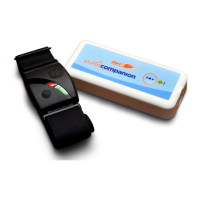
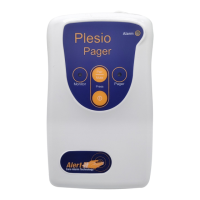
The Alert-iT Companion mini is a wireless epilepsy support system designed to provide peace of mind for carers and individuals with epilepsy. It discreetly monitors the user for movements that could relate to a seizure, and then alerts the carer via a pager. The system is manufactured by a team with over 20 years of experience in designing, manufacturing, and distributing care alarms, emphasizing quality and innovation to provide a robust and reliable solution.
Function Description:
The core function of the Companion mini is to detect seizure-related movements and alert a carer. The system comprises two main components: the Companion Mini (monitor) and the Plesio Pager. The monitor is placed under the user's mattress and uses a digital movement sensor to identify excessive movements. It supports the detection of tonic-clonic, partial, and generalized seizure types. When prolonged movements are detected (defaulting to 15 seconds, but programmable), the monitor enters an alarm mode and transmits a signal to the pager using Alert-iT's Safelink® Radio technology. This technology offers failsafe detection of radio integrity, alerting the carer if the radio signal is lost, ensuring the user is not left unprotected. The pager then provides an audible alarm, vibrates, and lights up its Alarm LED. The system is designed to send a continuous alarm signal every 10 seconds while spasm activity persists and an "all clear" signal after at least one minute of spasm-free activity. The pager will continue to display the Alarm LED until the Pair/Mute button is pressed.
Important Technical Specifications:
Companion Mini (Monitor):
- Connections: B-Micro USB 2.0
- Weight: 54g
- Material: White ABS Anti-microbial plastic casing
- Dimensions (mm): 100 x 45 x 15 (HxWxD)
- Batteries: 2x AAA (LR03) Non-rechargeable
- Battery Life: 12 months+
- Operating Temp: 5-35°C
- Humidity: 90% max. Non-condensing
- Sealing: IP53 (not waterproof)
- Radio Technology: Safelink® Radio, 450m+ radio range
- Compliance: Complies with 93/42/EEC as a Class 1 Medical Device for use in a Home Healthcare environment, EN60601 for Class 2 Electrical Safety, Group 1 Class B for EMC. Radio transmitted compliant to EN300-220 operating at 434.075MHz wideband 10mW power (class 8) less than 1% duty cycle (class 2) and compatible receiver Class 2.
- Power: 1.3mm 9V DC
- Weight: 144g
- Material: White ABS Anti-microbial
- Dimensions (mm): 120 x 70 x 20 (HxWxD)
- Batteries: 2x AA (HR6) Ni-MH Rechargeable 2500mAh
- Battery Life: 80 hours (100 typical)
- Charging time: 12 hours
Usage Features:
- Turning on the Monitor: The monitor is shipped in a low power state. To activate, press the recessed 'test' button using a pen tip. An internal red light will flash, indicating it's on and in a 60-second test mode for positioning.
- Turning on the Pager: Press and hold the ON/OFF button for 3 seconds. The pager will beep, all three LEDs will flash, and the green Pager LED will blip every 8 seconds to indicate it's awake and listening.
- Turning off the Pager: Press and hold the On/Off button for 3 seconds. The pager will bleep, and all three LEDs will flash 3 times.
- Positioning and Setup: The monitor should be placed under the mattress, ideally beneath the user. During the 60-second test mode, tap or press the bed to simulate seizure movements. The pager's 'monitor' LED should go steady, and a short audible tone will be heard with each detected movement. Once satisfied with detection, secure the monitor using supplied Velcro pads or cable ties (threading through holes in the base). The base can also be screwed to the bed (screws not provided). Sensitivity can be adjusted via software on a PC using the supplied USB stick and cable.
- Alarm Mode Operation: When prolonged movements are detected, the pager's Alarm LED lights up, an audible alarm sounds, and it vibrates. Pressing the Pair/Mute button temporarily mutes the alarm tone and stops vibration for 5 minutes. After a minute of spasm cessation, the pager resumes the alarm state; a second press of the Pair/Mute button clears the pager.
- Safety Notice: The monitor sends continuous alarm signals during spasm activity and an "all clear" signal after 1 minute of no spasms. The pager will still display the Alarm LED until the Pair/Mute button is pressed. Carers should always check the user even if the alarm has cleared.
- Pager LED Indicators:
- Green Pager LED blipping every 8 seconds: Pager is awake and listening.
- Red Monitor LED blipping every 8 seconds: Receiving Safelink® signal from the monitor.
- Red Monitor LED permanently lit with intermittent alarm tone: Pager stopped receiving failsafe radio signal from the monitor.
- Red Monitor LED flashing every second: Monitor's battery is low.
- Alarm LED lit, audible alarm, vibration: Seizure activity detected.
- Pairing Instructions: The monitor is usually pre-paired. If not, ensure the monitor is on. Within 30 seconds of powering up the pager, place the monitor close to the pager, press and hold the Pair button on the pager, and stimulate radio transmission from the monitor (e.g., pressing reset or waiting for the 8-second Safelink® signal). A beep and red Monitor LED blip indicate successful pairing. A "lower burp" with no red light indicates the monitor is too far away.
- Clearing Paired Devices: To clear all paired monitors from the pager memory, press and hold both the ON/OFF button and the Mute/Pair button together within the first 30 seconds after power-up, until the tone sequence finishes and the green Pager LED lights.
Maintenance Features:
- Routine Testing: It is recommended to test the system weekly by simulating spasm movements on the bed for 15 seconds (or the programmed time) to ensure the alarm call is sent to the pager.
- Cleaning: Regularly clean both units by wiping with cotton wool pads moistened with a mild detergent (0.5% washing up liquid) solution or an alcohol/baby wipe. Avoid getting liquid into the micro-USB connector.
- Changing Batteries in Companion mini: Remove the base of the monitor. Replace the 2x AAA batteries, paying attention to polarity markings. After replacement, press the recessed TEST button to turn the monitor back on and wait for the 60-second test mode to finish.
- Pager Charging: The pager's battery should last approximately 3 days. When low, the green Pager LED will flash every second; when very low, it will sound every minute. Plug into the provided charger. The Pager LED blips off every 8 seconds during boost charge and is solid green when approaching full charge. Charge for at least 12 hours.
- Warranty: Alert-iT offers a 3-year warranty from the date of purchase, including telephone helpline support (9.00 am - 5.00 pm weekdays, excluding public holidays) for fault diagnosis and advice. Faulty equipment will be repaired or replaced free of charge, but must be returned at the owner's expense. Damage due to misuse will be invoiced for repair and delivery costs. Liquid ingress voids the warranty.
- Important Information: The manual emphasizes the importance of routing power cables to avoid trip hazards, regularly checking power supplies for damage, ensuring alarms are annunciated, cleaning devices, regularly testing sensors, using only recommended power supplies and batteries, and operating the power supply away from direct heat. It warns against placing the monitor near sensitive electronic devices or strong electromagnetic fields. Only approved accessories should be used. Any modification to the equipment requires appropriate inspection and testing. Carers must conduct a risk assessment to determine if additional monitoring is needed and should never clear an alarm without checking the user's condition. Small screws and plastic bags from accessories should be kept away from vulnerable people. The Alert-iT system is designed for reliability but is not infallible; it is advisable to use it with additional monitoring techniques (e.g., video) in life-threatening situations. The carer is responsible for assessing risks and settings.

 Need help?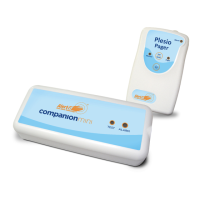

 To Next Page

 General