Operating Instructions
Starting
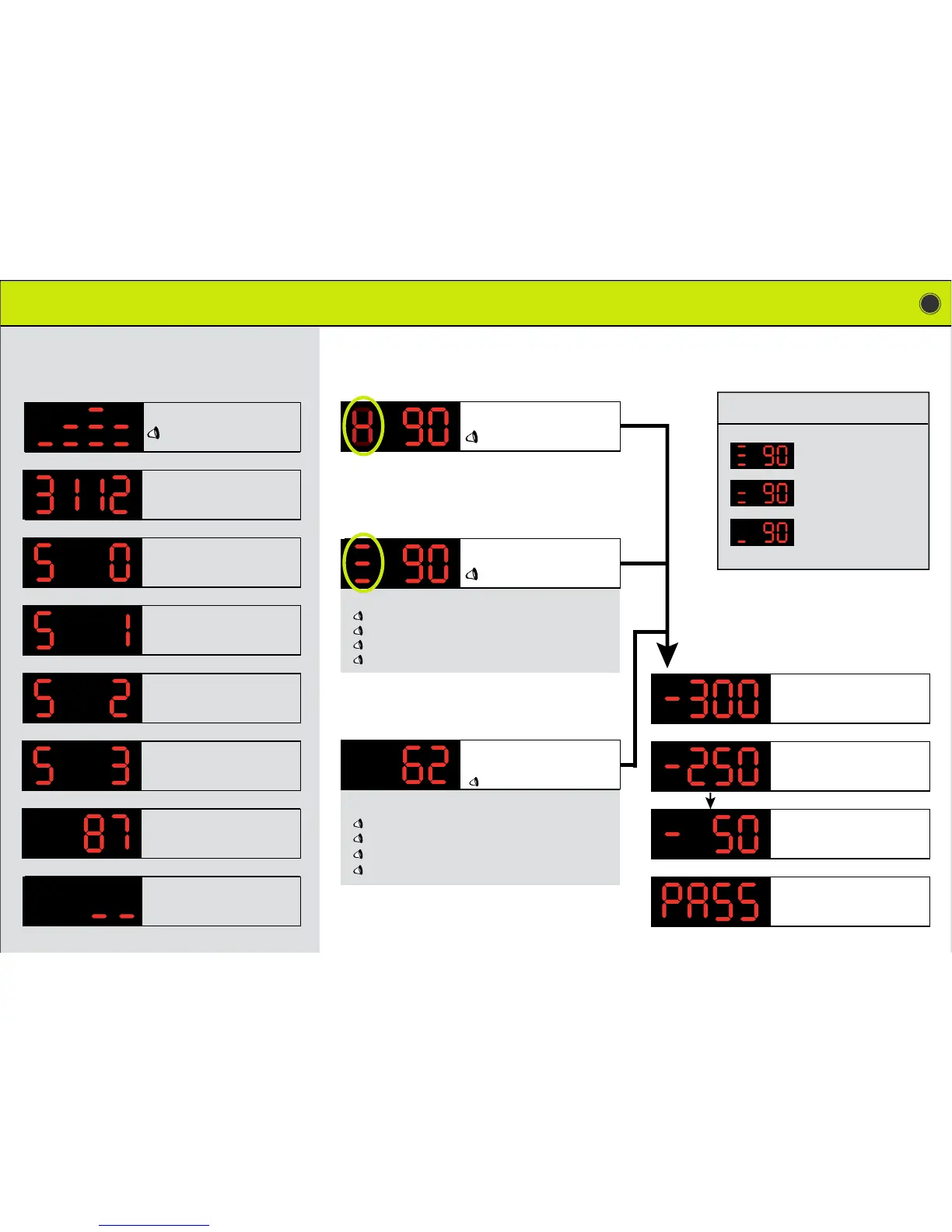
the G200
As you approach
a fixed speed camera :
5
Update version : month/day
Satellite connection is starting.
The connection is quicker if the vehicle
is stopped.
One satellite found...
Two satellites found...
Real speed of the vehicle.
Can differ from tachometer.
Vehicle is stopped
or you drive under …
Power on
Welcome, fasten your seat belt
At 300 meters, the distance is counted
down.
As you approach
a mobile speed camera :
250 … 200 … 150 … 100 meters from
the zone.
50 meters from the zone.
The control or danger zone is being
passed.
Three satellites found...
An animation is displayed 600 meters
before the control zone.
Warning, fixed speed camera.
Maximum speed is ...
Speed limit and frequency of the speed
camera.
Warning, mobile camera. Maximum
speed is …
As you approach
a danger zone :
Real speed of the vehicle, and the
distance between your vehicle and the
control zone.
...
Warning, dangerous curve
Warning, black spot
Warning, dangerous intersection
Warning, mobile camera...
Warning, mobile laser gun...
Warning, laser camera vans...
Warning, mini Gatso …
Warning, congestion charging zone
Mobile camera frequency:
one time per week
one time per month
one time per year
DEPENDING FROM THE DANGER ZONES :
DEPENDING FROM THE MOBILE CAMERA TYPE:


 To Next Page