4
Features
Important: Visit alesis.com to download the complete User Guide.
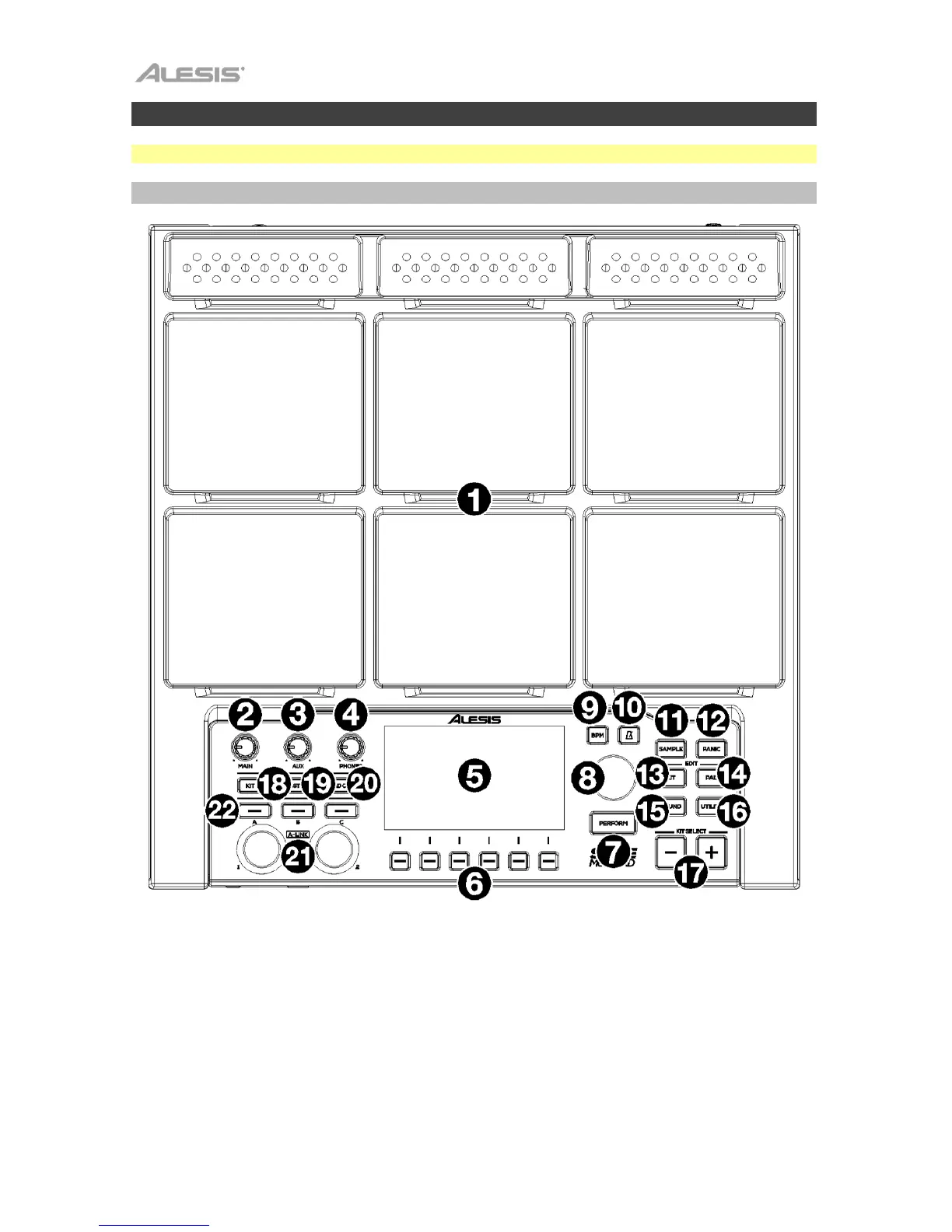
Top Panel
1. Pads: Use these pads to trigger samples or perform control functions.
2. Main Knob: Turn this knob to adjust the volume level of the Main Outputs on the rear panel.
3. Aux Knob: Turn this knob to adjust the volume level of the Aux Outputs on the rear panel.
4. Phone Knob: Turn this knob to adjust the volume level of the Headphone Outputs on the front
panel.
5. Display: As the center for editing kits, pads, effects, and samples, this full-color display shows
the current kit, settings, and other information. Use the Main Encoder to scroll through available
options and change parameter values, and press it to select. Use the Function Buttons (F1–F6)
to select tabs shown at the bottom edge of the display.
6. Function Buttons (F1 – F6): Press one of these 6 buttons to select the corresponding tab shown
above it (at the bottom edge of the display).



 To Next Page