6
Features
Top Panel
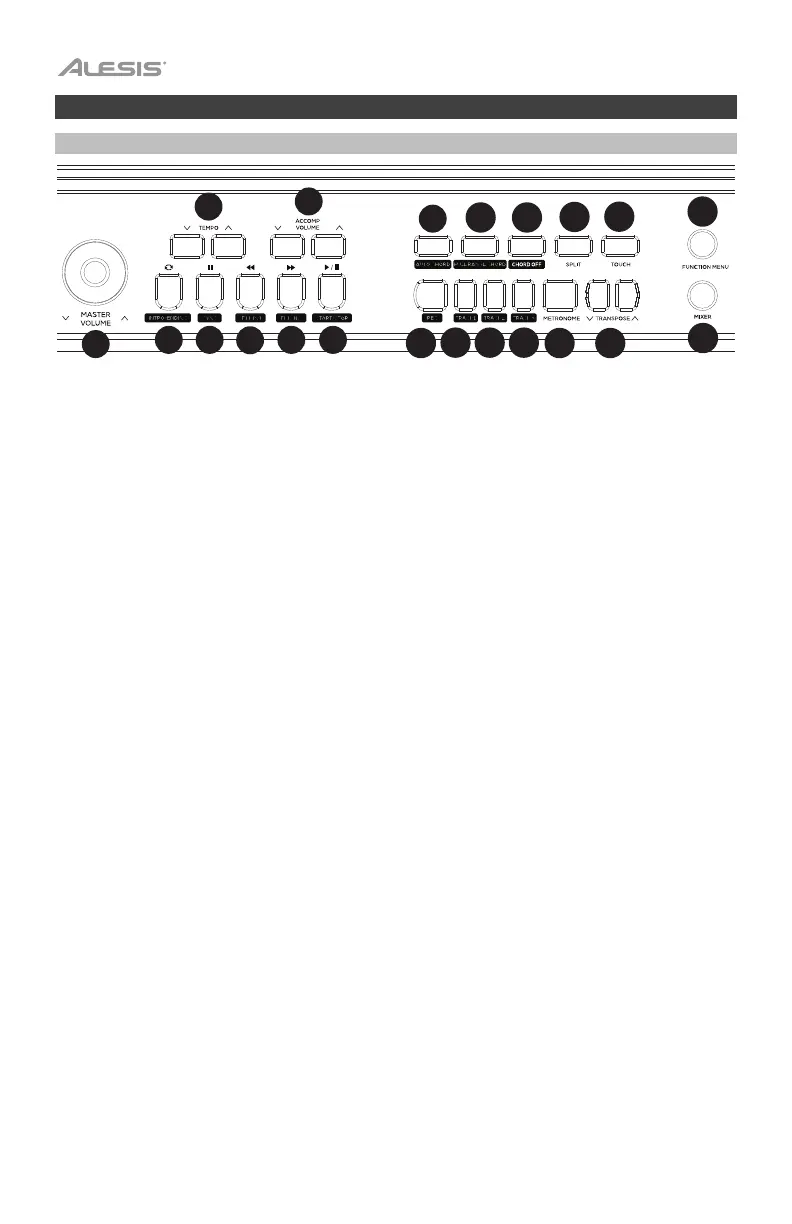
1. Master Volume: Adjust this knob to change the master volume level.
2. Tempo: Press these buttons to adjust the tempo up or down for an accompaniment
style, song, or metronome. See the section Tempo for more details.
3. Accompaniment Volume: Press these buttons to change the accompaniment volume.
4. Intro/Ending: Press this button to play the intro/ending of the auto accompaniment.
When in Song mode, press this button to set the beginning and ending position of a song
section loop. See the section Intro/Ending for more details.
5. Sync: When this button is pressed with the Auto Chord or Full Range Chord features
enabled, the auto accompaniment style will start immediately once a chord is played.
When in Song mode, press this button to pause a song. See the section Sync for more
details.
6. Fill In 1: Press this button to trigger a fill when playing along with a style. When in Song
mode, press this button to rewind through a song. See the section Fill In 1/Fill In 2 and
Accompaniment Pattern Variations for more details.
7. Fill In 2: Press this button to trigger a fill when playing along with a style. When in Song
mode, press this button to fast forward through a song. See the section Fill In 1/Fill In 2
and Accompaniment Pattern Variations for more details.
8. Start/Stop: Press this button to play or stop song playback or accompaniment style
playback.
9. Auto Chord: Press this button to start the auto chord accompaniment for the left-hand
chord area. See the section Chord Accompaniment Features for more details.
10. Full Range Chord: Press this button to have the whole keyboard use an auto chord
accompaniment. See the section Chord Accompaniment Features for more details.
11. Chord Off: Press this button to disable the auto chord or full range chord features.
12. Split: Press this button to turn the split function on/off. The split point for the keyboard
can be set in the Function Menu. See the section Split for more details.
13. Touch: Press this button to set the touch sensitivity level. See the section Touch
Sensitivity for more details.
14. Record: Press this button to enter Record mode. See the section Song Recording for
more details.
15. Track 1: Press this button to enable recording to track 1.
16. Track 2: Press this button to enable recording to track 2.
17. Track 3: Press this button to enable recording to track 3.
10
11
12
13
14
15
16
17
18
19
20
21
21
22
2726
23
24
25
28 29
30
31
32 33
34 35
36
37
38
39
40
41
1
2
3


 To Next Page