EasyManua.ls Logo

Alfa Network 233 - Automatic Buttonhole Creation

Default Icon
40 pages
Print Icon
To Next Page IconTo Next Page
To Previous Page IconTo Previous Page
Loading...
19
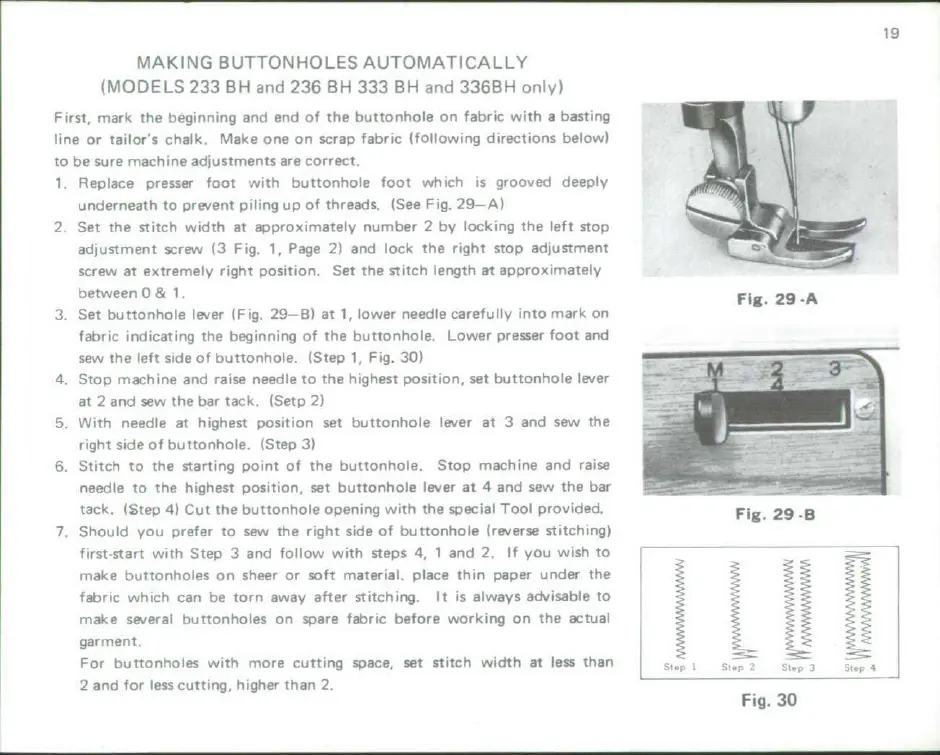
MAKING
BUTTONHOLES
AUTOMATICALLY
(MODELS
233
BH
and
236
BH
333
BH
and
336BH
only)
First,
mark
the
beginning
and
end of
the
buttonhole
on
fabric
with a
nbasing
line
or
tailor's
chalk,
Make
one
on
scrap
fabric
(following
directions
below)
to
be
sure
machine
adjustments
are
correct.
1,
Replace
presser
foot
with
buttonhole
foot
which
is
grooved
deeply
underneath
to
prevent
piling
up
of
threads.
(See
Fig.
29
A)
2
Set
the
stitch
width
at
approximately
number
2
by locking
the
left
stop
adjustment
screw
(3
Fig
1,
Page
2)
and
lock
the
right
stop
adjustment
screw
at
extremely
right
position.
Set
the
stitch
length at
approximately
between
0
& 1,
Fig. 29-A
3.
Set
buttonhole
lever
(Fig.
29--B)
at
1,
lower
needle
carefully
into
mark
on
fabric
indicating
the
beginning
of
the
buttonhole,
Lower
presser
foot
and
sew
The
left
tide
of
buttonhole.
(Step
1,
Fig.
30)
4.
Stop
machine
and
raise
needle
to
the
highest
position,
set
buttonhole
lever
at
2
and
sew
the
bar
tack.
(Setp
2)
5
With
needle
at
highest
position
set
buttonhole
lever
at
3
and
sew
the
right
side
of
buttonhole,
(Stepi)
6.
Stitch
to
the
starting
point
of
the
buttonhole,
Stop
machine
and
raise
needle
to
the highest
position,
set
buttonhole
lever
at
4
and
sew
the
bar
tack. (Step
4)
Cut
the
buttonhole
opening
with
the
special
Tool
provided.
Fig.
29
B
7,
Should
you
prefer
to
sew
the
right
side
of
buttonhole
nreverse
stitching)
first-start
with
Step
3
and
follow
with
steps
4,
1
and
2.
If
you
wish
to
make
buttonholes
on
sheer
or
Soft
material,
place
thin
paper
under the
fabric
which
can
be
torn
away
after
stitching. It
is
always
advisable
to
make
several
buttonholes
on
spare
fabric
before
working
on
the
actual
garment.
For
buttonholes
with
more
cutting
space, set
stitch
width
at
less
than
, -,
2
and for
less
cutting,
higher
than
2.
Fig. 30

Related product manuals