Using your gaming keyboard │ 8
Using your gaming keyboard
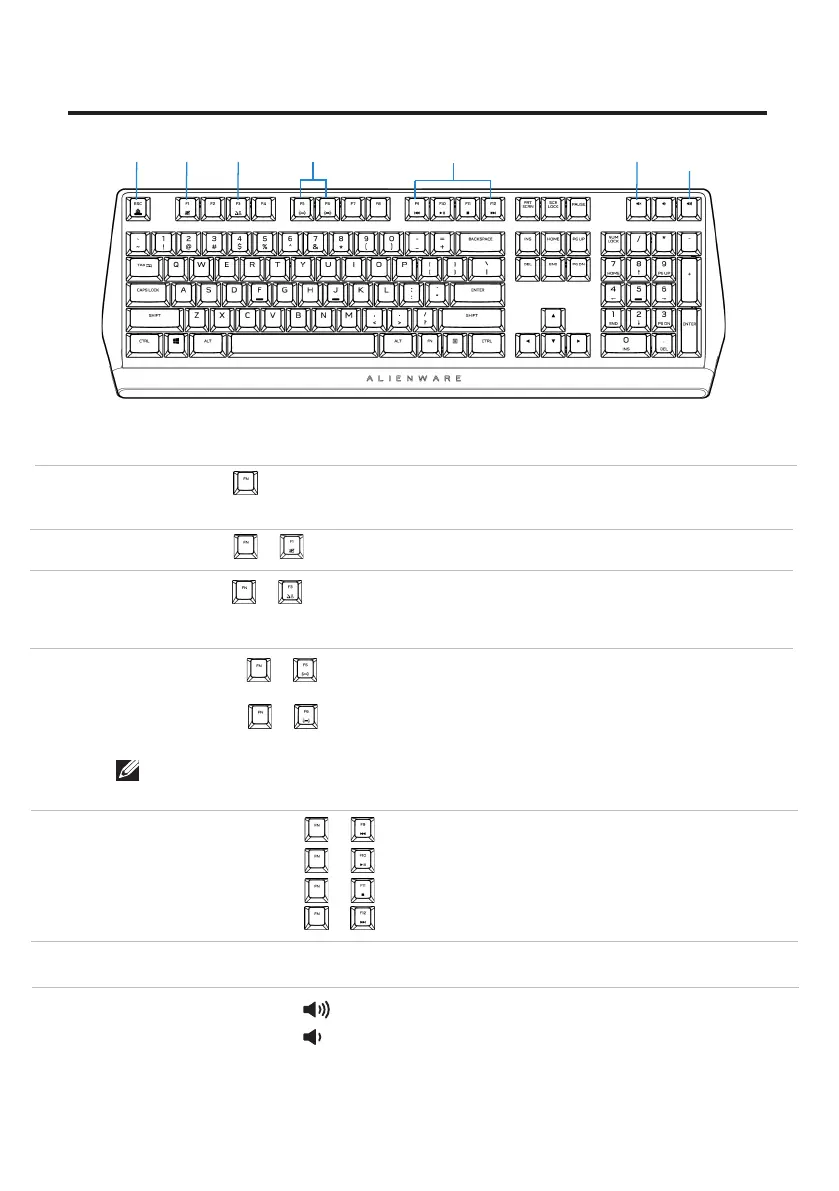
Callout Function Function keys Keyboard behavior
1 Fn Lock
2 Win Lock
3 Profile
switch
(press once to cycle)
• (Fn+F5)
• Press
• Press
• Press
• Press
The mute key
• Press to increase
• Press to decrease
+
(Fn+F1)
(Fn+F3)
(Fn+F9)
(Fn+F10)
(Fn+F11)
(Fn+F12)
+
+
+
+
+
+
+ Esc to toggle
4
Brightness
4
control
5 Media
5 playback
6 Mute
7 Volume
control
(system)
Disables the Windows key function
Enables you to switch between
profiles stored onboard
Decreases the keyboard-
backlight intensity
Increases the keyboard- backlight
intensity
Fast backward
Play/Pause
Stop
Fast forward
Mutes the speaker
Increases system volume;
Decreases system volume
Locks the F1 to F12 media-control
functions
2 3 4
5
6
7
(volume+/-)
1
•
(Fn+F6)
+
NOTE: Default keyboard-backlight is at maximum intensity



 To Next Page