EasyManua.ls Logo

Align 3GX Compact - Page 14

Align 3GX Compact
24 pages
Print Icon
To Next Page IconTo Next Page
To Previous Page IconTo Previous Page
Loading...
Green
LED
:
normal
direction
RedleDireverse
direction
Select
by
moving
the
rudder
stick
left
and
right
ZeBHno
eRe
E3
RUD
E3
Mode
1
Mode
Gyroscope
direction
settings
FER
IE
RASS
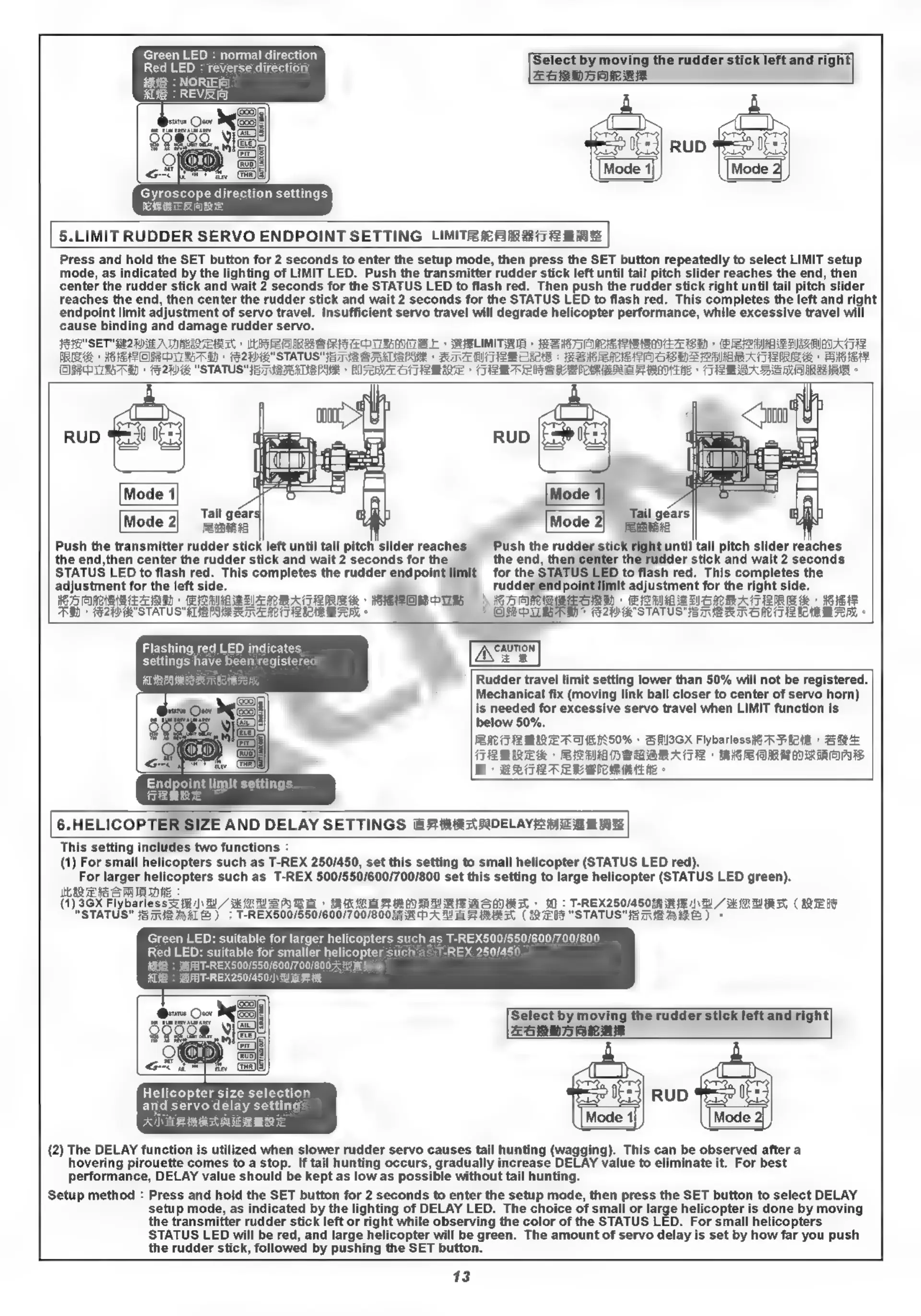
5.LIMIT
RUDDER
SERVO
ENDPOINT
SETTING
LIMITR
fe
ik
#8172
Bi
Press
and
hold
the
SET
button
for
2
seconds
to
enter
the
setup
mode,
then
press
the
SET
button
repeatedly
to
select
LIMIT
setup
mode,
as
indicated
by
the
lighting
of
LIMIT
LED.
Push
the
transmitter
rudder
stick
left
until
tail
pitch
slider
reaches
the
end,
then
center
the
rudder
stick
and
wait
2
seconds
for
the
STATUS
LED
to
flash
red.
Then
push
the
rudder
stick
right
until
tail
pitch
slider
reaches
the
end,
then
center
the
rudder
stick
and
wait
2
seconds
for
the
STATUS
LED
to
flash
red.
This
completes
the
left
and
right
endpoint
limit
adjustment
of
servo
travel.
Insufficient
servo
travel
will
degrade
helicopter
performance,
while
excessive
travel
will
cause
binding
and
damage
rudder
servo.
JIR
SET
MAME
A
NREAQEMT
REDRE
S
REPNE
»
RLIMITIA
EEOAE
SENEE
+
(PSHE
AAAS
REH
+
HEAPOREDITESAE)
+
F2WR"STATUS"}E7VE
SRALSPHE
»
ATA
AUTBCIL
:
SS
SME
LISSOHS
HARA
TRS
E
»
Bete
(USE
ILESAE)
»
FAW
"STATUS"
HETVSTCALSPMS
»
LI
TEMA
CTAB
ERTER
SRSA
RHR
>
TIBI
DENIRA
e
Mode
1
Tail
géar:
Mode
2|
eama
Push
the
transmitter
rudder
stick
left
until
tail
pitch
slider
reaches
Push
the
rudder
Stick
right
until
tail
pitch
slider
reaches
the
end,then
center
the
rudder
stick
and
wait
2
seconds
for
the
the
end,
then
center
the
rudder
stick
and
wait
2
seconds
STATUS
LED
to
flash
red.
This
completes
the
rudder
endpoint
limit
for
the
STATUS
LED.
to
flash
red.
This
completes
the
adjustment
for
the
left
side.
rudder
endpoint
limit
adjustment
for
the
right
side.
RARER
»
(PIRES
BIA
ABA
TIERS
POR
PUM
h
EDONUN
»
PITH
NOMBATARRe
iE
AW)
>
FE2W
STATUS
ARPER
ANTREMAN
©
ORPUMBAM
+
20
STATUS"
E
MIB
RMB
lie
TAZ
MTA
°
Flashing
red
LED
indicates
A
\UTION
settings
have been
registered
=
MERRTE
Rudder
travel
limit
setting
lower
than
50%
will
not
be
registered.
Mechanical
fix
(moving
link ball
closer
to
center
of
servo
horn)
is
needed
for
excessive
servo
travel
when
LIMIT
function
is
below
50%.
PEM
TARMERA(KLHN50%
»
GAYSGX
FlybarlessiG¥RPiotes
SRE
FRENKEL
SLMAHSBARATR
MEERE
ORADA
H
BRTETREKERRIEE
-
6.HELICOPTER
SIZE
AND
DELAY
SETTINGS
ER
HARADELAYS
AEE
MAE
This
setting
includes
two
functions
:
(1)
For
small
helicopters
such
as
T-REX
250/450,
set
this
setting
to
small
helicopter
(STATUS
LED
red).
For
larger
helicopters
such
as
T-REX
500/550/600/700/800
set
this
setting
to
large
helicopter
(STATUS
LED
green).
IR
EHS
S
PAI
DAE
(1)
3GX
Flybarless3¢
#8
/)\
5
EACH
*
BKCE
ARH
AN Re
MSA»
W:
T-
<REX250/45088
RE
NE
41
AUR
St
(REDS
"STATUS"
STERKE)
:
T-REX500/550/600/700/800
5
RPA
HE
ARR
(BE
"STATUS"
E
MIE
ARE)
©
Green
LED:
suitable
for
larger
helicopters
such
as
T-REX500/550/600/700/800
Red
LED:
suitable
for
smaller
helicopter
such
as
T-REX
250/450
B:
REX500/550/600/700/800A
E
E
FH
EX
250/450/)\
HE
A
`T-
Select
by
moving
the
rudder
stick
left
and
right|
ESRDJARLRE
Helicopter
size
selection
1 0
and
Bat
delay
se
E
RUD
EA
ANERRESMERE
Mode
1
Mode
2|
(2)
The
DELAY
function
is
utilized
when
slower rudder
servo
causes
tail
hunting
(wagging).
This
can
be
observed
after
a
hovering
pirouette
comes
to
a
stop.
If
tail
hunting
occurs,
gradually
increase
DELAY
value
to
eliminate
it.
For
best
performance,
DELAY
value
should
be
kept
as
low
as
possible
without
tail
hunting.
Setup
method
:
Press
and
hold
the
SET
button
for
2
seconds
to
enter
the
setup
mode,
then
press
the
SET
button
to
select
DELAY
setup
mode,
as
indicated
by
the
lighting
of
DELAY
LED.
The
choice
of
small
or
large
helicopter
is
done
by
moving
the
transmitter
rudder
stick
left
or
right
while
observing
the
color
of
the
STATUS
LED.
For
small
helicopters
STATUS
LED
will
be
red,
and
large
helicopter
will
be
green.
The
amount
of
servo
delay
is
set
by
how
far
you
push
the
rudder
stick,
followed
by
pushing
the
SET
button.
13

Related product manuals