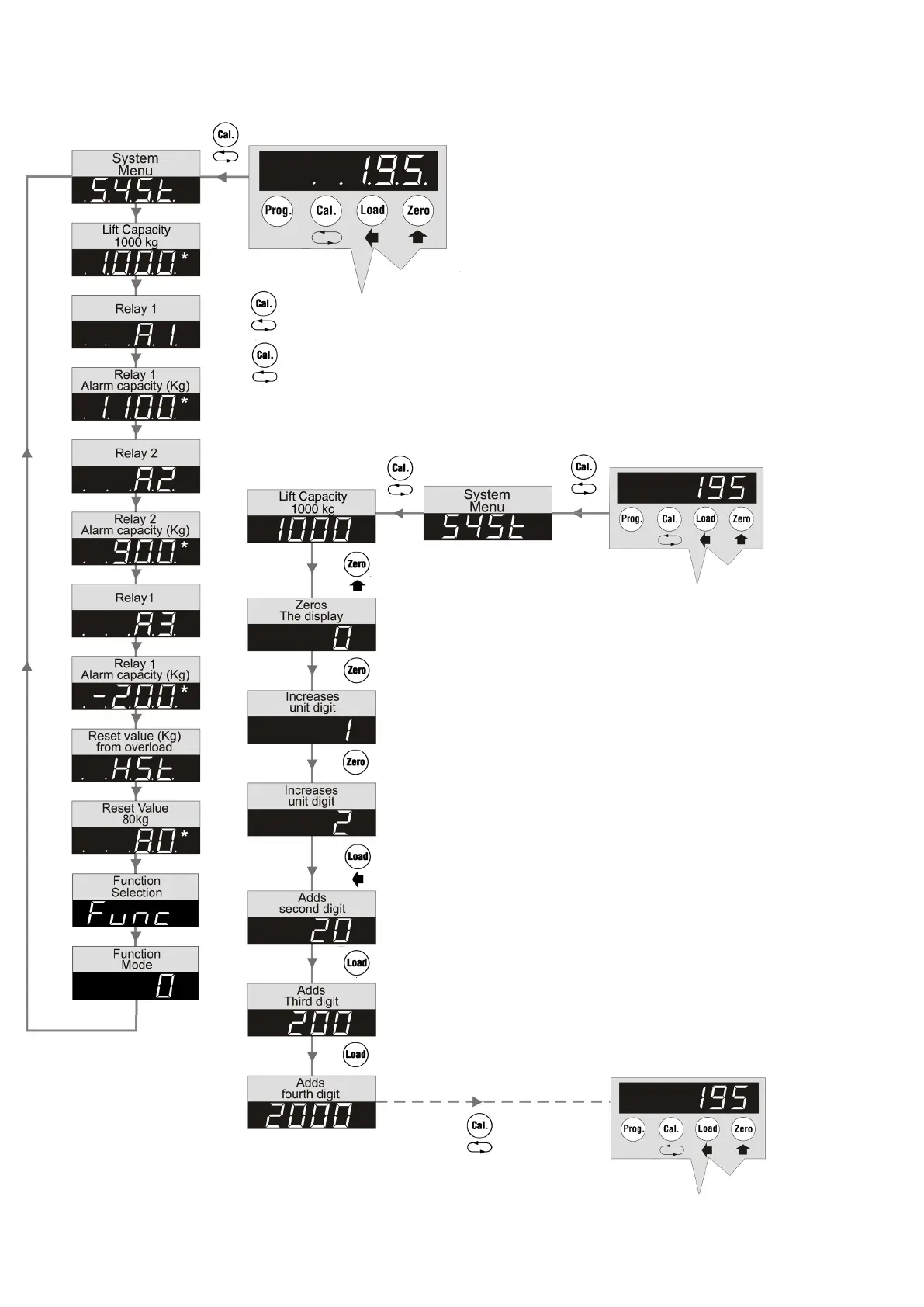
To set System parameters for OSD 5,
press the "Prog." and (+) "Zero" buttons.
Alarm limits can be set according to separate table.
Finish by pressing the "Prog." button or wait for 10
seconds.
Use the "Cal." button to enter the System Menu.
Use the "Cal." button to cycle through parameter(s) to be adjusted.
The example shows how to adjust the Lift capacity from 1000 kg to
2000 kg.
Example:
OSD 5 Calibration mode – System Set up
Use the “Cal.” button to enter the system menu.
Cycle through to select the parameter(s) to be adjusted,
using the "Cal." button.
Use the "Zero" button to re-set the displayed value to zero.
The first digit is increased by pressing the "Zero" button.
Use the "Load" button to select the second, third and
fourth digit respectively.
If required, adjust the second, third and fourth digit by
using the "Zero" button.
When the correct value has been set – cycle through to
the next parameter or return to the Weight display using
the "Cal." button.
Note: To ensure ALL changed parameters are stored,
the operator MUST tab through all the parameters
before returning to the Weight display.
– 5 –



 To Next Page