EasyManua.ls Logo

AlkaViva H2 Series - User Manual

AlkaViva H2 Series
2 pages
Print Icon
To Next Page IconTo Next Page
Loading...
Replacing The Filter(s)
In Your H
2
Series Ionizer
Vesta H
2
, Athena H
2
or Melody II
Watch the video below and learn how to replace
the lter(s) and reset the lter counter(s) in your
ionizer
vimeo.com/150375982
© AlkaViva, LLC - February 2017
To order replacement lters go to
alkaviva.com/water-ionizer-lters
or call Customer Support at (775) 324-2400
For any other quesons or help with lter installaon
please email
techsupport@alkaviva.com
We recommend you replace your lters at least once a year.
Date Installed:
Filter #1: ____________________________
Filter #2: ____________________________
For Private Wells
FIRST - You need to test your well water to make sure it is safe to drink. If
safe, we recommend using the external .01M UF Filter in place of one of your
lters. This external lter helps remove water-borne viral and bacterial
contaminants from potable water. This specialty lter is rated at 1/2 of the
life of an UltraWater Filter. We recommend that you replace this lter at 500
gallons or every 6 months, whichever comes rst.
Question and Answer IconNeed help?

Do you have a question about the AlkaViva H2 Series and is the answer not in the manual?

Summary

H2 Series Ionizer Filter Replacement Guide

Private Well Water Filtration

Recommends an external .01M UF filter for well water, detailing its purpose and replacement schedule.

Filter Replacement Schedule and Tracking

Advises annual replacement or based on usage, with fields for tracking installation dates.

Ordering Replacement Filters and Support

Provides website and phone number for ordering replacement filters and seeking installation help.

Filter Maintenance Procedures

Filter Lifespan and Replacement Triggers

Details when to change filters, including blinking indicators, annual replacement, or poor water quality.

How to Install a New Water Filter

Step-by-step instructions for removing the old filter and installing a new one, including reset.

Overview

This document describes the AlkaViva H2 Series Ionizer, a device designed for hydrogen-enhanced living by producing ionized water. The manual provides instructions for filter replacement and maintenance, ensuring the device's optimal performance and the quality of the water it produces.

Function Description

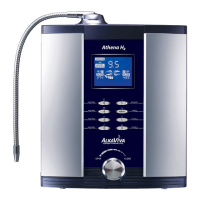
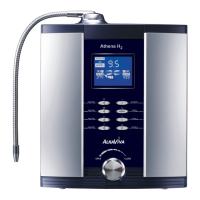
The AlkaViva H2 Series Ionizer, including models like Vesta H2, Athena H2, and Melody II, is a water ionizer that produces hydrogen-enhanced water. It is designed to filter and ionize tap water, providing alkaline water with a pH level of 9.5, as indicated on the device displays. The primary function is to enhance the quality of drinking water by removing impurities and altering its chemical properties to make it alkaline and hydrogen-rich. For well water, the manual recommends using an external .01M UF Filter to remove water-borne viral and bacterial contaminants, emphasizing the importance of testing well water for safety before use.

Important Technical Specifications

While specific technical specifications like flow rates or power consumption are not detailed, the document highlights crucial information regarding filter performance and replacement:

  • Filter Life Span: Filters should be changed at 999 (when the indicator blinks) or once a year, whichever comes first. For well water, the external .01M UF Filter is rated at half the life of an UltraWater Filter and should be replaced at 500 gallons or every 6 months.
  • Filter Types: The device uses two filters: a "Pre-filter" and an "UltraWater Filter." For well water, an external .01M UF Filter is recommended in place of one of the internal filters.
  • Filter Placement: The Pre-filter goes in the right compartment, and the UltraWater Filter goes in the left compartment. The external .01M UF Filter replaces one of these internal filters.
  • Water Quality Impact: Filter life can vary based on local water quality. Factors like rusty water from aged pipes, high levels of impurities or sediment, or very low water pressure can drastically shorten filter life.

Usage Features

The AlkaViva H2 Series Ionizer is designed for ease of use, particularly concerning filter replacement:

  • User Interface: The device features a digital display showing the alkaline level (e.g., 9.5) and likely other operational information.
  • Filter Installation: Filters are installed by aligning them with the base opening, pushing down, and twisting clockwise until locked. The "RIGHT SIDE UP" label on the filter should be readable. Protective stickers on the bottom of new filters must be removed before installation.
  • Filter Removal: Old filters are removed by twisting counterclockwise until the tab aligns with the slot, then gently but firmly pulling up.
  • Filter Cover Operation: Filter covers are opened by pressing and holding a white button at the bottom of the ionizer door and lifting the cover straight up. To close, align the tabs with the slots and press down until the cover locks.
  • Filter Reset Button: The device includes a Filter Reset Button (Red for the right filter, Green for the left) to reset the filter counter. Pushing it once results in one beep, and holding it down until a second beep confirms the reset.

Maintenance Features

Regular maintenance, primarily filter replacement, is crucial for the AlkaViva H2 Series Ionizer's performance and the quality of the water it produces:

  • Scheduled Filter Replacement: Filters should be replaced annually or when the filter indicator blinks at "999," whichever comes first. For well water, the external UF filter has a specific replacement schedule of 500 gallons or 6 months.
  • Early Filter Replacement: Users are advised to replace filters earlier if the water smells bad or if the water flow volume decreases, indicating potential filter exhaustion due to local water conditions.
  • Well Water Pre-treatment: For well water, an external .01M UF Filter is recommended to remove viral and bacterial contaminants, highlighting the importance of pre-treatment for specific water sources. Well water should always be tested for safety before using the ionizer.
  • Troubleshooting Support: The manual provides contact information for customer support (phone: (775) 324-2400) and technical support (email: techsupport@alkaviva.com) for filter installation help or other questions.
  • Online Resources: A link to replacement filters (alkaviva.com/water-ionizer-filters) and a video tutorial for filter replacement and counter reset (vimeo.com/150375982) are provided, offering convenient self-service options for maintenance.
  • Installation Guidance: Detailed step-by-step instructions with accompanying figures (Fig. 1-5) are included for both removing old filters and installing new ones, ensuring users can perform these tasks correctly. A towel is recommended during filter removal as some water may come out.

AlkaViva H2 Series Specifications

General IconGeneral
BrandAlkaViva
ModelH2 Series
CategoryAir Ionizer
LanguageEnglish

Related product manuals