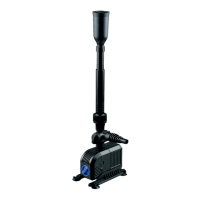
The All Pond Solutions FPP pump range is designed to be used with the
included fountain kit as a standalone system within a pond but can be used to
circulate water, pump to and from a separate filtration system or water features
using suitable flexible hose (flexible hosing sold separately).
Please read the below instructions carefully before beginning to set up your
pump. DO NOT CONNECT THE UNIT TO THE MAINS UNTIL SET UP IS
COMPLETE AND UNIT IS FILLED WITH WATER.
1. Connect the required
attachments - Choose the required
fountain attachments.
2. Position the unit - fully submerge
your FPP unit. Place it on a level and
sturdy surface at the bottom of your
pond, this is to avoid silt entering the
pump causing excessive wear and increasing pump guard cleaning.
3. Adjust the fountain head - make sure it is above surface of the pond. Adjust
the extendable pipe until desired height has been achieved.
IMPORTANT! Ensure that the pump’s fountain does not empty water out of
pond.
4. When installing your FPP as a standard water pump connect your outlet pipe
using a clamp / bracket and ensure this is tight and secure. The included
hosetail is designed to fit 20-40mm hose.
If not using the fountain connect your outlet pipe to either your filter, water
feature or alternative location.
5. Connect your FPP pump to the mains - Connect the unit to the mains using a
residual current device (RCD) for additional safety.
6. Switch on your unit at the mains - turn on the operation by switching on the
unit at the mains.
INSTALLATION & USE


 To Next Page