Page 3 Integra Telecom – Allworx 6X/24X/48X
2/25/2011
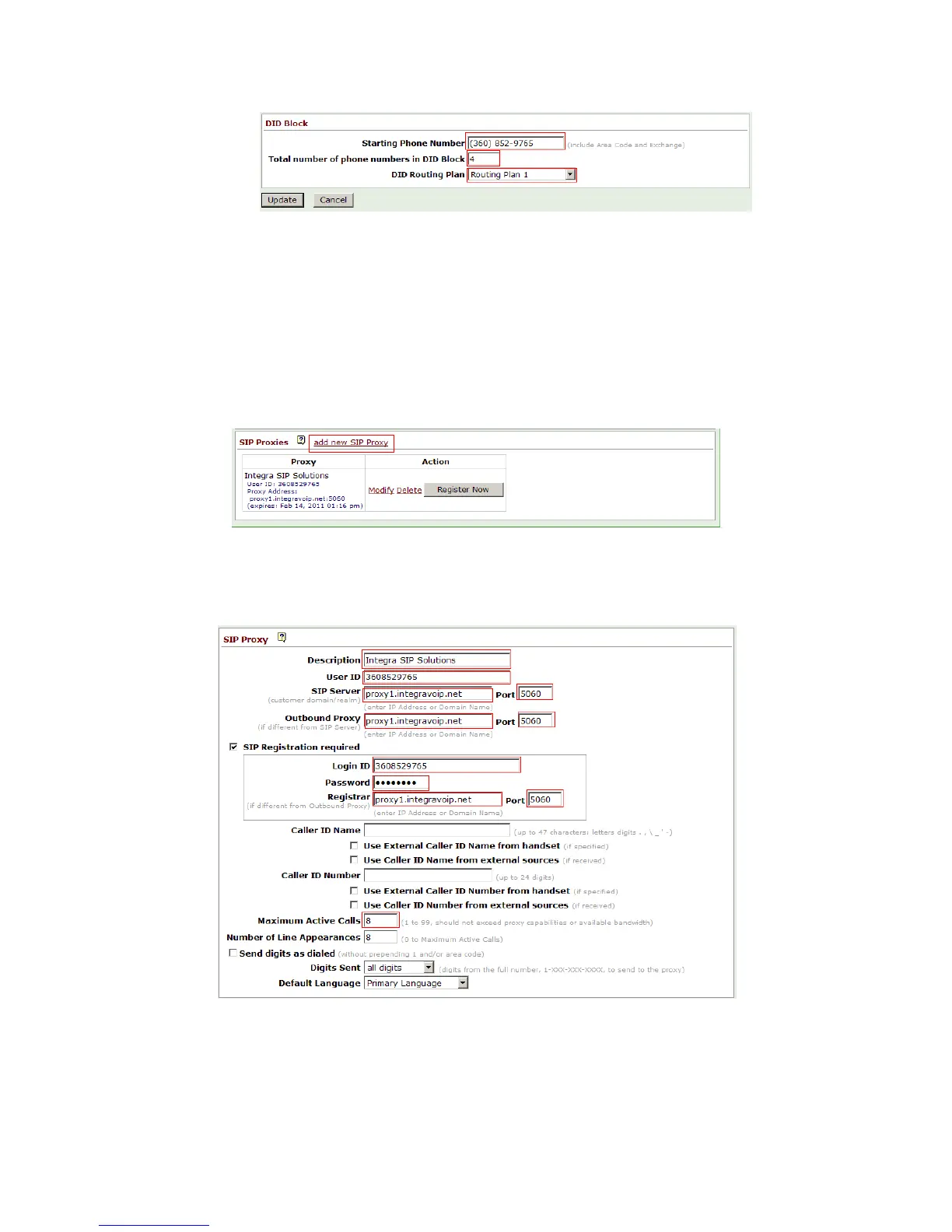
2. Enter the “Starting Phone Number” and “Total number of phone numbers in DID Block” as
provided by the Integra implementation team. Select “make a new Routing Plan from the “DID
Routing Plan” pulldown and click “Update.
3. Configure “Phone Number to Extension Mapping” as required for your deployment.
SIP Proxy Setup
1. Browse to Home >> Phone System >> Outside Lines. Select “add new SIP Proxy.
2. Input Integra in the “Description” field. Input “User Name” and “Password” as provided by
the Integra implementation team. Populate the fields “SIP Server”, “Outbound Proxy” and
“Registrar” as provided by the Integra implementation team and “Port” with 5060. Input
the “Maximum Active Calls” as provided by the Integra implementation team.



 To Next Page